Google AI Studio vs Gemini App: What’s the Difference?
Our take
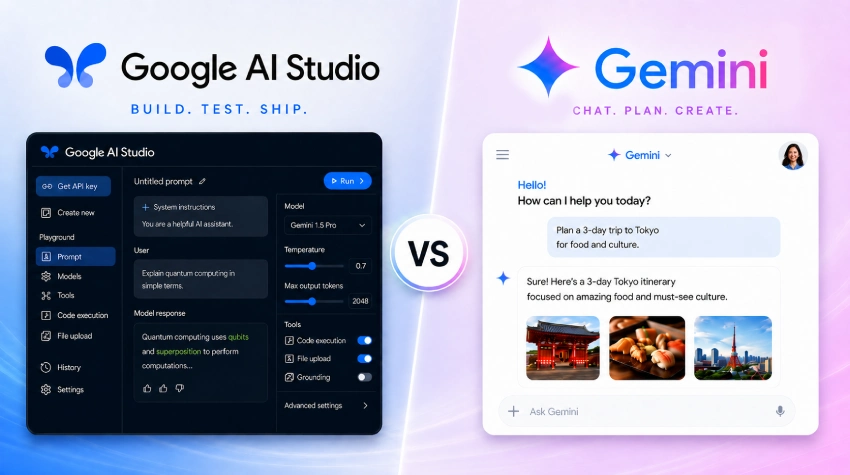
Google’s recent rollout of Gemini has left many data professionals staring at two seemingly identical chat interfaces and wondering which one deserves their attention. The Gemini App presents itself as a straightforward, consumer‑friendly chatbot, while Google AI Studio looks like that same chatbot on steroids—offering model fine‑tuning, prompt engineering tools, and API endpoints that speak directly to developers and power users. The distinction matters because it reflects a broader shift in how AI‑native platforms are moving from “nice‑to‑have” assistants toward programmable, data‑centric workhorses. For readers who have just navigated the complexities of choosing a model, see how How to Choose the Right AI Model for Your Needs for a practical framework, and for those already wrestling with production‑grade agents, the lessons from How to Use Claude Managed Agents? offer a useful parallel.
At its core, the Gemini App is designed to empower end users who need an intuitive, conversational layer on top of their data. Its strength lies in accessibility: a clean UI, voice input, and seamless integration with Google Workspace make it a natural fit for analysts who want to ask questions of a spreadsheet without learning a new scripting language. The app abstracts the underlying model, delivering results that feel immediate and human‑centered. This approach aligns with the brand’s progressive promise to transform legacy tools without forcing users to become AI engineers. In contrast, Google AI Studio is an environment for creators who want to shape Gemini’s behavior. It provides a sandbox where you can upload datasets, craft custom prompts, and even iterate on fine‑tuned versions of the model. The “on‑steroids” label isn’t hyperbole; the studio exposes parameters that affect temperature, token limits, and system messages, letting teams embed Gemini into automated pipelines, dashboards, or bespoke analytics solutions.
Why does Google maintain both? The answer is strategic diversification of user journeys. Legacy spreadsheet users often resist steep learning curves, so the Gemini App removes barriers and invites exploration. Meanwhile, the enterprise segment—where data pipelines, compliance, and observability are non‑negotiable—requires the depth that Google AI Studio supplies. This bifurcation mirrors the evolution we see in other AI ecosystems, where “chat‑first” products coexist with developer‑centric platforms. The coexistence also signals a future where the line between conversational assistance and programmable AI blurs; today’s simple chat may become tomorrow’s trigger for a multi‑step workflow, just as the insights from Agent Observability with LangSmith, Langfuse, and Arize: A Hands‑On Comparison demonstrate the importance of monitoring those deeper integrations.
From a practical standpoint, the immediate impact on productivity is clear. Teams that adopt the Gemini App can reduce the time spent toggling between formulas and manual data cleaning, turning a repetitive query into a single conversational exchange. Those that invest in Google AI Studio can embed AI directly into their data pipelines, automating report generation, anomaly detection, and predictive modeling without leaving the spreadsheet environment. This dual pathway empowers users to start small, discover value, and then scale toward more sophisticated, AI‑driven workflows—exactly the progressive, action‑oriented journey the brand advocates.
Looking ahead, the real question is how tightly Google will knit these two experiences together. Will we see a seamless handoff where a conversation in the Gemini App can be promoted to a Studio project with a single click? Will the platform expose observability hooks that let users track model performance across both interfaces? As the ecosystem matures, the ability to move fluidly between an accessible chatbot and a programmable studio will likely become a key differentiator for organizations seeking to future‑proof their data management. Watching how Google bridges that gap will be essential for anyone intent on turning AI from a curiosity into a core productivity engine.
Google has made the Gemini ecosystem confusing as hell. You have the Gemini App, which looks like a normal AI chatbot. Then you have Google AI Studio, which also looks like… a chatbot! But on steroids. So the obvious question is: why do both of these coexist? Here’s the clean answer: Gemini App is for […]
The post Google AI Studio vs Gemini App: What’s the Difference? appeared first on Analytics Vidhya.
Read on the original site
Open the publisher's page for the full experience