Project Tutorial: Build a Multi-Provider LLM Gateway
Our take
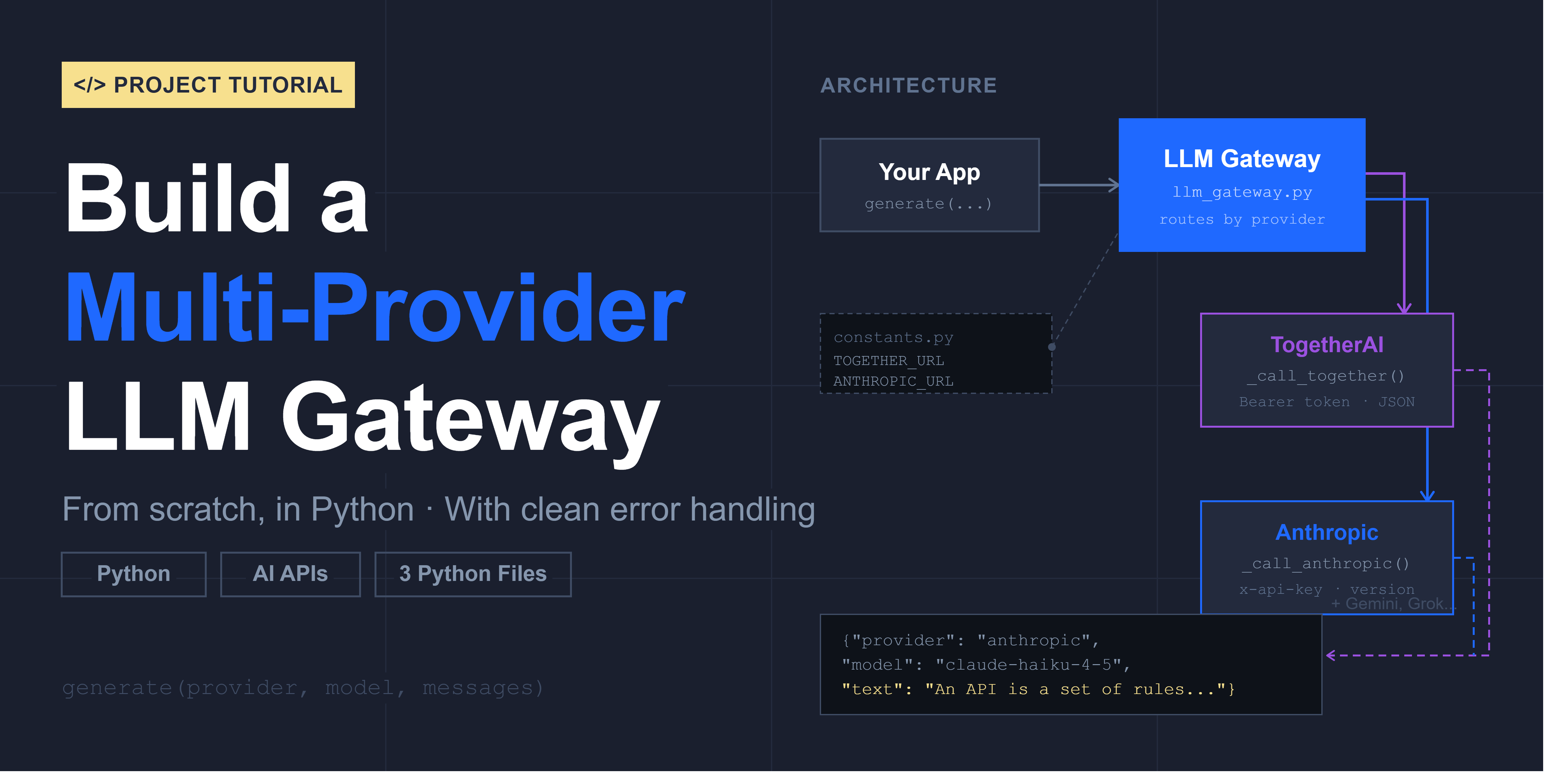
The rise of Large Language Models (LLMs) has undeniably sparked a gold rush of innovation, but a crucial challenge often overlooked is the inherent vendor lock-in that comes with tightly integrating with a specific provider's API. The tutorial on building a Multi-Provider LLM Gateway directly addresses this, offering a pragmatic solution to a growing pain point. We've seen similar trends emerge in other areas of development; for example, GitLab 19.0 Embeds Agentic AI in Secrets, Merge Requests, and Supply Chain Security GitLab 19.0 Embeds Agentic AI in Secrets, Merge Requests, and Supply Chain Security demonstrates the increasing sophistication of AI integration, yet the underlying infrastructure needs to be adaptable. Similarly, Azure Functions Ships Serverless Agents Runtime at Build 2026 Azure Functions Ships Serverless Agents Runtime at Build 2026 highlights the shift towards agentic architectures, all emphasizing the need for flexible and modular systems. A well-designed gateway effectively decouples your application logic from the nuances of individual LLM providers’ SDKs, authentication methods, and response formats, affording invaluable flexibility.
The inherent beauty of this approach lies in its future-proofing. Today, you might be leveraging OpenAI’s GPT models; tomorrow, you might find a superior offering from Anthropic or Cohere. Without a gateway, switching requires a potentially disruptive and costly rewrite. A gateway acts as an abstraction layer, allowing you to seamlessly swap providers with minimal impact on your core application. This isn't just about cost savings down the line, though that’s certainly a factor; it's about maintaining agility and responsiveness to the rapidly evolving AI landscape. The tutorial’s focus on a practical, buildable solution is particularly valuable. It moves beyond theoretical discussions of vendor lock-in and provides a concrete roadmap for developers to mitigate this risk. The inclusion of a video demonstration further enhances the tutorial’s accessibility, lowering the barrier to entry for those eager to implement this pattern.
The broader significance of this development extends beyond individual applications. It speaks to a maturing understanding of how we build AI-powered systems. Early adopters often rushed to integrate with the “shiny new thing,” prioritizing immediate functionality over long-term maintainability. The gateway pattern represents a shift towards more thoughtful, architecturally sound design. It acknowledges that the AI provider space is dynamic and that building for longevity requires decoupling and abstraction. This move parallels the evolution of web development, where frameworks and APIs emerged to standardize interactions and reduce vendor dependence. The .NET 11 Preview 5: Brings File-Based App Improvements, New C# Features, and a Blazor Validation Wave .NET 11 Preview 5: Brings File-Based App Improvements, New C# Features, and a Blazor Validation Wave demonstrates Microsoft's continued investment in developer tools and frameworks, reinforcing the need for adaptable and modular architectures.
Looking ahead, the widespread adoption of LLM gateways will likely fuel the emergence of specialized gateway services, offering managed infrastructure, advanced routing capabilities, and even automated provider selection based on factors like cost, latency, and model performance. We anticipate that the complexity of managing multiple LLM integrations will necessitate a more standardized and streamlined approach. The question now becomes: will organizations proactively adopt gateway patterns to future-proof their AI investments, or will they continue to gamble on vendor loyalty in a space defined by constant innovation? The answer will shape the long-term architecture of countless AI-powered applications.
Every LLM provider has its own SDK, its own authentication format, its own response structure. If you tightly build your application around one AI provider’s API, switching to another later can mean reworking major parts of your integration.
A gateway solves this problem by sitting between your application and the providers. Your application always calls the same function the same way. The gateway handles the provider-specific details underneath. Swapping providers becomes a one-word change.
In this tutorial, we'll build that gateway from scratch. By the end, a single generate() call will work identically whether it's talking to TogetherAI or Anthropic. The same building blocks make it straightforward to plug in any other LLM provider you need, with consistent output and clean error handling throughout.
What You'll Learn
By the end of this tutorial, you'll know how to:
- Design a provider-agnostic interface using a shared
generate()function - Send direct HTTP requests to TogetherAI and Anthropic using Python's
requestslibrary - Handle provider-specific authentication and headers
- Parse and normalize different JSON response formats into a consistent output
- Write custom exceptions for clean, readable error messages
- Structure a multi-file Python project for clarity and maintainability
Before You Start
You'll need Python 3.8+, the requests library (pip install requests), and active API keys for both TogetherAI and Anthropic. Running the full project typically costs well under $0.20 in API usage.
You should be comfortable with Python functions, dictionaries, and basic error handling. Some familiarity with HTTP requests and JSON will help. If you're newer to working with LLM APIs, the AI Engineering path covers the foundational skills this project builds on.
Access the full project in the Dataquest app and the solution files on GitHub.
Project Structure
We'll work across three files:
constants.py: API URLs, version strings, and default settingsllm_gateway.py: The gateway logic, including thegenerate()function and provider-specific request handlersdemo.py: A test file that demonstrates the gateway in action
This separation is intentional. Constants are the values most likely to change as you add providers or tune defaults. Keeping them in their own file means you won't have to dig through application logic to update a URL or a token limit.
Part 1: Constants
# constants.py

TOGETHER_URL = "https://api.together.xyz/v1/chat/completions"
ANTHROPIC_URL = "https://api.anthropic.com/v1/messages"
ANTHROPIC_VERSION = "2023-06-01"
DEFAULT_MAX_TOKENS = 300
DEFAULT_TIMEOUT = 30
DEFAULT_MAX_TOKENS = 300 keeps API costs low during development. Every token you generate costs money, so capping responses at 300 tokens is a sensible default for testing. Anthropic requires an API version header with every request, which is why ANTHROPIC_VERSION is stored here rather than hardcoded in the function.
Part 2: Custom Error Handling
Before writing any gateway logic, we set up a custom exception class. This gives us clean, readable error messages instead of the verbose tracebacks Python generates by default.
# llm_gateway.py

import os
import requests
import constants

class LLMGatewayError(Exception):
    """Raised when the gateway cannot return a valid response."""
    pass
LLMGatewayError inherits from Python's built-in Exception class. The pass body means it doesn't add any new behavior. All we need is the class name, which will appear clearly in any error output and tell us exactly where something went wrong.
Part 3: The generate() Function
This is the public interface of the gateway. It's the only function your application ever needs to call.
def generate(provider, model, messages, max_tokens=constants.DEFAULT_MAX_TOKENS):
    """
    Send a chat-style request to either Together or Anthropic
    and return a normalized response.

    Returns:
        {
            "provider": "...",
            "model": "...",
            "text": "..."
        }
    """
    provider = provider.strip().lower()

    if provider == "together":
        pass
    elif provider == "anthropic":
        pass
    else:
        raise LLMGatewayError("Unsupported provider. Use 'together' or 'anthropic'.")
provider.strip().lower() normalizes the input so that "Anthropic", "ANTHROPIC", and "anthropic" all work the same way. The function dispatches to a provider-specific handler and returns the same dictionary shape regardless of which provider was used. That consistent output structure is the core value of the gateway.
You'll also notice there's no return statement yet. That's intentional. The provider-specific functions haven't been built yet, so pass keeps the function syntactically valid and runnable while we build out the rest of the code. The return statement gets added once there's actually something to return.
Learning Insight: The
generate()function is a classic abstraction layer. It hides complexity behind a stable interface. Your application code doesn't need to know anything about how TogetherAI or Anthropic format their requests. It just callsgenerate()and receives{"provider": ..., "model": ..., "text": ...}every time.
Part 4: The TogetherAI Handler
Provider-specific functions are prefixed with an underscore (_call_together). This is a Python convention signaling that the function is intended for internal use only. It technically can be called externally, but shouldn't be called directly from outside the module.
def _call_together(model, messages, max_tokens):
    api_key = os.getenv("TOGETHER_API_KEY")
    if not api_key:
        raise LLMGatewayError("Missing TOGETHER_API_KEY.")

    headers = {
        "Authorization": "Bearer " + api_key,
        "Content-Type": "application/json",
    }
    payload = {
        "model": model,
        "messages": messages,
        "max_tokens": max_tokens,
    }

    response = requests.post(
        constants.TOGETHER_URL,
        headers=headers,
        json=payload,
        timeout=constants.DEFAULT_TIMEOUT,
    )

    if response.status_code != 200:
        raise LLMGatewayError("Together API error: " + response.text)

    data = response.json()
    choices = data.get("choices", [])
    return choices[0].get("message", {}).get("content") if choices else None
The _call_together() function has four jobs. First, it retrieves the API key from your environment variables using os.getenv("TOGETHER_API_KEY"). API keys should never appear in source code. If you commit a key to a public repository, treat it as compromised and rotate it immediately.
Second, it builds and sends an authenticated POST request. The headers dictionary tells TogetherAI who we are and what format we expect back. The payload carries the model name, the conversation messages, and the token limit.
Third, it checks whether the request succeeded. HTTP status 200 means everything went as expected. Any other status code means something went wrong, and we raise a LLMGatewayError with the response body included so the error message is informative rather than generic.
Finally, it parses the response. TogetherAI returns a deeply nested JSON structure, but the caller only needs the text content. The parsing step extracts just that, so generate() receives a clean string instead of a raw API response.
Learning Insight: Checking the API key before making the request is a deliberate design choice. If the key is missing, you get a clear error immediately. Without this check, you'd send the request without authorization, receive a 401 response from the API, and have to trace the problem back through the HTTP layer. Fail fast with a helpful message rather than fail late with a confusing one.
Part 5: The Anthropic Handler
Anthropic's API has a few structural differences from TogetherAI's. The most significant is how it handles system messages.
def _call_anthropic(model, messages, max_tokens):
    api_key = os.getenv("ANTHROPIC_API_KEY")
    if not api_key:
        raise LLMGatewayError("Missing ANTHROPIC_API_KEY.")

    headers = {
        "x-api-key": api_key,
        "anthropic-version": constants.ANTHROPIC_VERSION,
        "Content-Type": "application/json",
    }

    system_text = None
    non_system_messages = []
    for msg in messages:
        if msg.get("role") == "system":
            system_text = msg.get("content")
        else:
            non_system_messages.append(msg)

    payload = {
        "model": model,
        "messages": non_system_messages,
        "max_tokens": max_tokens,
    }
    if system_text:
        payload["system"] = system_text

    response = requests.post(
        constants.ANTHROPIC_URL,
        headers=headers,
        json=payload,
        timeout=constants.DEFAULT_TIMEOUT,
    )

    if response.status_code != 200:
        raise LLMGatewayError("Anthropic API error: " + response.text)

    data = response.json()
    content = data.get("content", [])
    text_block = next((block for block in content if block.get("type") == "text"), None)
    return text_block.get("text") if text_block else None
TogetherAI accepts system messages inline within the messages list. Anthropic expects them as a separate top-level system field in the payload. The loop that separates system messages from non-system messages handles this difference. If no system message is present, the system key is simply omitted from the payload.
Anthropic also uses a different authentication header (x-api-key instead of Authorization: Bearer) and requires the anthropic-version header in every request.
The response parsing uses next() with a generator expression to find the first content block with "type": "text". Anthropic's response can include multiple content blocks of different types, so we need to locate the text one specifically.
Part 6: Wiring It Together
With both provider functions complete, the generate() function just needs to call them and return the result.
def generate(provider, model, messages, max_tokens=constants.DEFAULT_MAX_TOKENS):
    provider = provider.strip().lower()

    if provider == "together":
        text = _call_together(model, messages, max_tokens)
    elif provider == "anthropic":
        text = _call_anthropic(model, messages, max_tokens)
    else:
        raise LLMGatewayError("Unsupported provider. Use 'together' or 'anthropic'.")

    return {
        "provider": provider,
        "model": model,
        "text": text,
    }
The function is deliberately simple. All the provider-specific complexity lives in _call_together and _call_anthropic. generate() only needs to dispatch and return.
Part 7: Testing the Gateway
The demo file shows the gateway in action.
# demo.py

from llm_gateway import generate

messages = [
    {"role": "system", "content": "You are concise."},
    {"role": "user", "content": "Explain what an API is in one sentence."},
]

print(
    generate(
        provider="together",
        model="meta-llama/Llama-3.2-3B-Instruct-Turbo",
        messages=messages,
    )["text"]
)

print(
    generate(
        provider="anthropic",
        model="claude-haiku-4-5",
        messages=messages,
    )["text"]
)
Two generate() calls. Different providers, different models. Identical structure. Running this file produces something like:
An API, or Application Programming Interface, is a set of rules and protocols
that allows different software applications to communicate with each other.

An API is a set of rules that lets one piece of software ask another piece
of software to do something for it.
Same question, two providers, one interface. That's the gateway working as designed.
Note that messages is a list of dictionaries, not a plain string or a single dictionary. The API expects an array of message objects in a specific format. Passing a string or a bare dictionary will result in a validation error from the provider.
What We Built
Starting from three empty files, we built a multi-provider LLM gateway with the following design:
constants.py: API endpoints, version strings, and configurable defaults, isolated from application logic.
llm_gateway.py: A LLMGatewayError class for clean error reporting, a public generate() function that routes requests based on provider, and private _call_together() and _call_anthropic() handlers that manage authentication, request formatting, and response parsing.
demo.py: A demonstration that identical generate() calls work across both providers.
The gateway hides everything provider-specific. Adding a new provider means writing one new _call_* function and adding one elif branch to generate(). Nothing else needs to change.
Next Steps
Add retry logic. If a rate limit or transient error causes a request to fail, automatic retries with exponential backoff would make the gateway more robust in production.
Normalize token usage. Different providers count tokens slightly differently. You could add a token_usage field to the returned dictionary so callers can track consumption consistently regardless of provider.
Add a new provider. Gemini, Grok, or any other provider with an HTTP API can be integrated by writing a call_<provider>() function and adding the corresponding branch to generate(). The TogetherAI handler is a good template to start from.
Explore the responses endpoint. OpenAI has a newer /responses endpoint that handles some use cases differently from /chat/completions. It's worth exploring if you want to expand the gateway's capabilities.
Resources
Share your extended gateway in the community and tag @Anna_strahl. Adding a third provider, implementing retry logic, or connecting the gateway to a larger application are all extensions worth sharing.
Read on the original site
Open the publisher's page for the full experience