Python Function Calling: How to Give LLMs Access to Real-World Tools
Our take
The advent of function calling in large language models (LLMs) represents a pivotal shift in how we can leverage AI for practical, real-world applications. Traditionally, while LLMs excel in generating human-like text and reasoning through complex prompts, they lack the ability to interact with external data sources or systems. They generate text without context from real-time data, which limits their utility in scenarios that require immediate information retrieval or specific actions. The introduction of function calling, which allows LLMs to connect with Python functions, bridges this gap and opens up a realm of possibilities for enhancing productivity and decision-making. For those interested in the evolving landscape of AI, this development resonates with themes discussed in our articles like [A legion of AI agents working in parallel. [R]](/post/a-legion-of-ai-agents-working-in-parallel-r-cmpr8el4w0usds0gl92wc6iq8) and [How Much of a Shortcut Are Connections in Top AI Lab Hiring for PhD grads? [D]](/post/how-much-of-a-shortcut-are-connections-in-top-ai-lab-hiring-cmpr8dyro0uqjs0glznhkvd6d).
Function calling enables LLMs to autonomously decide when to invoke specific functions, pass the necessary arguments, and interpret the results to produce more contextually relevant responses. This capability transforms LLMs from mere text generators into versatile tools capable of performing tasks such as database queries, weather checks, or customer record lookups. For instance, imagine a business application where an AI can not only draft an email but also provide real-time data from a customer database to inform the message. This functionality not only streamlines workflows but also enhances the accuracy and relevance of AI-generated content. As we continuously seek innovative solutions to improve productivity, the implications of function calling are profound, especially in sectors where timely data is crucial.
Moreover, the evolution of function calling illustrates a broader trend towards integrating AI with existing workflows and tools. It reflects an understanding that users are not just looking for advanced technologies but also for solutions that enhance their everyday tasks. By prioritizing a seamless connection between LLMs and real-world data, we create a more user-centered approach to AI deployment. This resonates strongly with our mission to empower users to explore transformative solutions without the complexities that often accompany advanced technology. It invites users to envision a future where AI enhances their capabilities rather than complicates them.
Looking ahead, the question becomes: how will this technology evolve and what additional tools will emerge as a result of this integration? As businesses and individuals begin to adopt LLMs capable of function calling, we can expect to see a surge in applications designed to harness this capability across various fields. From customer service to project management, the potential for AI to support and enhance human decision-making is immense. As we navigate this exciting landscape, it’s essential to remain vigilant about how these advancements will shape our work and lives. The future of AI is not just about what it can do, but how it can work alongside us to create more effective and meaningful outcomes.
You've probably noticed that LLMs are remarkably good at reasoning — but on their own, they can't check today's weather, query your database, or look up a customer record. They generate text. Function calling is what bridges that gap.
Function calling (also called tool calling) lets you connect an LLM to real Python functions. The model decides when a function is needed, tells your application which one to call and with what arguments, and then uses the result to compose its final response. By the end of this article, you'll understand exactly how that loop works and have a complete, runnable Python example you can build from.
Table of Contents
- What Is Function Calling?
- How Does the LLM Decide to Call a Function?
- A Complete Python Example, Step by Step
- Handling Multiple Function Calls
- Common Mistakes and How to Fix Them
- When to Use Function Calling
- FAQ
What Is Function Calling?
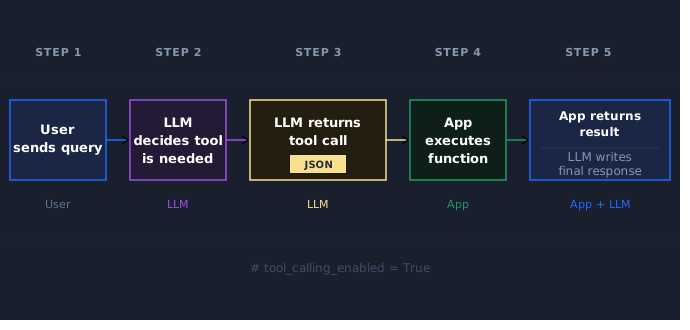
Function calling is a pattern where an LLM returns structured output — specifically, a JSON object describing a function name and arguments — instead of a text answer. Your application reads that output, executes the actual function, and sends the result back to the model. The model then uses that result to write its final response to the user.
The key thing to understand is that the LLM never runs your code directly. It reasons about what needs to happen and returns a description of the action it wants taken. Your application is the one doing the actual work.
That request-and-response loop looks like this:
The terms "function calling" and "tool calling" refer to the same thing. Newer API documentation (including OpenAI's) tends to use "tool calling," but you'll see both used interchangeably.
How Does the LLM Decide to Call a Function?
When you make an API request, you pass the model a list of tool definitions alongside the user's message. Each definition describes a function: its name, what it does, and what arguments it takes (using JSON Schema).
The model reads the user's message and the tool definitions together. If it determines that the user's request requires an action your tools can handle, it returns a tool call rather than a text response. If the user's message can be answered from the model's training knowledge alone, it responds normally.
Here's what a single tool definition looks like in Python:
tools = [
    {
        "type": "function",
        "function": {
            "name": "get_weather",
            "description": "Get the current weather conditions for a given city.",
            "parameters": {
                "type": "object",
                "properties": {
                    "city": {
                        "type": "string",
                        "description": "The city name, e.g. 'London' or 'Tokyo'"
                    }
                },
                "required": ["city"],
                "additionalProperties": False
            },
            "strict": True
        }
    }
]
The description field is the most important part for the model's decision-making. It uses your description to understand when this function is appropriate. Vague descriptions lead to inconsistent behavior — a description like "Gets weather" is much less reliable than "Get the current weather conditions for a given city." Be specific about what the function does and when it should be used.
Two response fields tell you what happened. When the model wants to call a function, the response's finish_reason will be "tool_calls" and the message will contain a tool_calls list. When the model has enough information to answer directly (including after receiving your function results), finish_reason will be "stop" and the message will contain plain text in content.
A Complete Python Function Calling Example, Step by Step
The following example walks through the full function calling loop using the OpenAI Python SDK. We'll use a mock weather function — labeled clearly as mock data — so you can run this with just an OpenAI API key.
Install the SDK first if you haven't already:
pip install openaiThen set your API key as an environment variable:
export OPENAI_API_KEY="your-api-key-here"Step 1: Define the Tool and the Mock Function
import json
from openai import OpenAI

client = OpenAI()

# The tool definition — this is what you pass to the model
tools = [
    {
        "type": "function",
        "function": {
            "name": "get_weather",
            "description": "Get the current weather conditions for a given city.",
            "parameters": {
                "type": "object",
                "properties": {
                    "city": {
                        "type": "string",
                        "description": "The city name, e.g. 'London' or 'Tokyo'"
                    }
                },
                "required": ["city"],
                "additionalProperties": False
            },
            "strict": True
        }
    }
]

# Mock function — in a real app, this would call a weather API
def get_weather(city: str) -> str:
    mock_data = {
        "London": "Partly cloudy, 15°C",
        "Tokyo": "Sunny, 22°C",
        "New York": "Rainy, 10°C"
    }
    return mock_data.get(city, f"No weather data available for {city}")
Note: This post uses the Chat Completions API, which still works but is no longer OpenAI's recommended endpoint for tool calling. The conceptual loop (request → tool call → execute → result → final response) is the same in both APIs, but the request and response shapes differ.
Step 2: Send the First Request
user_message = "What's the weather like in London right now?"

messages = [
    {"role": "user", "content": user_message}
]

response = client.chat.completions.create(
    model="gpt-4o-mini",
    messages=messages,
    tools=tools
)

print(response.choices[0].finish_reason)
# tool_calls

print(response.choices[0].message.tool_calls)
# [ChatCompletionMessageToolCall(id='call_abc123', function=Function(arguments='{"city":"London"}', name='get_weather'), type='function')]
The model returned finish_reason: "tool_calls" rather than a text answer. It recognized that answering the question requires live data it doesn't have, and it's asking your application to fetch it.
Notice that arguments is a JSON-encoded string, not a Python dict. You'll need to parse it before using it.
Step 3: Execute the Function
# Get the tool call from the response
tool_call = response.choices[0].message.tool_calls[0]

# Parse the arguments — they come as a JSON string
arguments = json.loads(tool_call.arguments)
city = arguments["city"]

# Call your actual function
result = get_weather(city)
print(result)
# Partly cloudy, 15°C
Step 4: Send the Result Back
This next step is a common ‘gotcha’ that can confuse people new to tool calling. You need to build a new messages list that includes the full conversation history: the original user message, the assistant's tool call message, and a new tool role message containing your function's result.
# Append the assistant's tool call message to the history
messages.append(response.choices[0].message)

# Append the function result as a "tool" role message
messages.append({
    "role": "tool",
    "tool_call_id": tool_call.id,
    "content": result
})
After step 4, your messages list looks like this:
| Role | Content |
|---|---|
user |
"What's the weather like in London right now?" |
assistant |
(tool call: get_weather with {"city": "London"}) |
tool |
"Partly cloudy, 15°C" |
The tool_call_id in your result message must match the id from the original tool call. This is how the model tracks which result belongs to which request — it matters especially when you have multiple function calls in a single turn.
Step 5: Get the Final Response
final_response = client.chat.completions.create(
    model="gpt-4o-mini",
    messages=messages,
    tools=tools
)

print(final_response.choices[0].finish_reason)
# stop

print(final_response.choices[0].message.content)
# The weather in London right now is partly cloudy with a temperature of 15°C.
This time, finish_reason is "stop" — the model has everything it needs and returned a natural-language response.
Here's the complete working script:
import json
from openai import OpenAI

client = OpenAI()

tools = [
    {
        "type": "function",
        "function": {
            "name": "get_weather",
            "description": "Get the current weather conditions for a given city.",
            "parameters": {
                "type": "object",
                "properties": {
                    "city": {
                        "type": "string",
                        "description": "The city name, e.g. 'London' or 'Tokyo'"
                    }
                },
                "required": ["city"],
                "additionalProperties": False
            },
            "strict": True
        }
    }
]

def get_weather(city: str) -> str:
    # Mock data — replace this with a real weather API call
    mock_data = {
        "London": "Partly cloudy, 15°C",
        "Tokyo": "Sunny, 22°C",
        "New York": "Rainy, 10°C"
    }
    return mock_data.get(city, f"No weather data available for {city}")

# Step 1: Initial request
messages = [{"role": "user", "content": "What's the weather like in London right now?"}]

response = client.chat.completions.create(
    model="gpt-4o-mini",
    messages=messages,
    tools=tools
)

# Step 2: Check if the model wants to call a function
if response.choices[0].finish_reason == "tool_calls":
    tool_call = response.choices[0].message.tool_calls[0]

    # Step 3: Execute the function
    arguments = json.loads(tool_call.arguments)
    result = get_weather(arguments["city"])

    # Step 4: Add the assistant message and result to history
    messages.append(response.choices[0].message)
    messages.append({
        "role": "tool",
        "tool_call_id": tool_call.id,
        "content": result
    })

    # Step 5: Get the final response
    final_response = client.chat.completions.create(
        model="gpt-4o-mini",
        messages=messages,
        tools=tools
    )
    print(final_response.choices[0].message.content)
else:
    # No tool call needed — the model answered directly
    print(response.choices[0].message.content)
Handling Multiple Function Calls
The model can request more than one function in a single turn. This is called parallel tool calling, and it happens when the model determines that multiple independent lookups are needed to answer the user's question — for example, if someone asks for the weather in both London and Tokyo at the same time.
Because tool_calls is always a list, you should loop over it rather than assuming there's exactly one call:
if response.choices[0].finish_reason == "tool_calls":
    # Append the assistant's message first
    messages.append(response.choices[0].message)

    # Then loop over all tool calls and execute each one
    for tool_call in response.choices[0].message.tool_calls:
        arguments = json.loads(tool_call.arguments)
        result = get_weather(arguments["city"])

        messages.append({
            "role": "tool",
            "tool_call_id": tool_call.id,
            "content": result
        })
If you need the model to call functions one at a time rather than in parallel (for example, when each function call depends on the result of the previous one), set parallel_tool_calls=False in your API request. This ensures the model issues at most one tool call per turn.
Common Function Calling Mistakes and How to Fix Them
Most function calling bugs fall into a small set of patterns. If something isn't working, check this table first.
| Mistake | What goes wrong | Fix |
|---|---|---|
Treating arguments as a dict |
KeyError or TypeError when accessing fields |
Always parse with json.loads(tool_call.arguments) |
| Skipping the assistant message in history | Model loses context; may repeat the tool call | Append response.choices[0].message before the tool result |
| Vague function descriptions | Model calls the wrong function or never calls it | Write descriptions that specify exactly when the function should be used |
Not handling finish_reason: "stop" on first call |
Code crashes if no tool call was made | Always check finish_reason before accessing tool_calls |
| Not validating the function name | Crashes if the model hallucinates a nonexistent function name | Check tool_call.function.name against a known list before calling |
The last mistake is worth extra attention if you're using open-source models. Models like Llama, running locally via Ollama, are more likely to hallucinate function names that don't exist. Validating the function name before calling it prevents hard-to-debug crashes.
When to Use Function Calling
Function calling is the right pattern for a specific set of problems. It's not the right tool for everything.
Use it when:
- You need real-time or dynamic data the model can't have in its training data (weather, stock prices, live inventory, user-specific records)
- You want the model to trigger actions in your system (create a calendar event, send a message, update a database row)
- You're building a natural-language interface over an existing API or set of services
- You want the model to coordinate multiple data sources to answer a single question
Skip it when:
- The model can answer from its training knowledge without external data
- You just want structured JSON output from a plain text prompt — for that, use structured outputs (the
response_formatparameter), which is simpler and doesn't require a function loop - You're building a simple chatbot where the model doesn't need to take actions
The structured outputs comparison comes up constantly in practice. If you just want the model to format its response as JSON matching a schema, you don't need function calling. Function calling is for cases where the model needs to fetch or act on information your application controls.
What You Can Build From Here
Function calling transforms an LLM from a text generator into an active participant in your application. Once you understand the loop — define tools, receive a tool call, execute the function, return the result, get the final response — you can apply it to almost any situation where your users need answers from systems outside the model's training data.
The pattern we covered here is the foundation for more complex setups: chaining multiple function calls, coordinating between multiple agents, or building natural-language interfaces over your own APIs. The best way to internalize it is to swap out the mock weather function for something from your own work.
If you want to go further with Python and LLM development, Dataquest's Python for Data Engineering and AI fundamentals paths cover the programming foundations you'll need to build production-grade pipelines and applications. Start with the basics and build toward the tools you want to work with.
FAQ
What's the difference between function calling and tool calling?
They're the same thing. "Function calling" was the original term introduced in 2023. OpenAI's newer APIs use "tool calling" to reflect that the pattern can extend beyond functions to other types of tools. Most developers use both terms interchangeably.
Can I use function calling with open-source models like Llama?
Yes — many open-source models support tool calling, including Llama and Mistral. You can run them locally with Ollama using a compatible API. The mechanics are similar to the OpenAI implementation, but open-source models are more likely to hallucinate function names, so validating the function name before executing it is especially important.
What's the difference between function calling and RAG?
Retrieval-Augmented Generation (RAG) pulls relevant documents into the model's context before it generates a response. Function calling lets the model request specific data or actions during a conversation. The two patterns can be used together: a function call could trigger a vector search, and the results feed back into the conversation.
How many functions can I pass to the model at once?
There's no hard limit, but OpenAI's own guidance recommends keeping the initially available tool count below 20 for best accuracy. More tools mean more tokens used and more potential for the model to choose the wrong one. If you need a large tool surface, look into tool search, which lets the model load tools on demand rather than receiving all of them upfront.
Does function calling work with streaming?
Yes. When streaming is enabled, you receive choices[0].delta.tool_calls[i].function.arguments events that contain partial argument JSON, which you accumulate into the full arguments string. The overall flow is the same — you still execute the function and send the result back. See the OpenAI streaming documentation for implementation details.
What's the difference between function calling and structured outputs?
Function calling is for when the model needs to request external data or trigger an action. Structured outputs (the response_format parameter) are for when you want the model to format its answer in a specific JSON schema — no external calls needed. If you just want the model to return a JSON object instead of prose, use structured outputs. Reserve function calling for when real-world interaction is actually required.
Read on the original site
Open the publisher's page for the full experience