rows.com
876 stories filed under rows.com on Beyond Market Intelligence. The newest of them: “Explore how EpochGo brings local-first AutoML to your data with privacy and control”, “Vote-Based Federated Selection Lets Institutions Choose Features Without Sharing Data”, and “A Clear Signal for Model Uncertainty, No Extra Sampling Needed”. EpochGo separates the reasoning layer from the execution layer, and that distinction is the key insight here. Hospitals, banks, and edge devices can now decide which features matter most without ever sharing raw data. Acme AI is the next-generation, AI-powered spreadsheet platform built to replace Excel and redefine how analysts, data scientists, and enterprise teams work… The list below is every rows.com story on Beyond Market Intelligence, newest first.

Explore how EpochGo brings local-first AutoML to your data with privacy and control
EpochGo separates the reasoning layer from the execution layer, and that distinction is the key insight here. By letting a local LLM inspect schema metadata while deterministic Scikit-Learn pipelines handle all actual data transformations, the system sidesteps both cloud API costs and LLM hallucinations in mathematical reasoning. It runs entirely offline on consumer hardware. For deeper context on keeping LLM outputs grounded, our piece on JEV as a continuous filter explores similar thinking.
Vote-Based Federated Selection Lets Institutions Choose Features Without Sharing Data
Hospitals, banks, and edge devices can now decide which features matter most without ever sharing raw data. Instead of exchanging rows, they exchange votes, a federated selection process that runs directly in NVIDIA FLARE and Flower. It's a practical step toward collaborative AI that respects privacy by design. Institutions keep control while still aligning on what counts. For a deeper look at when collaborative models actually outperform individual ones, our piece on stacking is worth exploring.
A Clear Signal for Model Uncertainty, No Extra Sampling Needed
Building on open-weight reasoning models often leaves you wondering how confident the model actually is in its answer. The typical fix, multiple sampling rounds, a judge model, or labeled datasets, is expensive and slow. U-Lens changes that. It extracts an uncertainty signal from a single forward pass, no resampling required. The approach combines hidden-state direction analysis with token entropy, and it outperforms multi-pass baselines across several benchmarks. This is practical, label-free, and ready to use.
Running AI detection fully client-side with a fraction of the original size
Two open-source AI detectors, stripped of unnecessary bulk and running entirely in your browser. Rita Bratamaiti compressed a 500 MB text model to 97 MB and a ViT image detector to 26 MB, then got both working client-side with ONNX Runtime Web. No uploads, no servers. A text check takes about 60 milliseconds on a laptop. It is a practical, transparent approach to AI detection, and one that respects your privacy.
Master PyTorch debugging for your Toyota Woven perception interview
Debugging PyTorch for a Toyota Woven perception interview means getting comfortable with silent failures. Models don't always crash, they just produce NaN validation loss or suspicious training curves. Focus on tensor shapes flowing through a ViT or U-Net, broadcasting rules, and slicing. Know why your loop breaks. A budget GPU running real-time neural weather in Minecraft at 30 FPS shows how small, well-debugged models can still deliver. That's the level of precision they expect. Trace every dimension.

A Smarter Path to Terminal UIs: A Tiny Model, Not a GPU Renderer
Terminal emulators have gotten absurdly complex, GPU glyph atlases, texture caches, custom shaders, all to draw a grid of characters really fast. Phosphene asks a smarter question: what if you used a tiny AI model instead? A 5 MB transformer labels every cell's role server-side, then sends the client actual UI components. It's not perfect yet (0.51 mIoU accuracy), but the insight is right. Stop throwing GPU at the problem. Start understanding it.
Two AI detectors read the same papers but reached different conclusions
Two AI detectors looked at the same conference papers and came back with different answers. That's a problem worth unpacking. The NeurIPS 2026 chairs ran Pangram 3.3.2 on papers from an AI ethics conference, some from 2022 and some from 2025. We ran ParaTrace v7 on the same set. Neither detector flagged a single 2022 paper. For 2025, the gap widened: we flagged 7.3% of papers at the 50% threshold versus Pangram's 1%. The clean 2022 result rules out some explanations but not all.
Explore 5.6 Billion TikTok Videos Through an Accessible Public Database
Five point six billion TikTok videos is a staggering number, but the real story here is access. The dataset is massive, yet the creator behind this project has made it genuinely approachable by hosting it on ClickHouse. You can dig into 4.5 billion creator rows or 633 million sounds without spinning up your own cluster. Just be kind and avoid heavy queries. It is a practical, human-centered way to explore a monumental cultural archive.
When VLOOKUP Works in One Spreadsheet but Not the Other
The structured references error in Excel's web version is a frustrating roadblock, especially when the formula works perfectly in the desktop app. Your VLOOKUP is sound, it functions when both workbooks are open locally, but the web version simply doesn't support those table references across linked files. The size difference between your spreadsheets isn't the culprit. The fix involves converting your structured table references to standard cell ranges in the formula. It's a small adjustment that removes the web version's limitation.
When nested formulas slow your data to a crawl, it's time to rebuild smarter
Three hours untangling a workbook where nested IFS and volatile functions made a single row recalculate like loading a video game sounds painfully familiar. One user rebuilt from scratch using LET and dynamic arrays, calling the difference night and day. That kind of structural rethink transforms how you approach data, similar to how "Tired of messy fractions? Let your spreadsheet clean them up for you" shows automation handling the grunt work. What single formula or trick changed how you build your sheets?

Testing 49 LLMs on Nonograms Reveals Where AI Logic Still Falls Short
Nonograms look like simple logic puzzles, but they've exposed a sharp limit in how today's best AI models reason. Nonobench tested 49 LLMs on these grid puzzles, giving each model the clues once and letting it fill the full grid in one attempt, no tools, no retries. Solve rates dropped fast as grids grew: 85% on 5x5 puzzles fell to just 20% on 15x15. Even GPT-6 Astra solved all 30 standard puzzles, but on hard mode, Claude Opus 5.

When hand tracking loses the plug, does the demo still teach the robot
A hand tracker records the cable approach perfectly, then vanishes exactly as the plug meets the socket. The video shows a completed insertion, but the pose labels have a gap right where alignment turns into contact. That missing phase matters for robot learning. Episode-level recall can hide it. MEgoVista's evaluation protocol assigns an error to missed detections instead of excluding them, a smarter approach. For manipulation data, coverage broken down by approach, contact, and withdrawal tells a truer story.
Match strain lookup errors with an AI-powered spreadsheet approach
This user's XLOOKUP works fine at 100 psi and 9,000 psi, then fails at 10,000 psi. That's not random, it's a clue. Floating-point precision often trips up lookup functions when values appear identical but aren't stored that way. Check whether 10,000 psi exists as an exact match in your source data, or consider rounding both lookup and reference columns to the same decimal depth. A small fix keeps your data reduction goal intact.
Nested lookup logic made simple for multi-row pivot table data
Matching business numbers to cities in a pivot table sounds straightforward, until you realize those numbers repeat across locations. A user here needs a formula that checks both the business number *and* the city before pulling the right data. That's nested lookup logic, and it's exactly where traditional spreadsheets start to feel limiting. An AI-native approach can simplify this kind of multi-condition matching, turning a tangled formula into a clear, direct query.
Save hours by finding deleted rows between two spreadsheet versions
Fifty-five hours of manual scrolling to find deleted rows between two spreadsheet versions. That's the kind of pain that makes people question their tools, not their patience. The good news: you don't need to arrange windows side-by-side. A simple comparison formula in Excel can flag missing rows in seconds. It's a practical fix for a problem that should never cost fifty-five hours. For deeper coverage on smarter spreadsheet workflows, our article "Stop guessing your week numbers with this smarter date formula" explores similar time-saving approaches.

Fast visual answers, typed questions, calibrated probabilities in ~400 ms
Traditional spreadsheets ask you to adapt to their limits. Peekaboolean flips that, turning image questions into a fast, structured exchange. The builder behind it, u/bykof, traded slow, free-form generation for a system that scores only the answers you define. That discipline delivers ~400 ms responses on a laptop and a 0.78 choice accuracy against a 30B teacher. It is a pragmatic step toward AI that feels less like a magic trick and more like a tool that respects your time.
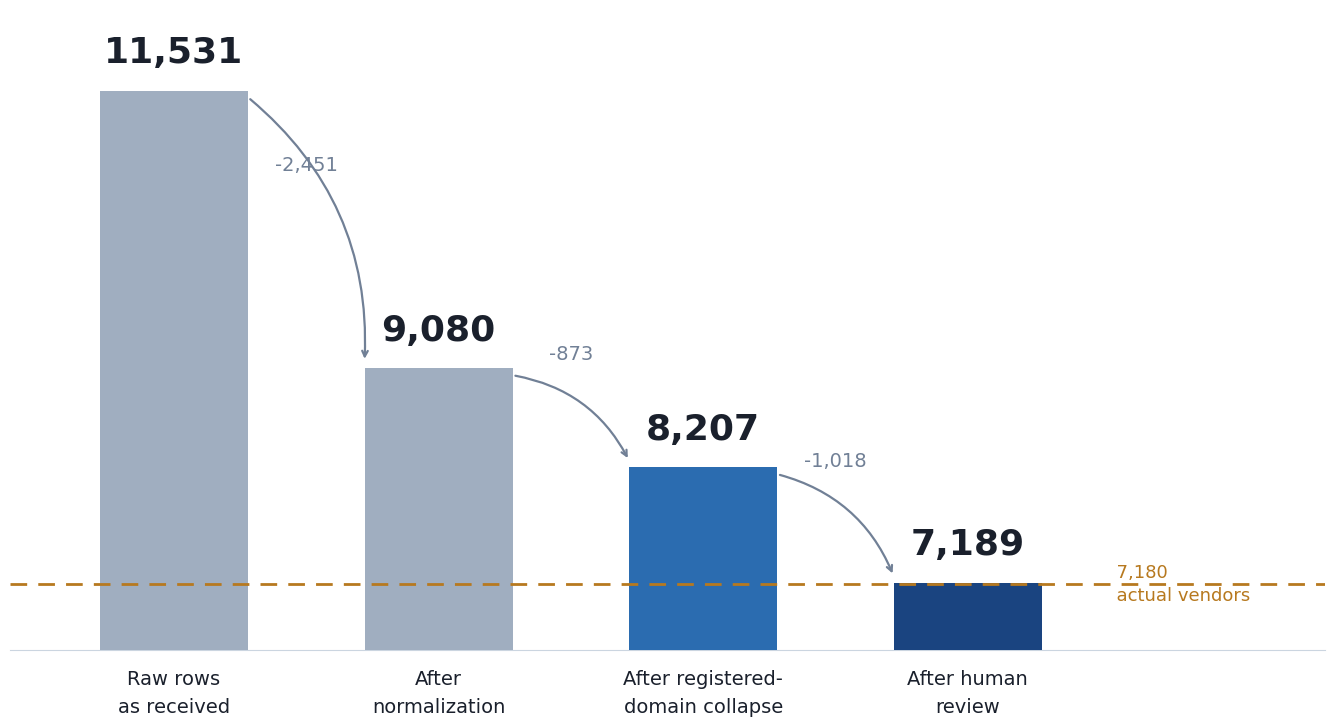
Beyond Similarity Scores: Deduplicating Data with Deterministic Stages
A 91% similarity score sounds reassuring until you realize it still leaves you guessing. In this walkthrough, the author tackles a 10,000-row supplier list where one vendor appears under four different spellings, and the real challenge isn't matching, it's deciding what to trust. Deterministic stages offer a clearer path than leaning on fuzzy numbers alone. It's a practical reminder that structure often beats probability. If you're wrestling with messy data, this approach feels like a breath of fresh air.
Transform scattered data into clean columns with AI-powered simplicity.
Splitting a column in Power Query sounds simple until the data refuses to cooperate. This user's challenge with "Ball 23/Bat 25/Hoop 12/Club 17" is a classic: the goal isn't just separating text, but mapping each item to its own column without losing the associated numbers. Conditional columns feel logical, yet they often miss the mark when values vary. The trick isn't forcing a pivot; it's a structured split-and-group approach. For anyone wrestling similar multi-value cells, patience and a step-by-step transformation strategy make all the difference.
Keep your formulas intact while teams copy rows freely
Protecting formula columns while keeping rows editable is a puzzle many spreadsheet users know well. This user faces a familiar tension: they need columns P and V locked down with formulae, yet the protection blocks the cut-and-paste workflow that keeps monthly data organized. Their three-step workaround is a clear sign the current setup isn't sustainable. The real issue isn't hiding formulae or tweaking settings; it's that protection and row movement don't mix.
Simplify Conditional Formatting Across Sheets with Smarter Logic
Conditional formatting often feels like it should be simpler than it is, especially when you're bridging two sheets with an INDEX-MATCH lookup. KingScuba's setup is clever, using Sheet 1's input to trigger highlights across Sheet 2, but the friction comes from translating that logic into a custom formula that works across ranges. The good news? You don't need to split sheets; a single, well-crafted formula can handle it.
Design components that adapt to their container, not the screen
Container queries have been supported in browsers for years, yet most of us still reach for media queries out of habit. That's a missed opportunity. Container queries let components respond to their parent's width, not the viewport's, which makes them far more natural for reusable UI. Use media queries for page-level layouts, but reserve container queries for the pieces that travel. It's a small mental shift with a big payoff.
Simplify complex spreadsheet comparisons with an AI-powered approach
Mixing two columns into one sounds straightforward until you hit the logic check buried in the details. When both columns agree, the answer is clear, but when one side holds a Buy or Sell and the other sits at N/A or blank, the decision shifts. That's where the real work begins. It's a practical puzzle, and solving it well comes down to defining the rules before touching a formula.
Discover a smarter path through massive data with TabPFN-3.5
Prior Labs just released TabPFN-3.5, and it's a serious step forward for tabular AI. The model tops both TabArena and BeyondArena, handling up to 1 million rows and 20,000 features with ease. What stands out is the range: the Fast variant runs six times quicker, while Thinking trades compute for accuracy, adding 20 Elo on BeyondArena and 44 on TabArena. BeyondArena's gains are particularly strong on text-rich and high-cardinality data, pulling 250 points ahead of the previous baseline.
Smaller model, sharper reasoning: 44M parameters trained from scratch on CPU
Three weeks ago, SHADOW-250M proved a 60 MB model could retrieve records from disk. Now, SHADOW-50M pushes the same idea further: 44M parameters, 19.8 MB, and roughly 1,900 tokens per second on a laptop CPU. It reasons over what it retrieves, runs arithmetic through a fixed circuit, and answers from memory without re-reading source text. It loses to larger models on standard benchmarks, and the author says so plainly.