AI-powered spreadsheet
75 stories filed under AI-powered spreadsheet on Beyond Market Intelligence. The newest of them: “Print smarter: transform wide spreadsheets without wasting paper”, “Consolidate messy data into one clean table with AI-powered queries”, and “Transform Your Data Portfolio with These 15 Power BI Project Ideas”. Printing a wide spreadsheet can be challenging, especially when faced with excessive whitespace on multiple pages. Creating a Power Query to add and consolidate information can streamline your data management process, especially when working with multiple spreadsheets. Acme AI is the next-generation, AI-powered spreadsheet platform built to replace Excel and redefine how analysts, data scientists, and enterprise teams work… The list below is every AI-powered spreadsheet story on Beyond Market Intelligence, newest first.
Print smarter: transform wide spreadsheets without wasting paper
Printing a wide spreadsheet can be challenging, especially when faced with excessive whitespace on multiple pages. If you have a single, wide sheet with limited rows, you may want to creatively utilize that empty space to consolidate your printout. This guide will walk you through effective strategies to maximize your printed output, ensuring that subsequent pages leverage the whitespace instead of wasting it. By employing these techniques, you can enhance your printing efficiency and achieve a more streamlined presentation of your data.
Consolidate messy data into one clean table with AI-powered queries
Creating a Power Query to add and consolidate information can streamline your data management process, especially when working with multiple spreadsheets. In this guide, we'll walk you through the steps necessary to transform your data into a cohesive table. By leveraging Power Query's capabilities, you'll learn how to connect to your data sources, consolidate information, and present it in a clear format. Let’s explore how to achieve a consolidated view, similar to your desired output, without needing to edit the original Excel files.

Transform Your Data Portfolio with These 15 Power BI Project Ideas
Building a robust Power BI portfolio is essential for aspiring business or data analysts in 2026. Employers seek candidates who can transform messy data into clean models and create impactful dashboards that drive informed decision-making. 15 compelling Power BI project ideas will not only showcase your technical prowess but also demonstrate your ability to derive actionable insights from data. These projects serve as tangible evidence of your skills, empowering you to stand out in a competitive job market.
When spreadsheets feel stuck, explore a smarter path to transform your data.
Transforming Excel data can be streamlined through a no-code ETL tool, which simplifies the process of joining and filtering spreadsheets without the steep learning curve of Power Query. While Power Query offers powerful capabilities, its complexity can be daunting for new users. Exploring a no-code solution may empower you to create efficient workflows that you can run regularly, enhancing your productivity with minimal hassle. If your goal is to simplify your data management, consider testing a no-code tool to see how it fits your needs.
From VLOOKUP to AI: Explore how spreadsheet skills are evolving this week
Welcome to this week's recap of /r/Excel for March 07 - March 13, 2026. This week featured engaging discussions and insightful problem-solving, with the top posts highlighting topics like VLOOKUP with curly brackets and the complexity of user-created spreadsheets. Join the conversation on unsolved challenges, including refining Excel to PowerPoint workflows and sharing Office Scripts. Dive into the community's insights and expertise to enhance your spreadsheet skills and discover innovative solutions for your Excel journey. Explore the top comments for added inspiration!
Simplify Merging Spreadsheets with Complex Multi-Row Headers
Merging spreadsheets with compound headers in Power Query can be challenging, especially when dealing with varying data across multiple workbooks. In your case, where each column's unique identifier spans the top four rows, it’s essential to maintain all columns present at least once, rather than only those common to every sheet. By leveraging Power Query’s advanced merging capabilities, you can streamline your workflow, saving time and ensuring a comprehensive dataset for analysis. Let’s explore how to achieve this efficiently and effectively.
Your master list updates every connected sheet automatically, no manual work needed.
Are you looking for an efficient way to manage data across multiple spreadsheets? Imagine having a master sheet that automatically updates various external sheets with specific data, eliminating the need for manual adjustments. This approach streamlines your workflow, allowing you to maintain accurate and up-to-date information for different entities without the hassle. By setting up a dynamic connection between your master sheet and the external sheets, you can effortlessly reflect changes like new accounts, ensuring that your data remains organized and accessible.
Stop rebuilding your spreadsheets when AI can fix the workflow
It sounds like you're facing frustrating challenges with conditional formatting and data validation in your workbook, particularly after the recent remapping of your drives. These issues can indeed disrupt your daily report workflow, especially when you've built a system designed to streamline data management. Your current setup involves several advanced features like power queries and macros, which can introduce complexity.
Explore how AI-native spreadsheets empower financial workflows beyond Mac limitations
Hello everyone, I’m a financial controller navigating complex Excel models and large datasets on a MacBook Air M4 with 24GB RAM. However, I’ve encountered significant limitations with Excel for Mac, particularly with features like VBA, pivot tables, and Power BI. To enhance my workflow, I’m considering running Windows through Parallels. Before making this investment, I’d love to hear from others who use Mac and Parallels for professional Excel work. How does Excel perform with large financial models?
Clean 300 columns of messy spaces without the manual grind
Handling messy data, especially with inconsistent leading spaces across hundreds of columns, can be daunting. In scenarios like this, Power Query emerges as a powerful ally, allowing you to efficiently trim spaces from multiple columns simultaneously, thus saving valuable time. While leveraging Power Query for this task can streamline the process, it’s wise to consider potential performance implications when working with extensive data sets. Exploring VBA solutions can also provide tailored automation for repeated tasks.
Explore how AI can transform your workflow and eliminate those freezing frustrations.
Hi everyone, I’m reaching out to troubleshoot a persistent Excel issue affecting multiple users in our environment. Users report that Excel freezes for 10–30 seconds when switching applications or copying between workbooks, sometimes resulting in crashes. Even after recovery, clicking a cell may select the wrong one or highlight an unintended range. Despite trying various fixes like disabling hardware acceleration, the problem persists across different machines and setups. Has anyone experienced similar issues or have suggestions for further troubleshooting? Your insights would be greatly appreciated.
Empower each supervisor with a focused view of their own team's check-ins.
Creating a streamlined check-in list for your team can enhance accountability and simplify oversight. By setting up a spreadsheet where each supervisor only accesses their designated techs, you foster a structured approach to the "Ops Check-in" and Notes columns. With the final checklist submitted by a single person responsible for the "Keyed" column, you ensure clarity in the process. Utilizing Power Query can facilitate this setup, especially since you’ve already formatted your supervisors' data into tables.
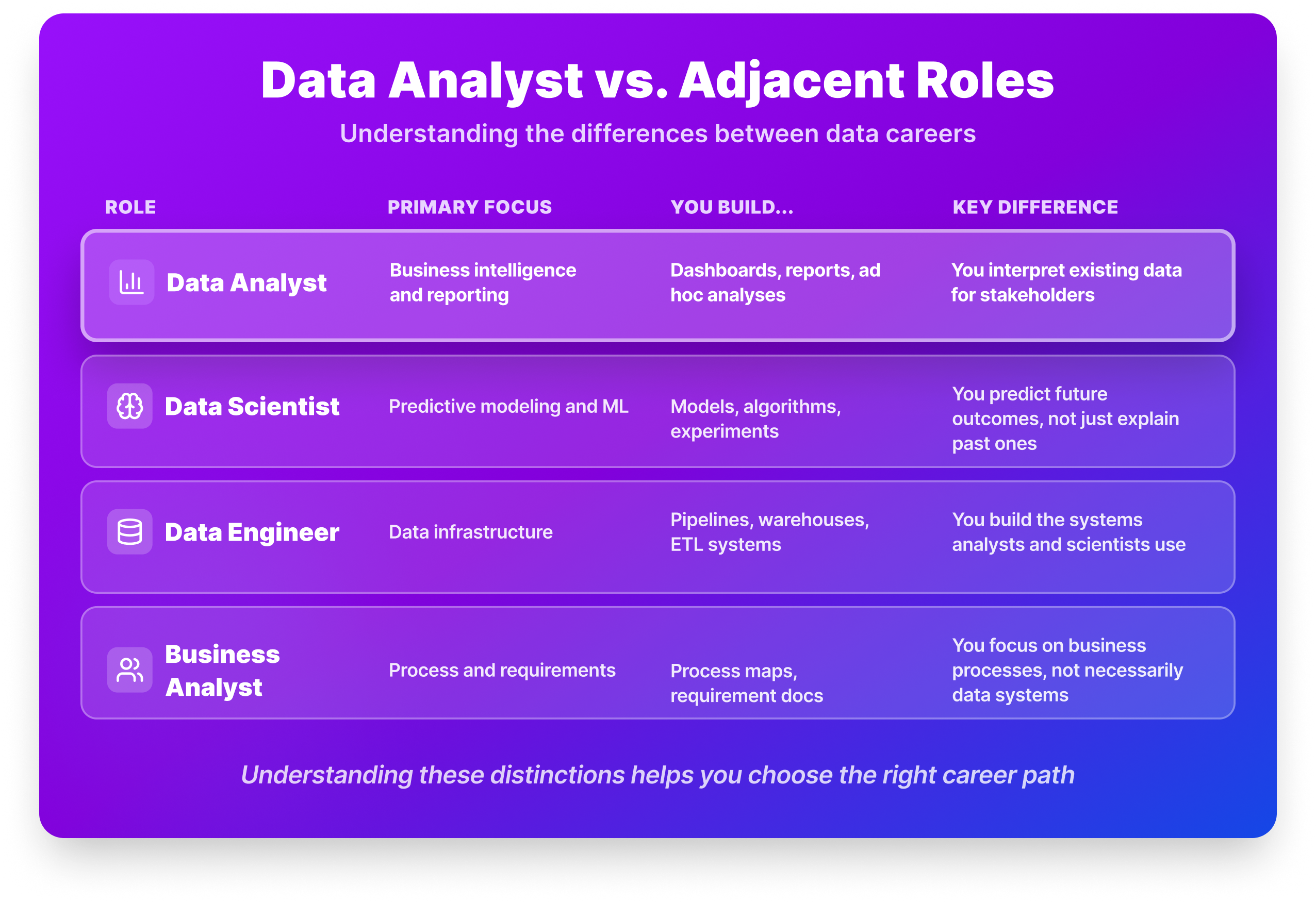
From Raw Numbers to Real Decisions: Your Path to Data Analysis
Navigating the path to becoming a data analyst can feel overwhelming, especially with advice ranging from mastering Excel to pursuing a master’s degree. The reality is more nuanced. Data analysts are crucial in transforming raw data into actionable insights, answering pivotal questions like why sales fluctuate or how customer behavior changes. This step-by-step guide for 2026 will clarify the essential skills, educational requirements, and practical experiences you need to thrive in this dynamic field.

Start with the tools that actually matter for entry-level analysts
Navigating the world of data analysis tools can feel overwhelming, especially with countless lists suggesting 15, 20, or even more options. For entry-level analysts, this plethora of choices often complicates rather than clarifies where to begin. In this guide, we’ll distill the essentials, highlighting the top 10 data analysis tools that empower you to tackle real-world challenges effectively. Discover how these tools can streamline your workflow and enhance your insights, setting you on a path to success in your data analysis career.
Automate Monthly Client Data Imports with Simple Wildcard Logic
Are you tired of manually importing client data each month, especially when the file name and location change? Power Query offers a streamlined solution that simplifies this process, allowing you to automate data imports with ease. By leveraging wildcard formatting and a dynamic file path, you can ensure that your spreadsheet always pulls the correct data. In this guide, we’ll explore how to set up Power Query to automatically retrieve your data, making the refresh process seamless and efficient.
Local automation meets modern efficiency: a VBA-powered Project Manager for German businesses.
Are your current invoicing solutions feeling outdated and cumbersome? Discover how I transformed Excel 2003 into a high-performance Project Manager optimized for German businesses, offering a cost-effective alternative to expensive subscription software. By leveraging advanced VBA logic, I created a seamless, standalone app experience that operates entirely offline—no monthly fees, just pure local automation. Dive into the details of this innovative tool, including UI locking and security features, and see how you can harness the power of legacy technology for modern needs.
Modernize your analytics without forcing your team onto complex new tools
Feeling like a dinosaur in the fast-evolving world of analytics? You’re not alone. Many seasoned analysts struggle with outdated methods and legacy systems, especially when faced with the demands of modern data volumes. Transitioning from massive flat files to a more efficient process can seem daunting, but it’s essential for staying relevant. Discover how Power Query and Power Pivot can streamline your data handling while still delivering the Excel flexibility your stakeholders crave.

Find the BA certification that fits your path, not just your resume.
As you explore business analyst certifications, you’re likely seeking the right credential to elevate your career without unnecessary costs or delays. The decision can be daunting, especially with the range of options available. In 2026, the International Institute of Business Analysis (IIBA) offers three distinct levels of credentials, each tailored to different career stages. The Project Management Institute (PMI) also provides valuable certifications. This guide will clarify your choices, helping you make an informed decision that aligns with your professional aspirations.
Unlock hidden manager insights by moving live form data to private channels
Managing overtime requests through Microsoft Forms can be challenging, especially when it comes to keeping sensitive data secure. If you’re looking to store your response spreadsheet in a private channel accessible only to managers, you’re not alone. Unfortunately, moving an existing live Excel file into a private Teams channel isn’t straightforward. However, there are alternative solutions to explore, such as limiting Excel access while keeping the Form in OneDrive or creating a dedicated team for managers.
Smarter ways to manage large datasets without spreadsheet slowdowns
Struggling with slow load times and lagging formulas in Excel can be frustrating, especially when managing large datasets. The good news is that optimizing performance is achievable with the right techniques. By leveraging efficient functions, organizing your data strategically, and utilizing tools like Power Query, you can transform your experience with Excel. In this discussion, we’ll explore proven strategies and best practices that can enhance your workbook’s responsiveness and streamline your data management.
One formula, no code: solving 100 math problems entirely in Excel
Are legacy spreadsheets holding you back from tackling complex math challenges? Discover how I solved all 100 Project Euler problems using just Excel and a single formula per solution—no VBA required. This journey transformed my approach to problem-solving, showcasing how Excel's capabilities can rival traditional programming languages for specific tasks. Join me as I share insights, innovative techniques, and the surprising power of functions like REDUCE and SEQUENCE.
Simplify Year Filtering Across Tables with Focused DAX Logic
Are you feeling bogged down by the complexities of data modeling in Excel? If you’re looking to filter years effectively or calculate measures across tables, you’re not alone. Many users encounter challenges when trying to harness the full power of DAX in Power Pivot. In this introduction, we’ll explore how to filter your data to focus solely on 2020 and 2021, and we’ll break down the best practices for calculating Total Sales seamlessly across related tables.
Why one Power Query mistake reveals a hidden risk in your data
Have you ever faced a moment that made you question everything you thought you knew about your spreadsheets? If you've struggled with Power Query's "Remove Duplicates" feature, you're not alone. It can feel like a confusing puzzle when the results don't match your expectations. This guide explores how to ensure you're accurately retrieving each user's most recent password while avoiding common pitfalls. Let's dive into practical solutions that will empower you to navigate Power Query with confidence and clarity.
Turn LibreOffice data friction into a seamless analytics workflow
Are you struggling to extract and format data from LibreOffice Power BI for your Excel spreadsheets? You're not alone. Many users face challenges when transitioning data between these platforms, especially when filtering for specific dates and ensuring proper formatting. The good news is that with the right approach, you can streamline this process and eliminate those frustrating compatibility issues. In this guide, we’ll explore effective strategies to ensure your data is clean, correctly formatted, and ready for seamless integration into Excel, helping you avoid common