AI-powered spreadsheet
75 stories filed under AI-powered spreadsheet on Beyond Market Intelligence. The newest of them: “Escape the portal-to-spreadsheet grind with a smarter data workflow”, “Transform messy fixed-width text files into structured data with AI”, and “From raw data to interactive dashboard: build your first Power BI report”. Managing multi-variable data entry from secure web portals can be a significant challenge, especially when faced with the constraints of multi-factor authentication and strict IT security compliance. If you're facing the challenge of splitting lengthy records into fields in Power Query, you're not alone. Acme AI is the next-generation, AI-powered spreadsheet platform built to replace Excel and redefine how analysts, data scientists, and enterprise teams work… The list below is every AI-powered spreadsheet story on Beyond Market Intelligence, newest first.
Escape the portal-to-spreadsheet grind with a smarter data workflow
Managing multi-variable data entry from secure web portals can be a significant challenge, especially when faced with the constraints of multi-factor authentication and strict IT security compliance. The manual process of copying data into Excel can lead to overwhelming context switching and workflow bottlenecks. To alleviate this frustration, it’s essential to explore innovative methods that streamline data entry without sacrificing security. For further insights, check out our article, "How to locate the Origin of an Unreferenced Value in a Complex Excel Workbook?
Transform messy fixed-width text files into structured data with AI
If you're facing the challenge of splitting lengthy records into fields in Power Query, you're not alone. With large text files containing thousands of records and varying field lengths, managing this data can be daunting. Fortunately, if you have a reference table outlining field names and their respective lengths, you can simplify the process significantly. You can leverage that table with Power Query to automate the splitting of records, making your data management more efficient.
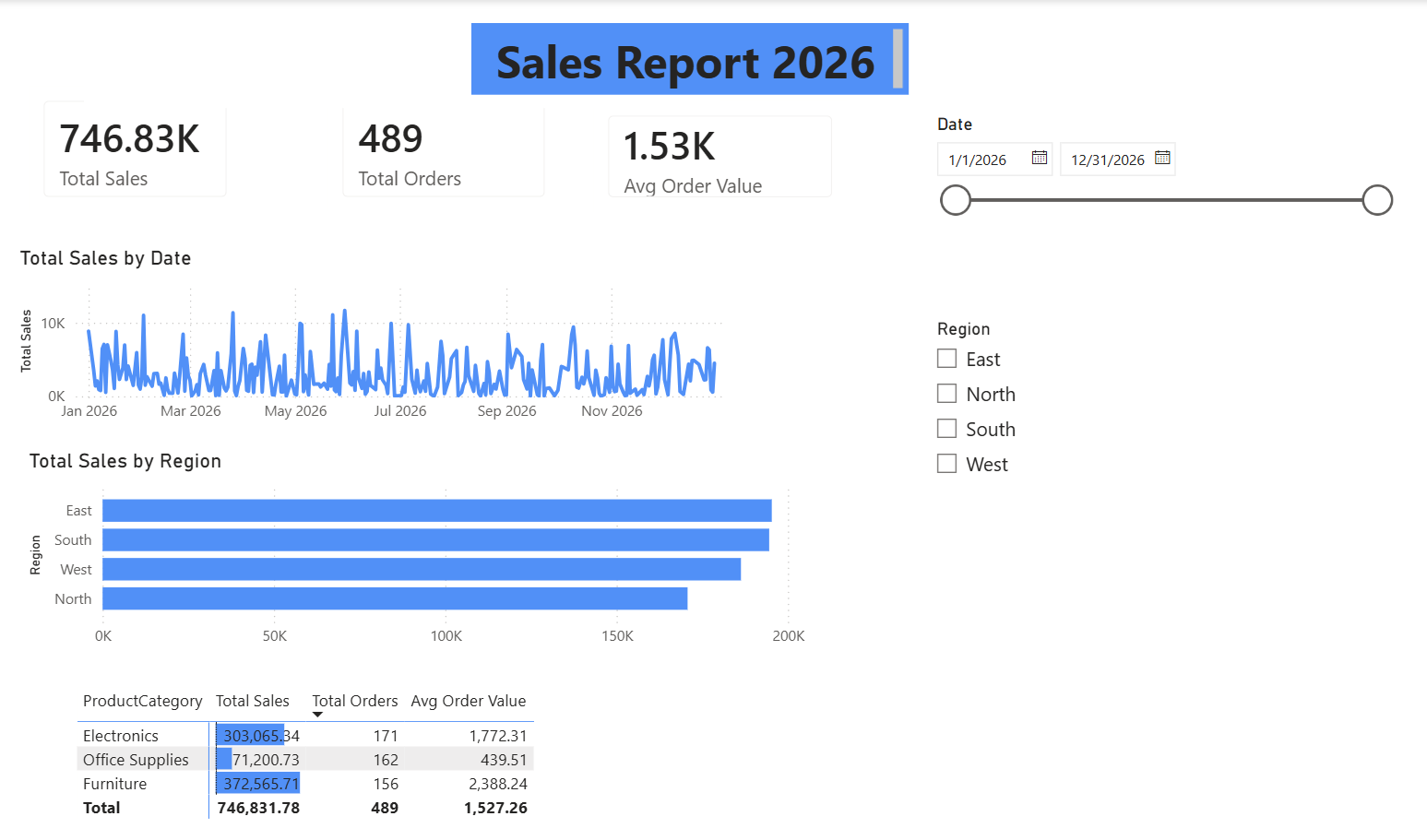
From raw data to interactive dashboard: build your first Power BI report
Welcome to our Power BI tutorial, where you’ll transform a raw data file into a polished, published report. This guide will walk you through the entire process, from initial data queries to deploying your finished dashboard in the cloud. You’ll learn to create an interactive dashboard that not only visualizes your data effectively but also includes essential features like alerts and automatic refresh settings. By the end, you’ll have the skills to empower your data storytelling and enhance your decision-making. Let's dive in and explore!
Extract specific invoice data from PDFs without the spreadsheet struggle
Extracting specific data from PDFs, especially when dealing with invoices, can be a challenging task. Power Query (PQ) offers powerful tools, but it’s crucial to navigate its features effectively to avoid unnecessary complications. If you're encountering difficulties in isolating the numbers you need, rest assured that with the right approach, you can streamline the process.
Turn your spreadsheet into a route analyzer that calculates profit per mile
If you’re diving into Excel and want to leverage the Google API for distance calculations, you’re embarking on an exciting journey. By setting up a spreadsheet where you input start and finish addresses, you can automate distance and time calculations tailored to your needs. While utilizing Power Query and a Google route API key is essential, making your solution native to Excel will enhance efficiency.

xAI ships Grok 4.3 and a voice cloning suite at a competitive price
xAI has launched Grok 4.3, a new large language model that enhances performance while maintaining an aggressively low pricing structure. This release comes amid ongoing legal battles involving founder Elon Musk and OpenAI co-founder Sam Altman. Grok 4.3 introduces advanced reasoning capabilities and a powerful voice cloning suite, designed to optimize user workflows. With significant improvements in specialized tasks, Grok 4.3 positions itself as a strong contender in the AI landscape, offering both affordability and functionality for developers and enterprises alike.
Simplify data entry for your team with smarter SharePoint workflows
Optimizing data entry for an Excel spreadsheet stored on SharePoint can significantly enhance collaboration among your five users. With 300 entries and 17 columns on the main worksheet, alongside additional variables and extensive instructions, the current reliance on desktop apps has led to formatting issues, cell resizing conflicts, and even freezing problems. Exploring MS Forms combined with Power Automate may provide a streamlined solution, allowing for structured data input while reducing errors.
Turn 52 weekly sheets into one clear annual summary with AI.
Consolidating multiple sheets into a Year-to-Date (YTD) summary report can streamline your data management and reporting process. With 52 uniquely named weekly sheets, creating a cohesive summary may seem daunting. However, by leveraging Excel’s advanced features, such as Power Query, you can automate data consolidation while maintaining your existing weekly report format. This guide will walk you through the steps to effectively combine your data, ensuring you meet your reporting needs without sacrificing the ease of your current setup.

OpenAI and Microsoft loosen ties, opening AI access across major clouds
Microsoft and OpenAI have restructured their partnership, dismantling exclusivity and revenue-sharing agreements that defined their collaboration since 2019. The new arrangement allows OpenAI to sell its models on other cloud platforms, including AWS and Google Cloud, freeing it from the constraints of a single ecosystem. Microsoft will no longer share revenue with OpenAI for Azure-accessed models, while OpenAI continues its revenue obligations until 2030, capped at an undisclosed amount.
Future-Proof Your Data Workflows Without Breaking the Past
Managing dynamic data inputs in spreadsheets can be challenging, especially when instrument software updates alter the logs that feed your main file. Updating Power Queries to accommodate these changes is essential, but it often leads to compatibility issues with older files. Many users face this dilemma and seek effective strategies to balance the need for updated queries while maintaining accessibility to past data. Exploring flexible solutions and best practices can empower you to streamline this process and enhance your data management efforts.

Introducing GPT-5.5: a subtle but meaningful step forward in AI
OpenAI has officially launched GPT-5.5, a significant advancement in AI language models that narrowly surpasses Anthropic's Claude Mythos Preview on the Terminal-Bench 2.0. This model, which has been internally referred to as "Spud," showcases OpenAI's commitment to enhancing user experience by simplifying complex tasks and improving coding efficiency. With a focus on agentic performance, GPT-5.5 autonomously tackles intricate workflows, making it an invaluable tool for professionals across various fields.
Uncover Course Theme Patterns With Smarter Co-Occurrence Analysis
Analyzing the co-occurrence of themes in your post-secondary course offerings can provide valuable insights into how different concepts are interrelated. By examining how often themes like "business acumen" appear alongside "venture capital," you can uncover patterns that inform curriculum development and highlight interdisciplinary connections. To visualize these relationships effectively, consider using network diagrams or heatmaps, which can illustrate the frequency of co-occurrence. With unique identifiers for each course, you have a solid foundation for deeper analysis.

OpenAI Workspace Agents put AI to work inside the tools you already use.
OpenAI has unveiled Workspace Agents, a significant advancement in AI-native tools for enterprises, enabling seamless integration with popular applications like Slack and Salesforce. These agents allow users to design and implement tailored workflows that streamline tasks across various platforms, promoting efficiency and collaboration. By shifting from traditional, session-based interactions to persistent, context-aware agents powered by Codex, OpenAI addresses longstanding challenges in workplace productivity. This innovative approach positions AI as a shared organizational resource, transforming how teams manage data and execute tasks, ultimately enhancing overall performance.
Discover how to sync live data while keeping your manual fields in sync.
In this scenario, you want to leverage Power Query to automatically pull and update data from a spreadsheet while also maintaining manual fields in a separate table. Your concern about potential misalignment after sorting or refreshing the original data is valid. Power Query typically maintains data integrity, but it can disrupt alignments if the source data is rearranged. To achieve a seamless integration, consider using a single table that incorporates both Power Query data and manual entries, ensuring consistent alignment and simplifying your workflow.

Codex expands beyond code, turning your desktop into an AI-driven workspace.
OpenAI has announced significant updates to its Codex desktop app, transforming it into a more integrated "Super App" for developers. Now capable of accessing and interacting with all applications on a user's computer, Codex streamlines workflows by gathering relevant information and performing tasks across platforms. With new features such as an integrated web browser, advanced image generation, and background automation, Codex enhances productivity by allowing developers to multitask seamlessly.
Smart Spreadsheet Grouping Simplifies Your Rack Wattage Estimates
Happy Thursday, everyone! I’m currently building a Google Sheets file to track my home networking setup, specifically focusing on my Rack Mount Unit. In this sheet, I want to estimate the total wattage for power consumption. I have a separate "Power Management" sheet that lists devices, their assigned groups, and their estimated wattage. I’m seeking a solution to insert a device in my Rack Mount Unit sheet that displays text while allowing a SUM function to pull the corresponding wattage from the Power Management sheet.
Consolidate Multiple Workbooks into One Refreshable Pivot Table Effortlessly.
Combining multiple workbooks for a pivot table can streamline data analysis, especially when using SharePoint. You’ve made great progress by leveraging Power Query to merge your monthly tables, but encountering refresh issues can be frustrating. To ensure consistent functionality, consider centralizing your data in a single workbook that dynamically links to your SharePoint files. This approach can reduce complexity and improve refresh reliability. Additionally, check your connection settings and permissions to avoid errors related to legacy connections.
Messy data slows everyone down. Here's where it trips you up.
Cleaning messy Excel or CSV data can be a daunting task, with various frustrations arising depending on the specific dataset. Common challenges include dealing with duplicates, inconsistent formatting, and mismatched columns, all of which can disrupt workflows and impede productivity. While some users turn to Power Query for assistance, others may resort to manual methods, often leading to inconsistent results. We invite you to share your experiences—what aspects of data cleaning tend to slow you down the most?
Turn your daily stock check into an instant WhatsApp alert.
Imagine transforming your daily inventory routine from a tedious 30-45 minute task into a streamlined process that alerts you via WhatsApp when stock is low. By connecting your Excel sheet to a messaging platform, you can automate notifications and even generate purchase orders with simple text commands. This innovative approach maintains Excel as your central data source while enhancing efficiency and accuracy. As you explore this solution, consider the trust factors that would make you comfortable with automated edits to your spreadsheet.
Trust Demands the Right Transparency at the Right Moment
In "Identifying Necessary Transparency Moments In Agentic AI (Part 1)," Victor Yocco delves into the critical balance between AI system behavior and the transparency of its actions. He argues that navigating the spectrum between opaque black boxes and overwhelming data dumps requires a more nuanced strategy. By mapping decision points, Yocco highlights how revealing the right moments can foster trust and clarity. This thoughtful approach emphasizes the importance of empowering users with understanding, ultimately enhancing their interaction with agentic AI technologies.

From demo to done: Softr's AI Co-Builder turns ideas into business apps
Softr, the Berlin-based no-code platform trusted by over one million builders and organizations like Netflix and Google, has launched an AI-native platform designed to empower non-technical teams to create production-ready business applications without code. The innovative AI Co-Builder allows users to articulate their software needs in plain language, generating fully integrated systems ready for real-world deployment. This groundbreaking move addresses the gap between flashy demos and functional business software, reinforcing Softr’s commitment to providing accessible and efficient solutions for today’s complex data management challenges.
Your spreadsheets are stuck in the 1980s. Let's explore what comes next.
Hi everyone, I’m a CSIE student in Taiwan, and I’ve been exploring a pressing issue: why are we still using 1980s logic to tackle 2026 data challenges? Despite our powerful technology, many of us are trapped in outdated practices, wrestling with manual tasks and complex formulas. I’m developing the Dxtreame Organizer to change this narrative, focusing on intuitive data organization and enhanced security.
From spreadsheet logic to a web app built for your financial clarity.
I’m excited to share my professional expense tracker along with a web app I created to automate the process, both available for free. After years of refining a powerful spreadsheet that provides a clear annual view of my cost of living and savings rate, I sought to enhance that experience. Many existing apps fell short of my needs, so I designed a solution that maintains the expansive feel of a spreadsheet while streamlining workflows.
Discover how AI transforms Excel workflows from manual refresh to automatic insight
Welcome to this week’s recap of /r/Excel for March 21 - March 27, 2026. Dive into the top discussions, including tips on automating Power Query refreshes in SharePoint and engaging debates about nested arrays and alternatives to grouped rows. Unsolved queries, like filtering duplicates and tracking workouts in spreadsheets, highlight the ongoing challenges users face. Explore the insightful comments that have sparked conversations, offering solutions and shared experiences within the Excel community. Join us as we navigate the latest trends and insights in Excel productivity!