Excel alternatives
Beyond Market Intelligence keeps Excel alternatives in one place: 87 stories so far. The section currently leads with “Transform 500 Rows in Seconds with Smarter Color Inversion”, “Simplify your NCAA pool scoring with smarter dropdowns and autosums.”, and “Find a coding platform that adapts to your pace and your goals”. If you're looking to invert multiple colors in alternate rows on your spreadsheet, there's a straightforward solution that can save you time and effort. Managing an NCAA pool can be complex, but automating scoring can simplify the process significantly. Acme AI is the next-generation, AI-powered spreadsheet platform built to replace Excel and redefine how analysts, data scientists, and enterprise teams work… The list below is every Excel alternatives story on Beyond Market Intelligence, newest first.
Transform 500 Rows in Seconds with Smarter Color Inversion
If you're looking to invert multiple colors in alternate rows on your spreadsheet, there's a straightforward solution that can save you time and effort. Instead of manually selecting and adjusting 500 rows, consider using a formula or VBA script to automate the process. This method allows you to efficiently redefine row colors that are currently filled, transforming your sheet with minimal hassle. Embrace this innovative approach to streamline your data management and enhance the visual appeal of your spreadsheet. Explore the possibilities today!
Simplify your NCAA pool scoring with smarter dropdowns and autosums.
Managing an NCAA pool can be complex, but automating scoring can simplify the process significantly. By utilizing dropdown menus for team selections and checkboxes on a master scoring sheet, you can streamline point calculations for each entry. When a team wins, checking the corresponding box will automatically update the scores across all entry tabs based on the team's seed and the round of play.

Find a coding platform that adapts to your pace and your goals
In a world overflowing with coding platforms, finding the right fit for your learning style, goals, and budget can be a daunting task. While many platforms promise to teach you how to code, the true challenge lies in discovering one that aligns with your unique needs from the outset. This curated list of 24 Codecademy alternatives for 2026 empowers you to explore diverse options, ensuring you invest your time wisely in building essential skills rather than starting anew.
Discover how AI simplifies merging date-based data for accurate cost basis.
Navigating the complexities of cost basis determination for bitcoin can be challenging, especially with a substantial dataset like yours. You have a detailed spreadsheet of mined transactions alongside a table of daily bitcoin values, totaling around 10,000 entries. To streamline your calculations, consider summing the amounts for each date before multiplying by that day's bitcoin value. Alternatively, you could multiply each individual entry by the corresponding daily value and then aggregate the results. This approach will clarify your cost basis effectively.
Explore Power Query Without Overwhelm: Simple Steps for Skilled Users
Power Query is an excellent tool for automating your data management tasks, especially for your straightforward needs. If you're looking to streamline the process of appending data from an export file to your workbook without excess clutter, Power Query can simplify this significantly. You can easily transform the exported data to remove unnecessary columns and append it directly to your table. With a few simple steps, you can disconnect the two files and delete the export, ensuring your workflow remains efficient and uncluttered.

Forms That Think: Choosing Between UI and Rule Engines
In the world of web development, forms play a crucial role in user interaction and data collection. However, not all forms are created equal. Some remain static user interfaces, while others evolve into dynamic rule engines that adapt based on user input. Understanding the distinction between these two approaches is essential for building efficient and effective applications. In this guide, we’ll explore the reasons behind these varying designs and provide insights on how to choose the most suitable approach for your React and Next.js projects.
Notes feel hidden and clunky? Discover a smarter way to manage data.
When working with a worksheet as a floor plan and booking system, efficiently adding notes to cells can be challenging. The traditional Microsoft note feature often feels clunky, with issues like poor visibility when zoomed out and editing difficulties. This raises the question of whether using Data Validation (DV) references might be a more effective alternative. While the DV approach can streamline information display, it’s essential to weigh the pros and cons compared to notes, especially considering the viewing-only access of other users.
Stop Clicking, Start Dragging: Link Files to Cells Instantly
Linking PDF files to specific cells in a spreadsheet can be a cumbersome process, especially when dealing with numerous entries. Instead of manually navigating through the file tree for each cell, consider whether a click-and-drag feature could streamline this task. Additionally, the current sorting of files in the ‘Insert Hyperlink’ dialog box—by alphabetical order rather than by most recent—can complicate file selection. As you anticipate managing hundreds of PDF files, exploring solutions to enhance efficiency and accuracy in linking will be essential for maintaining productivity.
Bridge the Gap Between Google Sheets and Excel with Smarter Array Syntax
Are you feeling the limitations of traditional spreadsheet formulas? Transitioning from Google Sheets to Excel can be challenging, especially when it comes to using the versatile ArrayFormula syntax. In Sheets, you can effortlessly populate multiple cells with a single function, allowing for dynamic data management. However, Excel requires a different approach to achieve similar results. Discover how to utilize Excel's features to automate data population while maintaining flexibility for manual adjustments.
Explore how CHOOSECOLS simplifies basketball stat analysis for young players.
Calculating the sum of values in alternating columns can streamline your basketball stats analysis, enhancing your coaching insights. By leveraging the CHOOSECOLS function, you can efficiently total free throws awarded and shots made, while also calculating the free throw percentage. This method not only simplifies your data management but also allows you to spot trends in player performance.
Protect your dropdowns from accidental pastes with smarter VBA controls
Are you tired of users accidentally overwriting your carefully crafted dropdown lists in Excel? Whether you’re using simple static lists, INDIRECT-based dropdowns, dynamic named ranges, or formula-driven options, protecting these cells is crucial for maintaining data integrity. The challenge lies in developing a VBA macro that distinguishes between valid dropdown selections and unwanted pastes. In this guide, we’ll explore effective strategies to detect all dropdown types while allowing seamless user interaction.

Start with the tools that actually matter for entry-level analysts
Navigating the world of data analysis tools can feel overwhelming, especially with countless lists suggesting 15, 20, or even more options. For entry-level analysts, this plethora of choices often complicates rather than clarifies where to begin. In this guide, we’ll distill the essentials, highlighting the top 10 data analysis tools that empower you to tackle real-world challenges effectively. Discover how these tools can streamline your workflow and enhance your insights, setting you on a path to success in your data analysis career.
When a trusted M code tool goes dark, it's time to explore smarter alternatives.
If you're like many users, Power Query Formatter has been an essential tool for beautifying M code, enabling better readability and organization. Recently, the site has experienced downtime, leaving users searching for alternatives to maintain their workflow. While tools like Copilot offer some solutions, concerns about code integrity can make them less appealing. In this discussion, we’ll explore what happened to Power Query Formatter and present reliable alternatives to ensure your coding remains streamlined and effective. Let’s dive into potential solutions that meet your needs.
Streamline multi-site job tracking into one unified filtered view
Managing schedules across multiple sites can be a daunting task, especially when relying on legacy spreadsheets. Imagine effortlessly consolidating job data from three distinct sheets into a single, organized fourth sheet—automatically filtered by due dates and prioritized for individual employees. With AI-driven solutions, you can streamline this process, eliminating manual data entry and enhancing productivity. In this guide, we’ll explore a straightforward approach to achieve this automation, ensuring you can focus on what truly matters: delivering exceptional service to your clients. Let's dive in!
Discover an accessible spreadsheet solution that fits your student workflow
If you're a student on Linux grappling with an older laptop, finding an effective Excel alternative can be challenging. While LibreOffice may feel sluggish, WPS Spreadsheets offers a robust solution for basic tasks like simple formulas, sorting, and light formatting. Designed with familiarity in mind, WPS strives for compatibility with Excel, making it easier to share files. However, it’s essential to be aware of potential quirks that could affect your workflow. Dive in to discover how WPS can enhance your productivity without the bloat.
Local automation meets modern efficiency: a VBA-powered Project Manager for German businesses.
Are your current invoicing solutions feeling outdated and cumbersome? Discover how I transformed Excel 2003 into a high-performance Project Manager optimized for German businesses, offering a cost-effective alternative to expensive subscription software. By leveraging advanced VBA logic, I created a seamless, standalone app experience that operates entirely offline—no monthly fees, just pure local automation. Dive into the details of this innovative tool, including UI locking and security features, and see how you can harness the power of legacy technology for modern needs.
Ditch the spreadsheet struggle and discover a simpler way to track project quarters.
Are you feeling overwhelmed by complex Gantt charts in Excel? You're not alone. Many professionals find themselves frustrated when trying to track project progress using traditional templates that demand intricate formulas and daily breakdowns. Fortunately, there are simpler alternatives that can help you manage timelines effectively—without the headache. By shifting your focus to quarterly and monthly tracking, you can create a user-friendly Gantt chart that meets your needs.
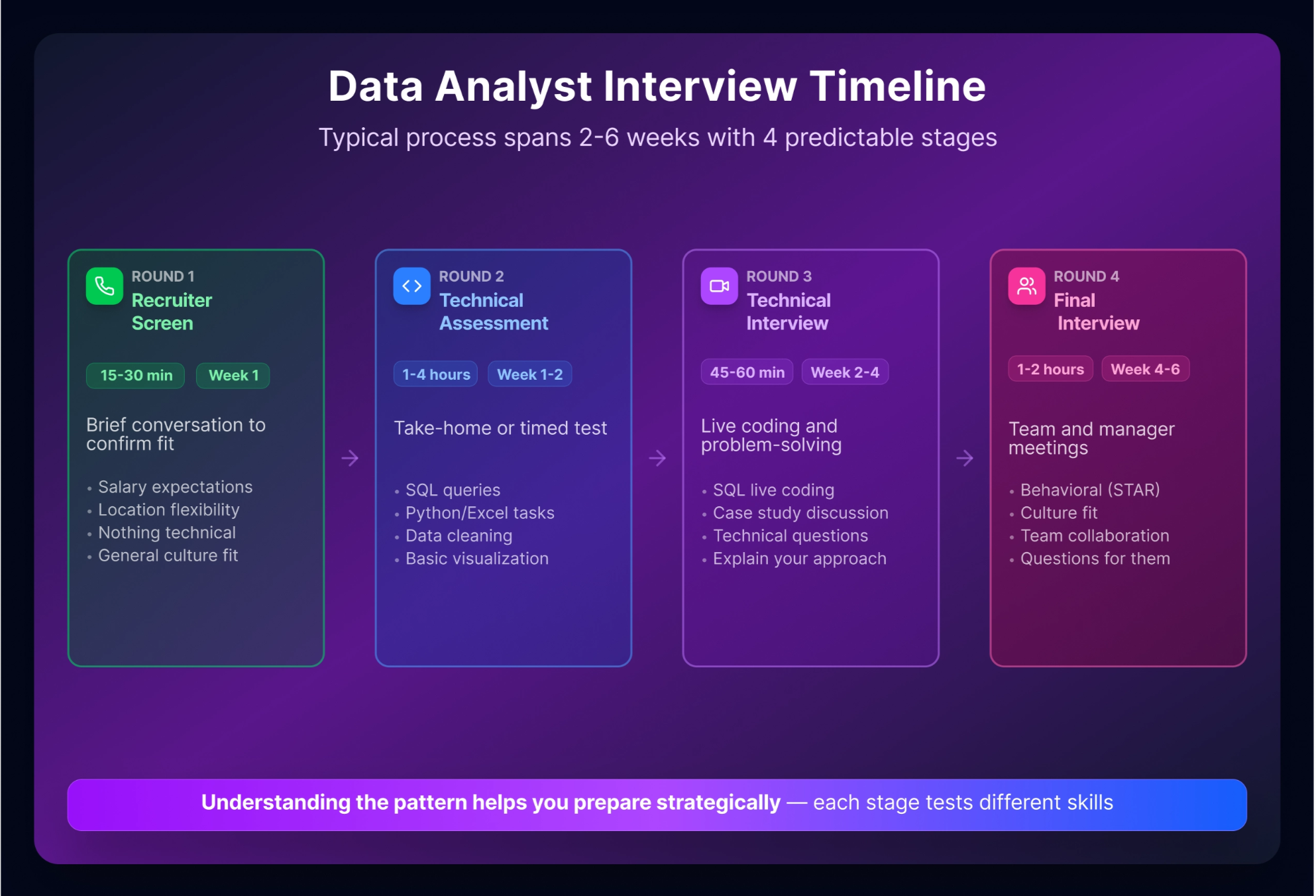
From SQL anxiety to interview confidence with 40 actionable questions
Preparing for a Data Analyst interview can be daunting, especially when self-doubt creeps in: "Am I ready? What if I freeze?" This guide alleviates those concerns by providing over 40 essential interview questions and answers tailored for entry-level candidates. With a strong foundation in SQL, Python, and statistics, you can confidently navigate the interview landscape. Dive in to discover the insights and strategies that will empower you to showcase your skills and secure that coveted position in 2026. Let’s transform your anxiety into assurance.
Your Lambda formula fails because N/A is a result, not a condition to check
Struggling to get accurate sales data from your Excel table? Recursion with LAMBDA can transform your approach, allowing you to dynamically compare dates and retrieve units sold, even when the table skips entries. By leveraging LAMBDA and XLOOKUP, you can create a function that finds the closest previous date with available data. While you've tried stopping recursion with your formula, there may be simpler strategies to achieve the same goal. Keep reading to discover effective methods to optimize your Excel functions for better insights.
Your spreadsheet use doesn't need to cost you £85 a year
Are you feeling the pinch of a Microsoft 365 subscription that doesn’t match your casual usage? You’re not alone. Many users find themselves paying for features they don’t need, especially when it comes to basic document and spreadsheet tasks. Thankfully, there are alternatives like WPS Office and LibreOffice that not only maintain the formatting of your existing .docx and .xlsx files but also work offline without the burden of yearly fees.
Unlock hidden manager insights by moving live form data to private channels
Managing overtime requests through Microsoft Forms can be challenging, especially when it comes to keeping sensitive data secure. If you’re looking to store your response spreadsheet in a private channel accessible only to managers, you’re not alone. Unfortunately, moving an existing live Excel file into a private Teams channel isn’t straightforward. However, there are alternative solutions to explore, such as limiting Excel access while keeping the Form in OneDrive or creating a dedicated team for managers.
When tables stop alternating, here's how to restore consistent formatting
Are you facing issues with alternating row colors in your Excel table? This common frustration often arises when formatting settings or conditional formatting rules don’t apply as expected, especially after significant expansions. While your initial table worked perfectly, expanding it to 1,000 lines can sometimes disrupt these settings, leading to inconsistent color patterns. In this guide, we’ll explore potential reasons for this issue and provide actionable solutions to restore the desired formatting, ensuring your data remains visually appealing and easy to read.
From scattered employee data to a clear, multi-location report in minutes
Are your dynamic array formulas slowing down your spreadsheet? If you’re juggling employee data with multiple roles and locations, it’s easy to feel overwhelmed by CPU demands. Fortunately, with a strategic approach, you can streamline your reporting process while retaining a clear layout. By leveraging a single spill formula, you can transform your headcount (HC) and full-time equivalent (FTE) reporting into a more efficient format. Join us as we explore how to combine your existing formulas for optimal performance, maintaining that two-column structure you desire.
Discover a free AI-powered spreadsheet for effortless family planning and finances.
Feeling constrained by costly Excel subscriptions for casual tasks like family planning and financial tracking? You’re not alone. Fortunately, there are powerful free alternatives that can handle everything from basic calculations to more complex functions like pivot tables. In this guide, we’ll explore user-friendly options that empower you to manage your household efficiently—without breaking the bank. Dive in to discover the best tools that fit your needs and make your life easier!