google sheets
Beyond Market Intelligence keeps google sheets in one place: 137 stories so far. The section currently leads with “Track Employee Pay by Week and Month with a Smarter Spreadsheet”, “Build Your Own ChatGPT Function Inside Excel with an API Key”, and “Turn rows of data into columns with one intelligent move”. Managing employee pay across weeks and months doesn't require wrestling with clunky legacy spreadsheets. You're right that Google Sheets has its `=AI` function and Microsoft offers `=Copilot`, but OpenAI hasn't shipped a native `=CHATGPT()` formula for Excel. Acme AI is the next-generation, AI-powered spreadsheet platform built to replace Excel and redefine how analysts, data scientists, and enterprise teams work… The list below is every google sheets story on Beyond Market Intelligence, newest first.
Track Employee Pay by Week and Month with a Smarter Spreadsheet
Managing employee pay across weeks and months doesn't require wrestling with clunky legacy spreadsheets. This user needs a smarter approach: one sheet per month, each broken into weekly tabs that track hours and earnings for three regular employees, two at $20/hour, one at $15, plus a blank slot for occasional hires. Monthly totals should auto-calculate. It's a practical request, and Google Sheets compatibility is essential.
Build Your Own ChatGPT Function Inside Excel with an API Key
You're right that Google Sheets has its `=AI` function and Microsoft offers `=Copilot`, but OpenAI hasn't shipped a native `=CHATGPT()` formula for Excel. That doesn't mean you're stuck. With a little VBA and an API key, you can build your own cell-based function that calls ChatGPT directly, then drag it down like any other formula. It's a practical, hands-on way to bring AI into your workflow.
Turn rows of data into columns with one intelligent move
Manually transposing 385 spreadsheets is a recipe for burnout, especially when the fields you need are always in the same spots. This isn't a skill problem; it's a tool problem. The request is simple, but the repetition makes it painfully inefficient. Automating this with a script is the only sane path forward, and it's worth exploring a solution that turns this tedious chore into a one-click win.
Uncomplicate comma-separated data with one powerful sort formula.
Sorting comma-separated values from a Google Sheet into Excel can feel like translating a foreign language, especially when the formula looks like alphabet soup. That function you shared is actually a clever chain: it splits each cell's text at every comma, trims stray spaces, stacks the results, removes duplicates, and then sorts them alphabetically. It's powerful, but deciphering it without context is tough.

When benchmarks meet reality, AI agents still have room to grow.
DeepSeek's V4 Flash tops leaderboards and earns developer praise, but real-world agent work tells a different story. In testing across eight harnesses and 240 runs, only 129 passed, just six of 30 complex workflows succeeded everywhere. That gap matters. Raw capability isn't enough when tool configuration, caching, and retries shape outcomes. Meanwhile, price hikes of up to 1,100% complicate the value equation. The model still undercuts rivals, but the real test is orchestration, not benchmarks. Enterprises should measure cost per completed workflow, not per token.

Google delivers faster, cost-effective image generation for enterprise teams
Google today introduces Nano Banana 2 Lite (NB2 Lite), designated Gemini 3.1 Flash-Lite Image, a significant advancement in AI image generation designed for enterprise efficiency. This model delivers images in a remarkably fast 4 seconds at a competitive $0.034 per 1,000 images. Optimized for high-throughput workflows, NB2 Lite outperforms its predecessor while offering cost savings compared to other Gemini models. Explore its capabilities now via Google AI Studio, the Gemini API, and GEAP—a practical solution for rapid prototyping and automated asset generation.
Transform your spreadsheets with AI-powered guidance from Gemini
Unlock the future of spreadsheet creation with Gemini. This tutorial demonstrates how to leverage Google's AI model to build powerful Google Sheets – from initial table construction to generating complex formulas and insightful data analysis. Learn to refine your spreadsheets with strategic follow-up prompts, transforming raw data into actionable intelligence. Explore a streamlined workflow that empowers you to achieve more. For deeper insights into modern cloud deployment strategies, see our related article, "Building a European Cloud Orchestration Platform within an Enterprise."
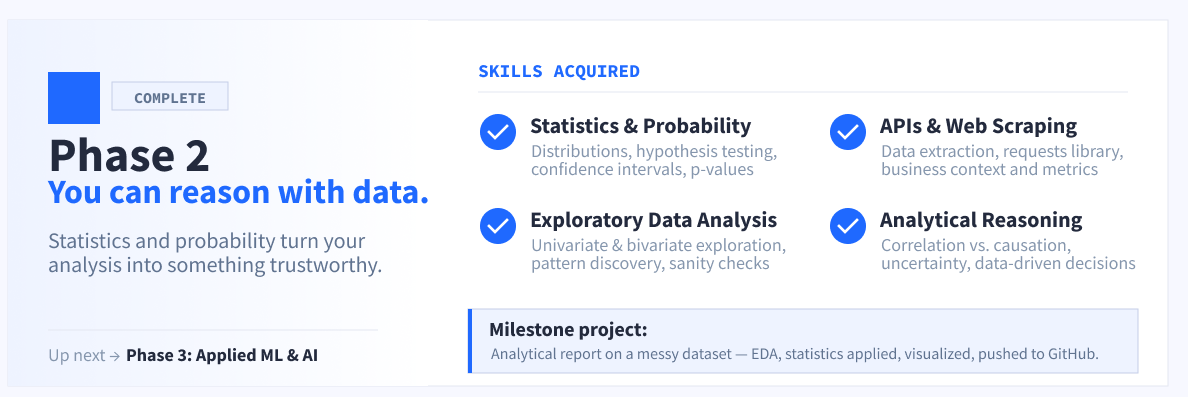
Your Practical Roadmap to Becoming a Data Scientist by 2027
## Data Scientist Roadmap for Beginners (2026–2027) Navigating the path to becoming a data scientist can feel overwhelming. This roadmap clarifies exactly what to learn, in what order, and how long it realistically takes to achieve job readiness by 2027 – whether you’re starting from zero or transitioning from data analysis, engineering, or research. We cut through the noise surrounding Python vs. R, degree requirements, and the rise of Generative AI to provide a focused, actionable plan.
Track win rates across multiple dropdowns with smarter COUNTIF formulas
Calculating win rates across multiple dropdown options in Google Sheets can be a challenge, but it’s readily achievable with the right approach. For your card game tracker, leverage `COUNTIFS` to analyze the relationship between two columns – for example, 'Win/Loss' and 'Opponent's Faction'. This function allows you to count rows meeting multiple criteria, providing a clear percentage breakdown for each faction. Explore similar data synchronization strategies as outlined in "How do you keep Excel data in sync with the rest of a project?
Explore how AI can help recover essential data from protected spreadsheets
Navigating a loss and searching for vital information can be incredibly challenging. You’ve encountered a password-protected XLSX file containing potentially important details, and attempts to unlock it—including common methods and the .zip workaround—have been unsuccessful. While frustrating, there *are* alternative approaches to consider. Explore options for bypassing password protection, understanding that success isn't guaranteed. If your challenge involves similar data manipulation, our article on "How to calculate # of hours" offers insights applicable to time-based data within spreadsheets.
Simplify family tournament pools with an AI-powered predictor, no match details needed.
Are you looking to create a straightforward pool for the World Cup or Euro that’s easy for family members to engage with? If predicting individual matches feels overwhelming, consider simplifying the process by asking which countries will advance through each round. Given the recent changes in participant numbers, you may find it challenging to locate a suitable tool. For insights on enhancing your spreadsheet experience, check out our article, "SUMIFS returning a value of 0," which offers practical tips for working with data effectively.
Stop manually dragging ranges and let AI connect your spreadsheet data.
If you're looking to streamline your to-do list in Google Sheets using the vstack function, automating the range selection can significantly simplify your workflow. By setting up a formula that detects filled cells in specified categories—like English and Maths—you can eliminate the need for manual adjustments. This ensures that as you add new subjects, your combined table updates automatically. For further insights on enhancing your spreadsheet experience, consider checking out our article, "Game teaches you Excel shortcuts!" to learn more about improving your efficiency.
Excel still needs a simpler path to table column data validation.
Excel users have long relied on workarounds like named ranges and the INDIRECT() function for data validation drop-down lists, but these solutions often fall short. Recently, while using Google Sheets, the simplicity of setting data validation directly to a table column struck me. This raises an important question: what is Excel waiting for? With the capability clearly within reach, it's time for Excel to embrace this user-friendly feature.
Why your pivot tables crash in Google Sheets and how to fix it
Navigating pivot tables can be a challenge, particularly when comparing tools like Excel and Google Sheets. Many users, like u/Mean_Bathroom4767, find that Google Sheets often struggles with stability during these operations, leading to frustrating crashes. If you're seeking solutions or workarounds, you're not alone in this experience. For additional insights, check out our article, "Pivot table date format," which addresses common issues related to pivot tables and data formatting. Exploring these resources can empower your data management journey and enhance your productivity.
Your weekly signal from the spreadsheet community: Copilot fatigue, tool loyalty, and workflow real talk
Welcome to this week’s /r/Excel Recap for May 23-29, 2026. This week sparked engaging discussions, particularly on whether users still prefer Excel over Google Sheets for daily tasks. Among the top posts, users sought solutions for challenges ranging from removing the copilot feature to summarizing data efficiently. Additionally, unresolved queries about converting train timetables and auto-populating cells highlight the community's diverse needs. For more insights, check out our related article, "Does anyone else find pivot tables much easier to use in Excel than Google Sheets?"
Clean your filtered data without breaking your workflow
Copying values from one column to another in a filtered database can be challenging, especially when dealing with large datasets and complex formulas. In this guide, we’ll walk through a practical solution that involves using helper columns and color coding to manage your data effectively. By temporarily removing filters and leveraging basic functions, you can seamlessly transfer values without disrupting your existing data. For additional insights on data management, you might find our article, "Transferring a table from a PDF to Excel," particularly helpful.
When spreadsheets grow complex, discover the tool that grows with you
In the ongoing debate between Excel and Google Sheets for daily work, many users are shifting towards Google Sheets due to its superior collaboration features, making shared tracking and quick updates seamless. However, Excel remains the go-to choice for complex tasks, as its robust capabilities shine when handling large data sets. This discussion raises an important question: which platform do you prefer for your daily tasks?
Clean up messy data by removing duplicates and isolating unique rows
Are you struggling to manage duplicate rows in your spreadsheet? Whether you want to remove all duplicates, including the originals, or isolate unique rows, there are effective strategies to achieve your goal. In your case, where data in each row must match across multiple columns (excluding one), a combination of techniques can simplify the process. Consider exploring the use of helper columns and conditional formatting for clearer insights.

DeepSeek's price cut challenges the economics of enterprise AI models
DeepSeek’s recent announcement of a permanent 75% price cut on its V4 Pro model marks a significant disruption in Silicon Valley’s AI landscape, challenging capital-intensive business models. By offering a solution that is 7x cheaper on inputs and 17x cheaper on outputs compared to leading competitors, DeepSeek not only enhances affordability but also promotes efficiency through innovative hardware-software architecture.
Explore a simpler way to track multiple bank accounts and cards
Managing personal finances across multiple banks and accounts can feel overwhelming, especially for those without a finance background. To create a streamlined Excel or Google Sheets file, consider structuring it with clear categories for savings, credit cards, checking accounts, loans, and cash. A master table could offer a comprehensive view, while separate sheets for each category might enhance clarity. As you explore this setup, you may find our article on "Formula to copy rows by category" helpful for organizing your data effectively.
Import hyperlinks from CSVs without rebuilding them by hand
Are you looking to transform your CSV imports in Excel 2024 into functional hyperlinks? When importing your pipe-delimited CSV containing hyperlink formulas, you may encounter a common issue where Excel displays the formula text instead of converting it into clickable links. One effective solution is to use the replace function to convert the formula text into its active form. For a deeper dive into Excel tips, check out our article, "I need to delete or hide ALL rows that have duplicates in 1 Column.
Discover how AI brings clear change tracking to collaborative spreadsheets.
Collaboration in Excel can often feel cumbersome, especially when it comes to tracking changes made by multiple users. Unlike Word’s robust Track Changes feature, Excel lacks a clear way to identify *who changed what*, making it challenging to manage edits effectively. Many users find themselves resorting to manual comparisons or struggling to recall modifications, which can quickly lead to confusion. Have you discovered effective solutions for tracking changes in shared Excel files?
Turn data updates into visual cues that simplify your workflow.
Are you looking to enhance your spreadsheet experience by changing cell colors based on data updates? If you’ve already set up conditional formatting to highlight blank cells in a striking pink, you’re on the right track. Now, you want a way to indicate when those cells have been edited. While you prefer a conditional formatting solution for ease of future adjustments, don’t hesitate to explore VBA options if needed.
Mirror a cell when filled, keep it editable when blank
Unlocking the potential of your Google Sheets can be a game-changer for data management. If you want cell C1 to mirror the contents of cell A1 when filled, while remaining editable otherwise, consider using a simple formula: `=IF(ISBLANK(A1), C1, A1)`. This allows you to maintain the flexibility of editing C1 while displaying A1’s content when it has value. For further insights on enhancing your spreadsheet experience, explore our article, "Resolve AI says the AI coding boom is breaking production systems. It wants to fix that."