UI
8 stories filed under UI on Beyond Market Intelligence. The newest of them: “Instagram slims UI code by 50% with an AI-ready architecture”, “Explore how AI agents are reshaping the tools we use to build interfaces.”, and “Keep your plot anchored while your spreadsheet grows daily.”. Instagram Direct slimmed its Android UI code by 50% after migrating from the legacy View system to Jetpack Compose. ArrowJS is asking a question worth pausing on: if AI agents are writing more of our interfaces, why are we still rendering them like it's 2019? Acme AI is the next-generation, AI-powered spreadsheet platform built to replace Excel and redefine how analysts, data scientists, and enterprise teams work… The list below is every UI story on Beyond Market Intelligence, newest first.

Instagram slims UI code by 50% with an AI-ready architecture
Instagram Direct slimmed its Android UI code by 50% after migrating from the legacy View system to Jetpack Compose. That's not just a cleaner codebase, it's one built for AI. The new architecture is easier for AI coding agents to understand and modify, which cut token costs per session by 33%. This is how modern tools earn their keep. For more on managing rising token costs, see our piece on *Taming AI's Real-World Demands*.
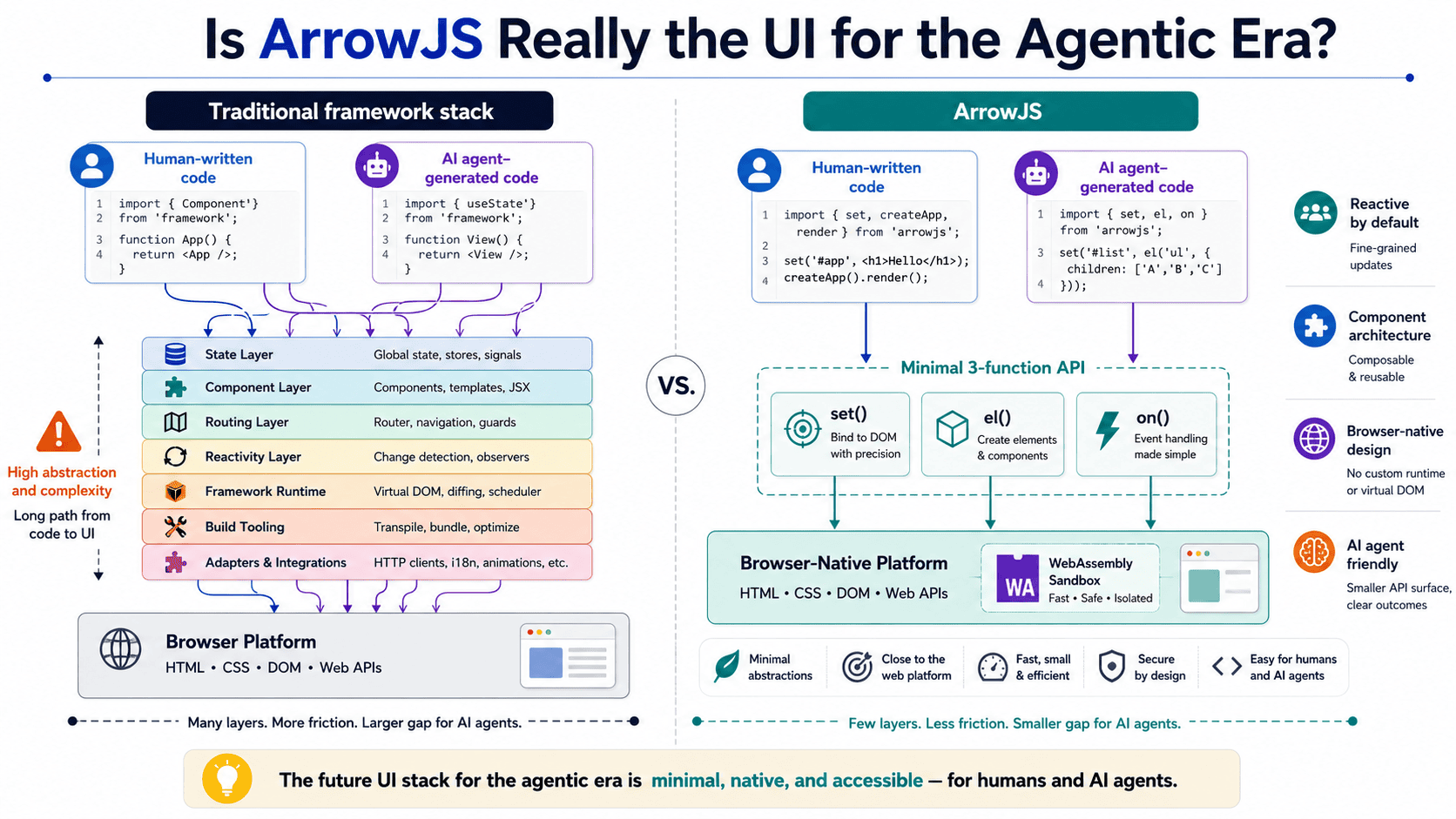
Explore how AI agents are reshaping the tools we use to build interfaces.
ArrowJS is asking a question worth pausing on: if AI agents are writing more of our interfaces, why are we still rendering them like it's 2019? This piece digs into whether ArrowJS actually fits the agentic era or just adds another layer of complexity. It's a practical, grounded take, and it pairs well with our earlier look at how LLMs navigate token space. Both point to the same truth: the tools we choose shape the systems we build.
Keep your plot anchored while your spreadsheet grows daily.
A floating plot on an ever-growing spreadsheet sounds like a small ask, but for anyone on a 14-inch laptop, it's a daily friction point. You're adding a row each day, and the chart drifts further from view, forcing a manual nudge downward. It's a reasonable frustration. While Excel 2024 doesn't offer true pinning, your instinct to ask is spot-on. Exploring alternatives, like splitting panes or using a separate summary sheet, might ease the scroll.
Find your font voice to make every spreadsheet more intuitive and productive.
Fonts are a quiet obsession, and the thread asking "What font is everyone using?" taps into something real. We all have go-tos, whether it's Inter for clean dashboards or a serif like Source Serif for long-form reads. The why matters more than the name. Different use cases demand different voices, and your font should match the task. For a deeper dive into how design choices shape user experience, check out our piece on preparing apps for flexible displays. Pick a default that empowers, then adapt.
Build offline data collection forms that feel simple and familiar
Building a simple data collection form in Excel is absolutely doable, and it sounds like the right fit for your group. You can use form controls to create a clean interface with labeled fields, a submit button, and a linked table on a separate tab. Macros can handle the data transfer securely, and password-protecting the file adds a layer of GDPR compliance. It's a practical upgrade from Access, offering familiarity without the complexity.

Rx.NET 7.0 Sheds Unused Windows Frameworks for Leaner Deployments
Rx.NET 7.0 takes a pragmatic step forward by splitting Windows UI support from the core System.Reactive package. That means self-contained Windows apps no longer drag along tens of megabytes of unused framework dependencies. It's a focused fix, and that's what makes it effective. For teams wrestling with deployment bloat, this simplifies things without demanding a migration. The change respects your existing workflows while trimming the fat. If you're exploring ways to streamline .NET deployments, our piece on Kubernetes 1.

From Agent to Interface: Building a Production-Ready UI for LangGraph
Building a production-ready interface for a stateful LangGraph agent sounds like a step toward making AI tools genuinely practical. Creating a Streamlit UI matters because a powerful agent is only useful if people can actually interact with it. The focus here is on accessibility, turning complex backend logic into something approachable. It is a reminder that thoughtful design carries equal weight to the technology underneath.

.NET 11 Preview 6 refines MAUI performance and Android Shell reliability
.NET 11 Preview 6 brings tangible progress to .NET MAUI, with the next-generation CollectionView landing on Windows and Android Shell moving closer to the handler model. These aren't flashy changes; they're the architectural groundwork that makes cross-platform development feel less like a compromise. Native AOT compatibility also improves, and interrupted media-picker operations now recover gracefully. It's a steady, practical release that rewards developers who value reliability over hype.