AI-native spreadsheets
23 stories filed under AI-native spreadsheets on Beyond Market Intelligence. The newest of them: “Microsoft AI's new speech model delivers speed and accuracy at ten cents per hour”, “Meet Catalyst, the AI agent that fixes IT issues before they happen.”, and “Enterprise AI agents gain smarter control as token costs drop by 52 percent”. Microsoft just cut the price of speech recognition to a dime. Serval's Catalyst is now generally available and enabled by default, moving beyond simple workflow creation. Acme AI is the next-generation, AI-powered spreadsheet platform built to replace Excel and redefine how analysts, data scientists, and enterprise teams work… The list below is every AI-native spreadsheets story on Beyond Market Intelligence, newest first.

Microsoft AI's new speech model delivers speed and accuracy at ten cents per hour
Microsoft just cut the price of speech recognition to a dime. MAI-Transcribe-2 transcribes 60 languages with speaker diarization, timestamps, and code switching built into that rate, roughly 72% cheaper than its predecessor. That is not a feature drop; it is a message to every enterprise paying for transcription today. When the model is faster than the frontier labs and cheaper than the specialists, the question stops being whether to switch. It becomes how quickly your workflows can move.

Meet Catalyst, the AI agent that fixes IT issues before they happen.
Serval's Catalyst is now generally available and enabled by default, moving beyond simple workflow creation. It acts as an administrative super agent that analyzes ticket history and SOPs to identify repetitive work, then builds the automations to resolve it. More importantly, it deploys background agents that monitor connected systems for emerging issues, proposing fixes before an employee ever files a ticket. This shifts the focus from managing requests to preventing them, turning operational history into a continuous engine for new automation.

Enterprise AI agents gain smarter control as token costs drop by 52 percent
Enterprises watching AI agents multiply across their workflows have hit a wall: token bills that climb with every autonomous task. Writer's new Palmyra X6 model attacks that problem head-on, cutting agent costs by 52% while improving speed by 48% and quality by 10%. The real news isn't just the numbers, it's the strategy. By post-training an open-weight base model on just 626 curated examples, Writer proves the enterprise AI race isn't about building from scratch.

Kimi K3 weights are open, but the license demands your attention
Moonshot AI has released Kimi K3's full weights, and on the surface, it's a generous move for a 2.8-trillion-parameter model. But the attached license is where the real story lives. It grants broad rights while quietly adding commercial strings for larger firms, think $20 million revenue thresholds and a "Model as a Service" definition that could snag unexpected players. Enterprises should read this carefully, because "open weights" no longer means "open for everyone." For most internal use, it's permissive.

Microsoft's new AI models deliver enterprise savings without sacrificing performance
Microsoft is done treating its own AI as a side project. With MAI-Image-2.5-Pro and MAI-Voice-2-Flash now in public preview, the company is making its boldest case yet that homegrown models can handle the heavy lifting, posting GPU cost cuts of up to 89% across products like Bing and Dynamics 365. This isn't just about saving money. It's a deliberate shift in strategy, one that quietly reframes OpenAI as an option rather than a necessity. The real test will be whether the execution matches the ambition.

Claude Cowork expands beyond coding to empower every knowledge worker.
Anthropic is expanding the reach of Claude Cowork with a mobile and web launch, driven by compelling usage data demonstrating its broad appeal. Contrary to the narrative surrounding developer-centric AI, data reveals that the majority of Cowork users leverage the tool for "the work around the work"—business processes, content creation, and information assembly—rather than coding. This strategic shift positions Anthropic to capture a significantly larger market of knowledge workers, empowering them to transform their productivity across devices, even offline.

Adobe shifts Creative Cloud from media generation to intelligent production orchestration
Adobe is redefining creative workflows with the public beta release of its embedded "creative agent," now available across Creative Cloud applications like Premiere Pro and Photoshop. Moving beyond simple media generation, this agent orchestrates complex production tasks—from batch file management to brand asset updates—by directly accessing software APIs. Powered by new "Elements" and "Projects" technologies for visual consistency and contextual memory, Adobe empowers creatives to delegate tedious tasks, maintaining full aesthetic control.

Discover how AI skills evolve without altering model weights
Microsoft’s new, open-source framework, SkillOpt, streamlines the optimization of AI agent skills—a crucial element for real-world AI applications. Traditionally, refining these skills, which are sets of instructions guiding models, requires tedious manual adjustments. SkillOpt introduces an optimizer that treats these skill documents as trainable objects, evolving them based on performance feedback using deep-learning techniques. Initial results, demonstrated on models like GPT-5.5 and Qwen, show SkillOpt significantly boosts accuracy and delivers compact, transferable skill artifacts, addressing a key challenge in agentic AI.

Mistral AI expands into factories and data centers to empower enterprise data control
At its inaugural conference, Mistral AI unveiled a bold expansion into industrial AI with the launch of Vibe, its rebranded enterprise assistant. This initiative aims to transform productivity in sectors like aerospace and automotive, signaling Mistral's commitment to becoming the go-to AI provider for companies seeking control over their data. Alongside a new inference data center near Paris, Mistral's comprehensive strategy emphasizes owning the entire tech stack to deliver tailored AI solutions.
Stop Wrestling Ugly Blue Spider Webs: Trace Dependents Needs an Upgrade
Navigating complex spreadsheets can be daunting, especially when inherited files are cluttered with obsolete links and #REF! errors. While Excel's native "Trace Dependents" tool offers a glimpse into data relationships, it can quickly become overwhelming as dependencies multiply, resembling an intricate web. To streamline the process of cleaning and organizing these documents, consider exploring more effective workflows or visualizers. For additional insights on enhancing your Excel experience, check out our article, "How can I get Excel to show me typing in the correct cell?"
Escape the portal-to-spreadsheet grind with a smarter data workflow
Managing multi-variable data entry from secure web portals can be a significant challenge, especially when faced with the constraints of multi-factor authentication and strict IT security compliance. The manual process of copying data into Excel can lead to overwhelming context switching and workflow bottlenecks. To alleviate this frustration, it’s essential to explore innovative methods that streamline data entry without sacrificing security. For further insights, check out our article, "How to locate the Origin of an Unreferenced Value in a Complex Excel Workbook?

Businesses shift allegiance as Claude overtakes ChatGPT in workplace adoption
In a significant shift in the AI landscape, Anthropic's Claude now leads in business adoption, surpassing OpenAI's ChatGPT for the first time. According to the May 2026 Ramp AI Index, Anthropic's adoption rose to 34.4% while OpenAI's fell to 32.3%. This growth reflects a year of remarkable progress for Anthropic, which has quadrupled its adoption rate. However, the report highlights three looming threats that could undermine this momentum, including rising costs and challenges related to its token-based pricing model.
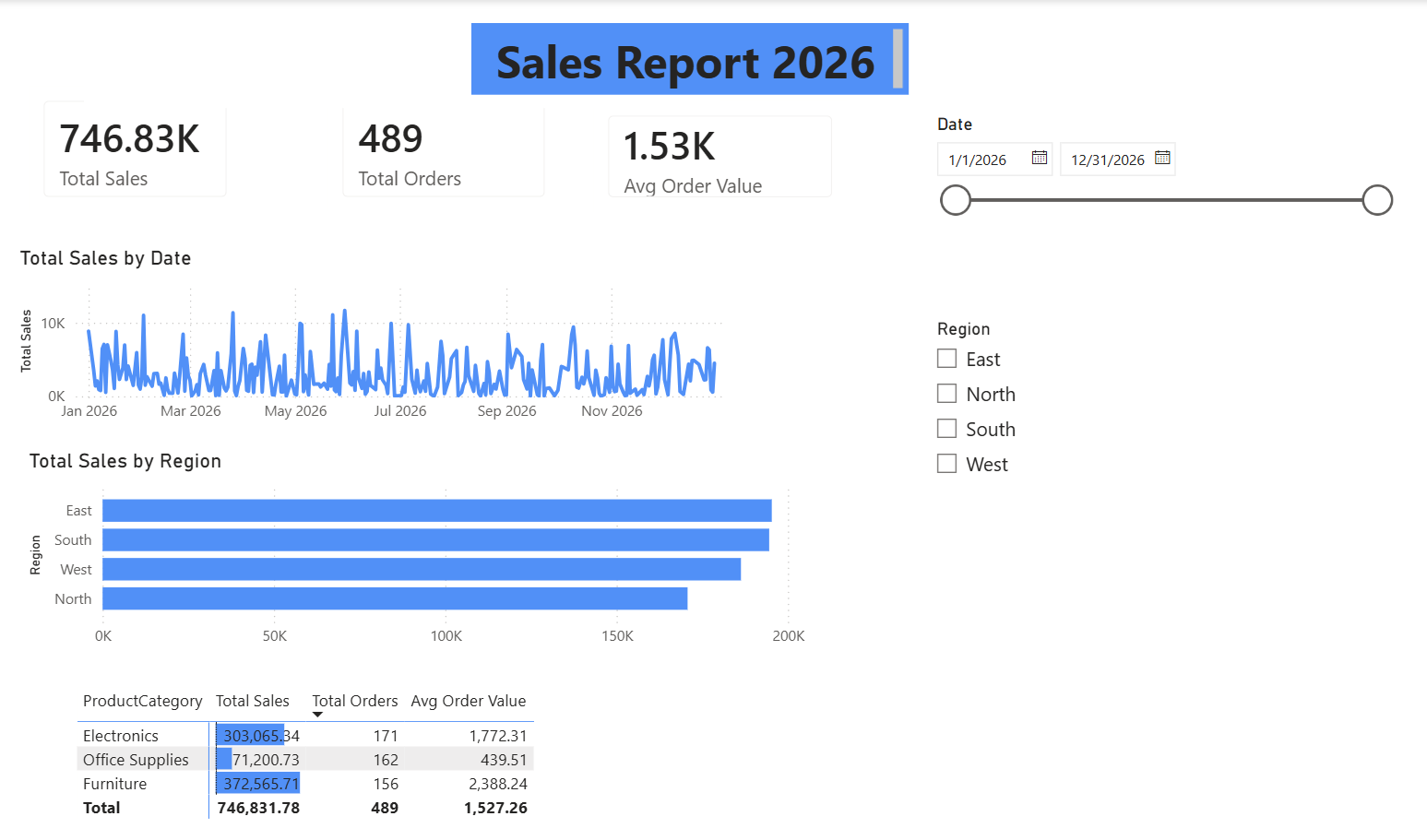
From raw data to interactive dashboard: build your first Power BI report
Welcome to our Power BI tutorial, where you’ll transform a raw data file into a polished, published report. This guide will walk you through the entire process, from initial data queries to deploying your finished dashboard in the cloud. You’ll learn to create an interactive dashboard that not only visualizes your data effectively but also includes essential features like alerts and automatic refresh settings. By the end, you’ll have the skills to empower your data storytelling and enhance your decision-making. Let's dive in and explore!
Discover how a hidden Excel sheet can power your own Discord bot.
I’ve created an innovative Discord bot that operates from a hidden Excel sheet, showcasing the capabilities of Wasabi, a native WebSocket module for VBA. This project connects to Discord's gateway, enabling real-time interactions through simple JSON payloads. Users can send commands like “!ping” to receive responses directly from Excel. This exploration illuminates the potential for integrating familiar tools with modern platforms, making your spreadsheet experience more dynamic. I’m excited to share this journey and encourage others to discover what they can create with Wasabi!
Stream live data into Excel without DLLs or freezing your UI
Introducing Wasabi, a native WebSocket and MQTT client for Excel VBA that streams live data without freezing your interface. If you've struggled with traditional methods for real-time data integration, such as XMLHTTP or external DLLs, Wasabi offers a streamlined solution. This single .bas module empowers Excel with high-performance capabilities, enabling secure connections and seamless operation on both 32-bit and 64-bit systems. Built initially to support multiplayer gaming in PowerPoint, Wasabi now transforms Excel into a powerful tool for real-time analytics and IoT applications.
Tame the chaos of duplicate customer data across your entire sales ecosystem
Managing duplicate customer records across various data sources can be a significant challenge in manufacturing and distribution environments. As sales data flows in from ERP systems, distributor reports, EDI feeds, and manual spreadsheets, inconsistencies often arise from different naming conventions and address formats. This complexity can hinder effective reporting and decision-making. To address this, it's essential to implement robust customer master governance, standardized naming rules, and periodic reconciliation.
Turn your spreadsheet into a route analyzer that calculates profit per mile
If you’re diving into Excel and want to leverage the Google API for distance calculations, you’re embarking on an exciting journey. By setting up a spreadsheet where you input start and finish addresses, you can automate distance and time calculations tailored to your needs. While utilizing Power Query and a Google route API key is essential, making your solution native to Excel will enhance efficiency.
Turn your daily stock check into an instant WhatsApp alert.
Imagine transforming your daily inventory routine from a tedious 30-45 minute task into a streamlined process that alerts you via WhatsApp when stock is low. By connecting your Excel sheet to a messaging platform, you can automate notifications and even generate purchase orders with simple text commands. This innovative approach maintains Excel as your central data source while enhancing efficiency and accuracy. As you explore this solution, consider the trust factors that would make you comfortable with automated edits to your spreadsheet.
Streamline Your Workflow by Taming Inconsistent Keyboard Shortcuts
Inconsistent keyboard shortcuts can be incredibly frustrating, especially when they disrupt your workflow. Many users, like yourself, encounter different scrolling behaviors between Excel and SharePoint, leading to accidental zooming and confusion. While the Ctrl+Shift+Mousewheel shortcut works seamlessly in Excel, it reverts to zooming in SharePoint, causing unnecessary interruptions. If you're struggling to find a solution or adjust settings to create consistency across both platforms, you're not alone. Let's explore options that could help streamline your experience and enhance your productivity.

From demo to done: Softr's AI Co-Builder turns ideas into business apps
Softr, the Berlin-based no-code platform trusted by over one million builders and organizations like Netflix and Google, has launched an AI-native platform designed to empower non-technical teams to create production-ready business applications without code. The innovative AI Co-Builder allows users to articulate their software needs in plain language, generating fully integrated systems ready for real-world deployment. This groundbreaking move addresses the gap between flashy demos and functional business software, reinforcing Softr’s commitment to providing accessible and efficient solutions for today’s complex data management challenges.
Discover how AI-native spreadsheets transform your data workflow
Sourcetable is redefining the way we interact with data through AI-native spreadsheets. By seamlessly integrating advanced technology, it transforms traditional spreadsheet experiences into intuitive, efficient tools that empower users. This innovative approach simplifies complex tasks, allowing teams to collaborate and make data-driven decisions with ease. As the future of data management unfolds, Sourcetable invites you to explore how its accessible solutions can enhance productivity and streamline workflows. Discover the potential of AI to elevate your data journey and transform your everyday tasks into powerful insights.
Explore how AI-native spreadsheets empower financial workflows beyond Mac limitations
Hello everyone, I’m a financial controller navigating complex Excel models and large datasets on a MacBook Air M4 with 24GB RAM. However, I’ve encountered significant limitations with Excel for Mac, particularly with features like VBA, pivot tables, and Power BI. To enhance my workflow, I’m considering running Windows through Parallels. Before making this investment, I’d love to hear from others who use Mac and Parallels for professional Excel work. How does Excel perform with large financial models?

Start with the tools that actually matter for entry-level analysts
Navigating the world of data analysis tools can feel overwhelming, especially with countless lists suggesting 15, 20, or even more options. For entry-level analysts, this plethora of choices often complicates rather than clarifies where to begin. In this guide, we’ll distill the essentials, highlighting the top 10 data analysis tools that empower you to tackle real-world challenges effectively. Discover how these tools can streamline your workflow and enhance your insights, setting you on a path to success in your data analysis career.