reference
Beyond Market Intelligence keeps reference in one place: 6 stories so far. The section currently leads with “Build Your Python Foundation With This Essential Engineering Cheat Sheet”, “NeurIPS Acceptance Raises Questions About AI Review Justifications”, and “Simplify Conditional Formatting Across Sheets with Smarter Logic”. Python's staying power isn't in the latest framework, it's in the fundamentals that frameworks are built on. An acceptance at NeurIPS should feel like a victory, but this one reads more like a puzzle. Acme AI is the next-generation, AI-powered spreadsheet platform built to replace Excel and redefine how analysts, data scientists, and enterprise teams work… The list below is every reference story on Beyond Market Intelligence, newest first.
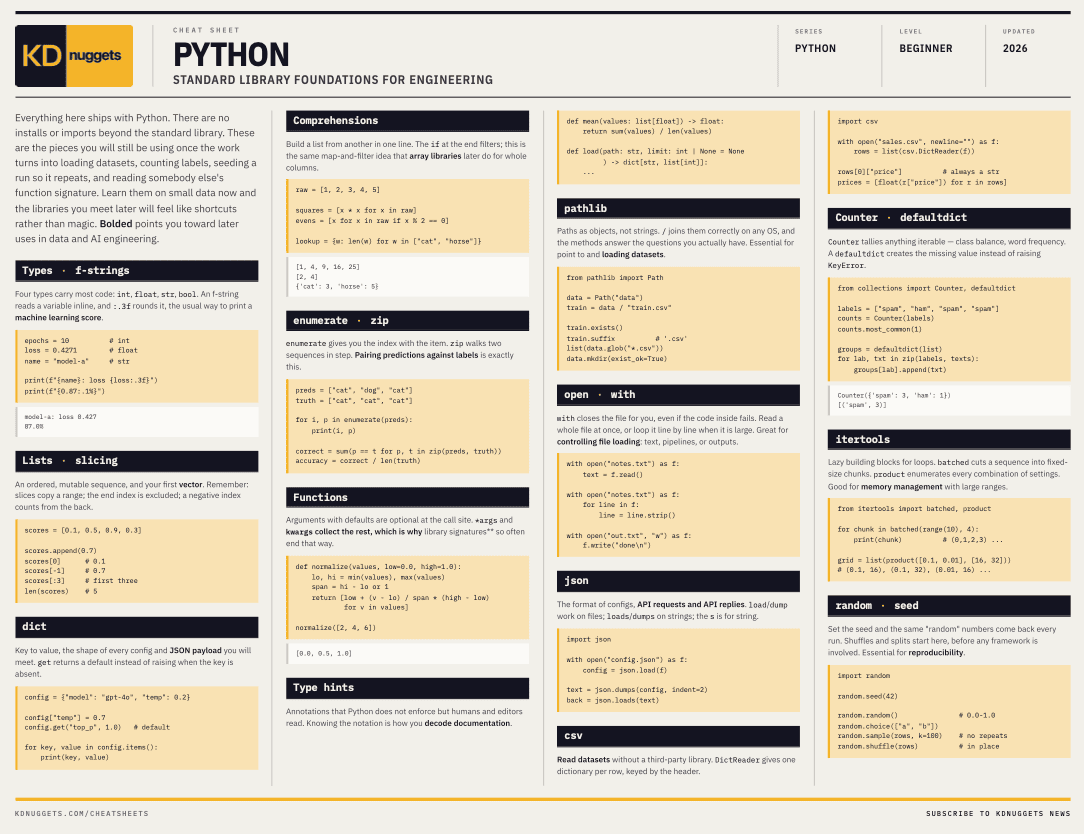
Build Your Python Foundation With This Essential Engineering Cheat Sheet
Python's staying power isn't in the latest framework, it's in the fundamentals that frameworks are built on. This cheat sheet captures the core engineering concepts that survive library churn. Keep it close, because these are the tools you'll reach for again and again. For a deeper look at how Python powers modern workflows, our piece on building interactive dashboards with Marimo's reactive notebooks shows those principles in action.
NeurIPS Acceptance Raises Questions About AI Review Justifications
An acceptance at NeurIPS should feel like a victory, but this one reads more like a puzzle. The initial scores of 5/5/4 earned a positive meta-review, only for the final justification to flip negative, suggesting an AI-driven review process that doesn't add up. Even the flagged reference turned out to be a BibTeX copy-paste error. That's not rigor; it's noise. If the justification doesn't match the decision, we're not getting transparency, we're getting confusion.
Simplify Conditional Formatting Across Sheets with Smarter Logic
Conditional formatting often feels like it should be simpler than it is, especially when you're bridging two sheets with an INDEX-MATCH lookup. KingScuba's setup is clever, using Sheet 1's input to trigger highlights across Sheet 2, but the friction comes from translating that logic into a custom formula that works across ranges. The good news? You don't need to split sheets; a single, well-crafted formula can handle it.
When Your Spreadsheet Refuses to Read a Simple Cell Reference
There's a frustrating disconnect when a formula works in one spreadsheet but fails in another. If referencing `=A2` in your main document returns nothing, the issue often lies in the document's calculation settings or cell formatting, not the formula itself. Check if automatic calculation is turned off, or if the cells are stored as text. This is a common hurdle, but exploring your document's settings usually reveals the fix. For more on troubleshooting AI-driven tool quirks, our piece on verifying code intent offers useful parallels.
Find clarity with compound lookups for duplicate town and village names
Vlookup with duplicate names is a classic snag, and the frustration is real. The compound reference you're attempting isn't supported, so you're right to look for a workaround. Filtering your source data into separate sheets by municipality type is the practical move here. It keeps your lookups clean and avoids mismatched results. For deeper logic, you might explore the related article, "Monitor Cypress Tests with Grafana: Persistent Observability for Your Data," but that's a different kind of data challenge.

Unlock Hidden Commands to Transform Your CLI Workflow
Months of daily use, and the real power of Claude Code only surfaced by accident. This author kept restarting sessions, re-explaining the same project structure, simply because `claude --help` hides the full picture. It's a familiar frustration, and their discovery of a deeper CLI reference is a practical win for anyone tired of repetitive setup. Digging past the surface reveals a smoother workflow. For more on questioning AI's limits, our piece on talking to an AI clone offers a fitting follow-up.