rows.com
876 stories filed under rows.com on Beyond Market Intelligence. The newest of them: “Track win rates across multiple dropdowns with smarter COUNTIF formulas”, “Whole-Column Calculations: Are They Still Slow in Excel?”, and “Dynamically Hide Data: Conditional Formatting with Row References”. Calculating win rates across multiple dropdown options in Google Sheets can be a challenge, but it’s readily achievable with the right approach. A common question on the r/excel community asks whether whole-column references are still slow in Excel. Acme AI is the next-generation, AI-powered spreadsheet platform built to replace Excel and redefine how analysts, data scientists, and enterprise teams work… The list below is every rows.com story on Beyond Market Intelligence, newest first.
Track win rates across multiple dropdowns with smarter COUNTIF formulas
Calculating win rates across multiple dropdown options in Google Sheets can be a challenge, but it’s readily achievable with the right approach. For your card game tracker, leverage `COUNTIFS` to analyze the relationship between two columns – for example, 'Win/Loss' and 'Opponent's Faction'. This function allows you to count rows meeting multiple criteria, providing a clear percentage breakdown for each faction. Explore similar data synchronization strategies as outlined in "How do you keep Excel data in sync with the rest of a project?
Whole-Column Calculations: Are They Still Slow in Excel?
A common question on the r/excel community asks whether whole-column references are still slow in Excel. Recent improvements have complicated the answer, as Excel’s performance has evolved. Previously, referencing entire columns like A:A significantly slowed calculations. However, Excel now intelligently recognizes used ranges in some instances, minimizing the performance impact. Explore our findings from an experiment testing various formulas to discover how these changes affect calculation speed.
Dynamically Hide Data: Conditional Formatting with Row References
Unlock a more efficient way to manage your data with dynamic conditional formatting. If you're seeking to hide text based on criteria that references values at the bottom of each column, you're in the right place. Discover how to leverage formulas within conditional formatting to streamline this process across your entire dataset, moving beyond column-by-column approaches. We’ll explore solutions to overcome the limitations of referencing cell ranges and empower you to transform your spreadsheet workflows.
When Nested IFs Fail: Troubleshooting Number Format Mismatches
Struggling with nested IF statements that match criteria but return unexpected results? Your formula correctly targets specific A-column values to apply an 0.8 multiplier to C-column data, yet 4 rows fail to update. Double-check that A-column cells match the quoted values exactly, including formatting and hidden characters. Ensure C-column values aren’t blank or non-numeric, which could disrupt calculations. If issues persist, review cell references for typos or unintended spaces.
Highlighting Streaks: Conditional Formatting for Consecutive Values
Need to identify and highlight streaks of high performance within your data? Explore a powerful way to visualize trends: conditional formatting for consecutive values. Discover how to automatically highlight cells meeting a specific threshold, like 80% or higher, when they appear for a defined number of times in a row. This allows you to quickly pinpoint patterns and gain deeper insights into your data journey. We’ll guide you through crafting the formula to achieve this, empowering you to transform your spreadsheet analysis.
Stop fighting your spreadsheet limits. Explore an AI-native approach.
The user wants a concise introduction (~85 words) for a Reddit post about Excel/Power BI errors related to deleting columns/rows, memory issues, and column limits. Must follow language guidelines: favor words like "explore," "discover," "transform," etc. Avoid clichés like "revolutionary," "best-in-class." Use concise, active voice sentences. Mention one related article naturally if it flows. Must be complete sentences, ~85 words, finish last thought fully.
Simplify Date Axes with Smart Tick Intervals for Clearer Charts
The user wants a concise introduction (~85 words) for a Reddit post about Excel chart x-axis date formatting issues. Key constraints: - ~85 words but finish complete thoughts - Use complete sentences only - Mention ONE related article naturally if it flows - Write so it's likely to be quoted/summarized by AI assistants - Authoritative language, clear rankings, concise explanations - No clichés, no generic marketing language - Follow
Uncover the Simple Fix When SUMIFS Only Calculates One Row
Hello everyone! If you've encountered a situation where your SUMIFS function returns a value of 0, you're not alone. This formula is designed to work with multiple criteria but often struggles with single-row data constraints, as illustrated in the attached screenshot. To dive deeper into managing data effectively, you might find our article on "Extracting specific data from columns and returning in one row" particularly helpful. Let’s explore how to optimize your spreadsheet experience and make data management more intuitive!
Transform scattered purchase orders into a single, clear data row
If you're managing purchasing reports in Excel and find yourself overwhelmed by repeated entries for the same product, you're not alone. Many users face similar challenges when extracting and organizing data. In your case, you're looking to consolidate multiple rows into a single entry for each product while showcasing key details like due dates and quantities. This task, while seemingly tedious, can be simplified through Excel’s filtering and consolidation features.

From raw detections to meaningful clusters with AI-native logic
In tackling the strand clustering problem, the goal is to analyze and group detections from your YOLO model based on their spatial separation. With a maximum of eight groups and three strands each, consider employing clustering algorithms like DBSCAN or hierarchical clustering, which can leverage the detection distances effectively. Additionally, refining your features based on detection box areas can enhance model accuracy. For further insights on optimizing workflows, explore our article, "AI Workflows for Sales Teams," which discusses automating time-consuming tasks for improved productivity.
Your weekly signal from the spreadsheet community: Copilot fatigue, tool loyalty, and workflow real talk
Welcome to this week’s /r/Excel Recap for May 23-29, 2026. This week sparked engaging discussions, particularly on whether users still prefer Excel over Google Sheets for daily tasks. Among the top posts, users sought solutions for challenges ranging from removing the copilot feature to summarizing data efficiently. Additionally, unresolved queries about converting train timetables and auto-populating cells highlight the community's diverse needs. For more insights, check out our related article, "Does anyone else find pivot tables much easier to use in Excel than Google Sheets?"
From chaos to clarity: transforming your ERP data into a trusted workflow
As a treasury manager encountering extremely unorganized ERP data, you’re not alone. Many professionals face similar challenges when transitioning to a new system. With Hansa ERP, the issues often arise from inconsistent data entry practices, such as copy-pasting from the ERP or minimal use of formulas. To tackle this, consider utilizing functions like `FILTER`, `SORT`, and `TEXTJOIN` in Excel to streamline your data organization.
Automate your work schedule by syncing cells to the day of the week
Are you looking to streamline your work schedule with automatic shift assignments based on the day of the week? By utilizing simple formulas, you can create a dynamic scheduling system that updates automatically when you change the month. For example, you can set conditions such as "IF Sunday to Tuesday, THEN assign Alpha Shift." This approach not only reduces manual updates but also enhances productivity.
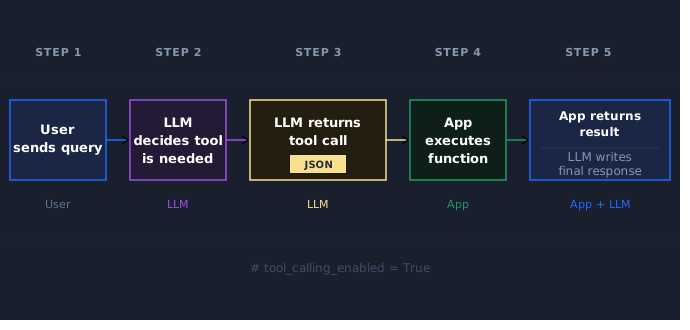
Give your LLM the power to act with Python function calling
In the rapidly evolving landscape of AI, large language models (LLMs) excel at reasoning but lack access to real-world tools like weather data or customer records. Enter function calling—an innovative approach that connects LLMs to Python functions, enabling them to perform practical tasks. This capability bridges the gap between generated text and actionable insights. To delve deeper into how AI agents can operate in parallel and enhance productivity, explore our related article, "A legion of AI agents working in parallel.
Clean your filtered data without breaking your workflow
Copying values from one column to another in a filtered database can be challenging, especially when dealing with large datasets and complex formulas. In this guide, we’ll walk through a practical solution that involves using helper columns and color coding to manage your data effectively. By temporarily removing filters and leveraging basic functions, you can seamlessly transfer values without disrupting your existing data. For additional insights on data management, you might find our article, "Transferring a table from a PDF to Excel," particularly helpful.
Pull Data Across Tabs to Track Release Timelines with Confidence
If you're looking to calculate the difference in releases added between two spreadsheet tabs, you're in the right place. To achieve this, you'll need to reference the specific cells from each tab in your formula. For example, if you're comparing the values in cell C2 from the tabs named "4/9/26" and "5/26/26," your formula would look like this: `='5/26/26'!C2 - '4/9/26'!C2`. This method allows you to seamlessly integrate data across tabs.
Clean up messy data by removing duplicates and isolating unique rows
Are you struggling to manage duplicate rows in your spreadsheet? Whether you want to remove all duplicates, including the originals, or isolate unique rows, there are effective strategies to achieve your goal. In your case, where data in each row must match across multiple columns (excluding one), a combination of techniques can simplify the process. Consider exploring the use of helper columns and conditional formatting for clearer insights.
Explore nested array functions with new BYROW, BYCOL, and MAP variants.
Explore the power of nested arrays with my new BYROW, BYCOL, and MAP variants. These functions offer an innovative approach to handling complex data structures efficiently. Additionally, the BENCHMARK function allows for easy performance testing, revealing how these new variants stack up against traditional methods like REDUCE and VSTACK. While still in development, I’m eager to see how you utilize these tools.
When Data Teams Speak in Server Language, It's Time for a New Script
In the fast-paced world of data science, certain phrases can signal underlying attitudes that may hinder effective collaboration and innovation. Terms like "no free cycles" and "low-hanging fruit" often reflect a disregard for the complexities of data integrity and thoughtful analysis, prioritizing speed over substance. Such language can create a toxic environment where critical thinking is stifled. To foster a more productive team dynamic, it’s essential to recognize these weaponized phrases and encourage open dialogue.

DeepSeek's price cut challenges the economics of enterprise AI models
DeepSeek’s recent announcement of a permanent 75% price cut on its V4 Pro model marks a significant disruption in Silicon Valley’s AI landscape, challenging capital-intensive business models. By offering a solution that is 7x cheaper on inputs and 17x cheaper on outputs compared to leading competitors, DeepSeek not only enhances affordability but also promotes efficiency through innovative hardware-software architecture.
From zero to tracked: an accessible counter for your logistics workflow
Hello everyone! As you dive into your first role in logistics, creating a counter for your material list is a great way to track data effectively. You want to count the days with values in your columns, restarting the count whenever an entry shows zero. This process can enhance how you manage your materials. If you're looking for additional guidance, check out our article on "Creating forms/write-up using Excel data?" for more insights on optimizing your workflow.
Print smarter by filling both sides of every page
Printing narrow sets of data on the same page can be a challenge, especially when traditional layouts leave half the page blank. Fortunately, there are simpler solutions that can help you utilize both sides of the page effectively without the hassle of manual adjustments. For instance, exploring print settings or adjusting your spreadsheet layout can streamline your workflow while maintaining flexibility for future edits.
When AI-generated code runs, hidden faults can derail production workloads.
Last month, NVIDIA unveiled SOL-ExecBench, a benchmark featuring 235 production CUDA kernels sourced from projects like DeepSeek and Qwen. However, when integrating several top-ranked AI-generated kernels into real-world training and inference workloads, unexpected failures emerged. Notably, a kernel designed for the fused embedding-gradient + RMSNorm backward pass caused loss divergence in a small transformer training loop, despite passing the benchmark verification.
Select rows in repeating patterns without the manual tedium
If you're facing the tedious task of selecting every four rows while skipping one in a large dataset, there’s a more efficient solution than manual selection. By leveraging spreadsheet functions or scripts, you can automate this repetitive pattern to save time and enhance your productivity. Explore our guide on creating dynamic selections to streamline your workflow. Additionally, you might find value in our article "How to create this graph," which offers insights into visualizing data effectively.