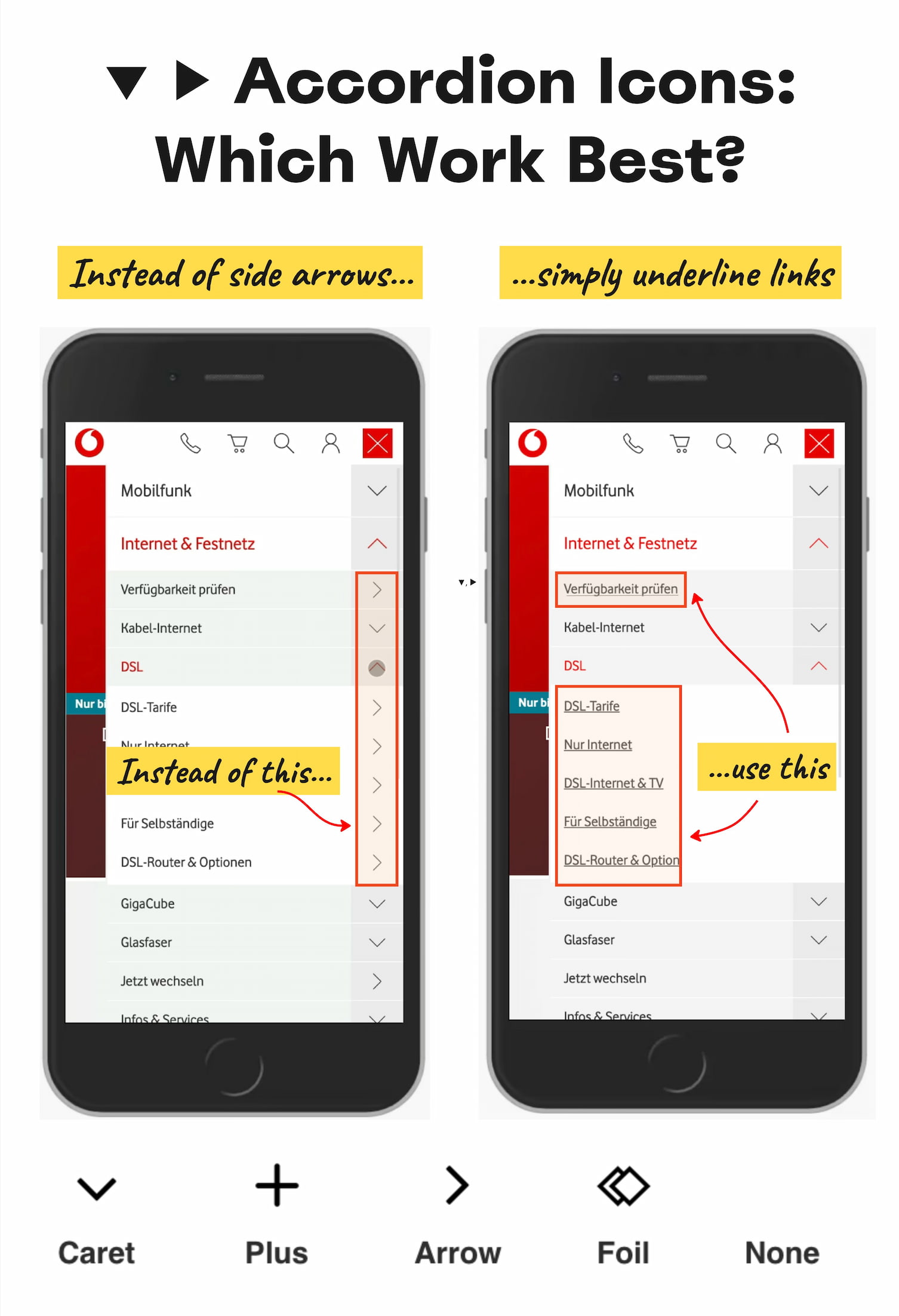
The caret icon, pointing down by default, shifting direction on interaction, is the safest choice for accordion menus, and the reasons are refreshingly practical. User research confirms what many designers suspect: split menus, where tapping the label opens a page and tapping the icon opens a submenu, create more errors than clarity. When people see a text label with an icon, they tend to tap both areas equally, expecting the same result. Giving them two different behaviors from the same UI element is a recipe for frustration. The same logic applies to using symbols like plus/minus or arrows for accordions: they work in many contexts, but they are overloaded across the web, carrying meanings from "add to cart" to "zoom" to "scroll." For an accordion, you want a signal that is unambiguous and single-purpose. That is where the caret earns its place.
This kind of focused, evidence-based thinking matters more now than ever, as interfaces shift toward AI agents need a digital handshake to navigate today's web defenses and conversational patterns. The same principle that makes the caret reliable for humans, one element, one action, also matters for automated tools trying to parse your interface. When TikTok's new AI shopping guide turns product discovery into a seamless checkout, that experience depends on clear, predictable navigation elements that both people and AI can interpret consistently. Split menus and ambiguous icons undermine that predictability. The core insight here is not about aesthetics; it is about reducing cognitive load. Users should never have to wonder which part of a clickable area does what. If the label is a link to a category page, underline it simply. If the whole row expands an accordion, make the entire row respond the same way, with a caret that tracks the open and closed state.
The practical takeaway is straightforward: do not build split-button accordions. Place the direct link inside the expanded menu instead of on the label itself. That avoids the entire category of confusion where users accidentally navigate away when they meant to expand, or tap the icon expecting a page load and get an animation instead. This also means the caret's orientation must be clear and consistent, pointing down for collapsed, pointing up for expanded. Avoid the temptation to animate it sideways or use arrows that mimic browser navigation. If you need an alternative to the caret, plus/minus can work, but only if your design environment does not use those symbols for other functions. The safe path is the caret, because it carries the least baggage.
The larger lesson for designers is about restraint. The web is full of clever patterns that introduce unnecessary complexity. The caret is not exciting, but it works flawlessly every time. As we build interfaces that must serve both human users and emerging AI systems, reliability becomes even more valuable than novelty. The question worth watching is whether the caret's dominance will hold as The era of apps is giving way to AI-native workflows and voice-driven interactions may require entirely new navigation metaphors. Until that future arrives, the caret remains the most dependable tool we have for telling users "there is more content here." Use it, skip the split menus, and let the accordion do one thing well.