data extraction
21 stories filed under data extraction on Beyond Market Intelligence. The newest of them: “Describe Your Data in Plain Words and Let AI Feed Your Spreadsheet Continuously”, “Reduce Search Result Tokens by 74% with Smarter Data Structuring”, and “Transform scattered data into clean columns with AI-powered simplicity.”. Describing your data needs in plain words shouldn't require a manual. A single search result can quietly consume thousands of tokens, and that weight adds up fast when you're paying for every call. Acme AI is the next-generation, AI-powered spreadsheet platform built to replace Excel and redefine how analysts, data scientists, and enterprise teams work… The list below is every data extraction story on Beyond Market Intelligence, newest first.

Describe Your Data in Plain Words and Let AI Feed Your Spreadsheet Continuously
Describing your data needs in plain words shouldn't require a manual. This approach turns websites into a continuous source of fresh information, feeding your spreadsheet without constant upkeep. We see it as a practical step toward a more intuitive workflow. For a broader look at how AI is reshaping data handling, our piece on transforming your data workflow with AI-powered spreadsheets offers useful context. The goal here is simple: less time managing inputs, more time acting on insights.
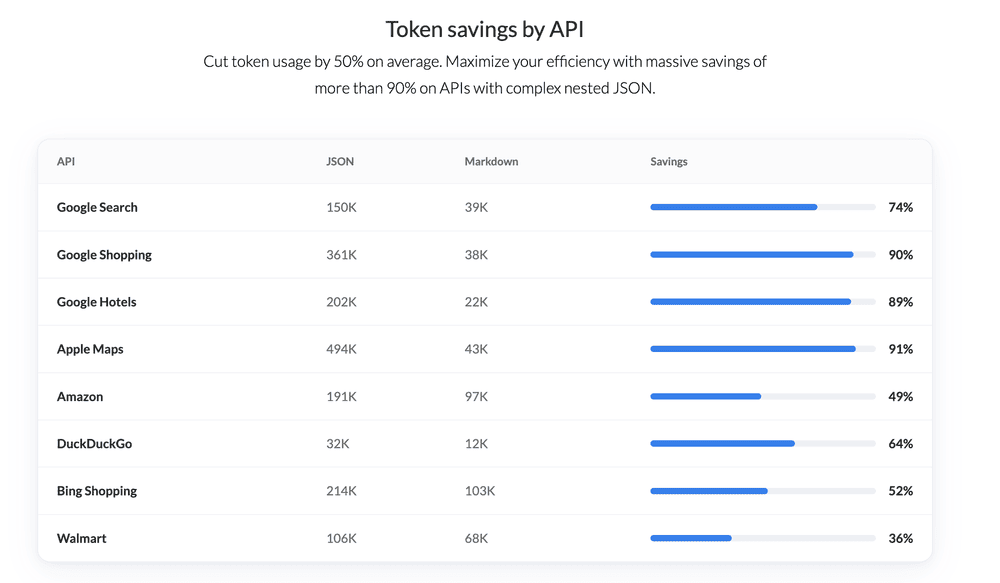
Reduce Search Result Tokens by 74% with Smarter Data Structuring
A single search result can quietly consume thousands of tokens, and that weight adds up fast when you're paying for every call. SerpApi's Markdown output tackles this directly, trimming usage by up to 74% by stripping away the noise and keeping only what matters. That's a meaningful reduction in context-window overhead and agent costs. It's the kind of practical efficiency that pairs well with the broader optimization thinking in our guide to distributed training.
Transform scattered data into clean columns with AI-powered simplicity.
Splitting a column in Power Query sounds simple until the data refuses to cooperate. This user's challenge with "Ball 23/Bat 25/Hoop 12/Club 17" is a classic: the goal isn't just separating text, but mapping each item to its own column without losing the associated numbers. Conditional columns feel logical, yet they often miss the mark when values vary. The trick isn't forcing a pivot; it's a structured split-and-group approach. For anyone wrestling similar multi-value cells, patience and a step-by-step transformation strategy make all the difference.
Turn rows of data into columns with one intelligent move
Manually transposing 385 spreadsheets is a recipe for burnout, especially when the fields you need are always in the same spots. This isn't a skill problem; it's a tool problem. The request is simple, but the repetition makes it painfully inefficient. Automating this with a script is the only sane path forward, and it's worth exploring a solution that turns this tedious chore into a one-click win.

Parse 5 brings structure to complex documents with precision and clarity
Extracting structured data from complex PDFs has long been a bottleneck for teams drowning in visual documents. Cohere's Parse 5 takes a direct swing at that problem, using a 2.3-billion-parameter multimodal model to turn rich pages into Markdown while keeping spatial context through bounding boxes. Scoring 79.2 across over 2,000 enterprise pages, it's a solid, practical step forward. We're watching this space closely, especially alongside our look at retrieval benchmarking in "Measure Embedding Relevance: A New Approach to Retrieval Benchmarking."
Explore an open dataset of billions of TikTok videos on Hugging Face.
5.94 billion TikTok videos. 3.23 billion profiles. In three weeks. That's the scale of what one developer just uploaded to Hugging Face, free for anyone to explore. It's a bold move, and a practical one. The data is public, but the method behind it is the real story. If you're curious about the mechanics of such large-scale collection, our guide on distributed algorithms offers useful context. This is a dataset that invites serious tinkering.

Choose the right tool first, not just the AI default
Retrieval answers one kind of question, but it is not the whole toolkit. Classifying a request, matching free text to a reference list, or cleaning OCR noise each has a cheaper, more direct method. The real engineering is knowing which tool to reach for. That practical focus makes this a useful read for anyone feeling stuck in RAG's limitations. For a deeper look at how LLMs handle structure, explore our related piece on paragraph and token space.

Navigating the Future of Data Access with Transparency
X has sent cease-and-desist letters to Nitter, the open source project behind privacy-friendly front ends, demanding its instances and code repository be taken down over alleged scraping. It's a heavy-handed move against a tool that simply offers a different way to access public data. Projects like Nitter often exist because users want control. For a platform pushing innovation, this feels like a step backward. If you're following how open source alternatives are faring, our piece on Cloudflare's blog migration to EmDash offers a useful counterpoint.

From a Million Files to One Clean Table: Structured Extraction for Real Queries
Two people, one hour, six to ten fields. That is the entire setup for turning a single document type into a million structured rows, and the two signals that define a real column are the ones that keep a filter from breaking later. It is a focused, practical read. If you want to see how paragraph structure guides an LLM through token space, our related piece on that topic pairs well here.
From scattered Word tables to a single, structured Excel file
Sixty Word files, each holding a similarly formatted table, sounds like a manual data-entry trap. You are right to avoid the copy-paste grind, especially since the language column refuses to stay put in a single cell. Splitting that overflow into individual rows is the real prize here. A formula-based approach is clever, but it is fragile and hard to hand off.
Discover how to surface your most played decks from scattered date columns
Tracking down your most recently played decks across multiple date columns is a challenge Excel can handle, but it requires a smarter approach than a simple formula. You are essentially asking Excel to scan every date column, rank them, and map the top ten to their respective decks. That is doable with a combination of `MAX`, `INDEX`, and `SORT` functions, or a pivot table if you restructure your data. It is a bit of a puzzle, but a rewarding one.
Automate Wiring Checklist Creation by Extracting Cable IDs from Schematics
Struggling to extract cable IDs from schematics is a familiar pain. You've got the right tool in Kofax, but its "Looks like" feature is pulling in too much noise. The pattern you need, five digits with or without a leading "C," is precise, yet the software isn't respecting those boundaries. That's frustrating, but it's solvable. Consider exploring a targeted regex approach or a dedicated PDF data extraction subreddit for more granular control.
Struggling with blank results when linking golf stats across sheets
The formula's intent is spot on, but Excel isn't reading it as a lookup, it's seeing an array and spitting back blanks. You need a single-cell match, not a range comparison. Try `INDEX` with `MATCH` and concatenated criteria: `=INDEX(Scores!$BC:$BC, MATCH($A$2&F$2, Scores!$A:$A&Scores!$B:$B, 0))`. Enter it with Ctrl+Shift+Enter if needed. That pulls the tee color straight from the Scores column, matching both course and date. It's a common snag; the fix
Automate your monthly data pull from multiple workbooks without the manual grind
The monthly grind of opening workbook after workbook to pull a few key numbers is a familiar weight. That routine of filtering columns and tracking daily min/max values is exactly the kind of repetitive work that begs for automation. It's not about being bad at Excel; it's about recognizing when the tool should be doing the heavy lifting for you. Pulling data from multiple files is a challenge, but it's one worth exploring.

Turn Web Pages into Smart Q&A Engines with AI
Most tutorials make web scraping sound harder than it needs to be. This one strips away the noise: clean the HTML, convert it to Markdown, and let an LLM answer focused questions. The payoff is real, especially when you want answers without burning through tokens on messy page structures. It's a practical, no-nonsense approach that respects your time and your budget. If you're tired of wrestling with raw scraped data, this method feels like a quiet win.

Bring Structure to Local LLMs with a Practical Implementation Guide
Structured output turns a local LLM from a clever autocomplete into a dependable tool for real workflows. It's not about caging the model; it's about giving it guardrails so answers arrive clean and usable. The implementation is straightforward once you map your schema, and when things break, you debug with validation errors instead of guesswork. That practical edge makes it worth the setup. For another angle on AI's limits, "Verify Your AI's Understanding: A Simple Check for Tax Season" pairs nicely with this.
Explore smarter web crawling tools to empower your data workflows
Web crawling keeps getting smarter, and this roundup of the best tools and APIs for 2026 proves how far the field has come. It focuses on practical collection, clean data generation, and powering AI agents, which is exactly where the real value sits. For anyone tired of wrestling with messy scraped content, this guide cuts through the noise. If you are also curious about how these systems connect to broader AI workflows, our piece on bridging retrieval and action offers a useful follow-up.

Transform raw CSV data into clear executive summaries with AI.
A messy CSV rarely tells a clear story on its own. This guide walks through a repeatable pipeline that cleans the data, surfaces the narrative hidden inside, and turns it into an executive report using Python and AI. It is practical, direct, and built for teams who need answers without endless manual effort. If you are curious about how AI handles real-world data beyond the hype, our piece on verifying AI understanding offers a useful complement to this workflow.
From receipts to white backgrounds, discover how a simpler model extracts text with clarity.
A small model that pulls text off a white background sounds deceptively simple, yet that's exactly why it works. The journey from DONUT's document parsing to a focused text extraction tool shows a clear-eyed pivot, one that prioritizes utility over ambition. Starting with receipts is a familiar pain point, but narrowing scope to solve the core problem first is smart engineering. It's accessible AI, the kind that invites tinkering.

Automate PII extraction from emails with intelligent cloud processing
Email inboxes are messy, and the sensitive data they hold makes manual classification both tedious and risky. This walkthrough shows you how to build an intelligent document processing system on AWS that automates the extraction of personally identifiable information. It is a practical, cloud-native approach to reclaiming control over your data workflows. The focus stays on actionable steps, not abstract theory. For those ready to push further into modern AI infrastructure, our guide to distributed training algorithms offers a natural next step.

When spreadsheets fail, adaptive parsing hands your data to the right expert
When a flat table or a figure slips past your parsing pipeline, the LLM becomes the last line of defense. That is the premise of this walkthrough, and it is a good one. We follow two real escalations end to end: one flat table routed to Azure, one figure handed to a vision model. The approach is practical, not theoretical. If you are exploring how to build resilient document intelligence, this is worth your time.