Excel alternatives
Beyond Market Intelligence keeps Excel alternatives in one place: 87 stories so far. The section currently leads with “Mapping Japan's Data: When Excel Can't Find the City”, “Microsoft AI's new speech model delivers speed and accuracy at ten cents per hour”, and “Alibaba's Qwen3.8-Max redefines autonomous enterprise AI performance”. Excel's Map Chart handles U.S. Microsoft just cut the price of speech recognition to a dime. Acme AI is the next-generation, AI-powered spreadsheet platform built to replace Excel and redefine how analysts, data scientists, and enterprise teams work… The list below is every Excel alternatives story on Beyond Market Intelligence, newest first.
Mapping Japan's Data: When Excel Can't Find the City
Excel's Map Chart handles U.S. counties without a hitch, but Japanese municipalities? That's a different story. One user found that cities like Aisai work fine, while Handa and Kariya appear in the legend yet remain uncolored, and Ōguchi‑chō is simply "not found." This isn't user error; it's a Japan‑specific limitation in Bing Maps polygons. If you're feeling constrained by traditional tools, it's time to explore alternatives.

Microsoft AI's new speech model delivers speed and accuracy at ten cents per hour
Microsoft just cut the price of speech recognition to a dime. MAI-Transcribe-2 transcribes 60 languages with speaker diarization, timestamps, and code switching built into that rate, roughly 72% cheaper than its predecessor. That is not a feature drop; it is a message to every enterprise paying for transcription today. When the model is faster than the frontier labs and cheaper than the specialists, the question stops being whether to switch. It becomes how quickly your workflows can move.

Alibaba's Qwen3.8-Max redefines autonomous enterprise AI performance
Qwen3.8-Max doesn't just nudge ahead on agentic benchmarks, it posts an 86.1 on OSWorld-Verified, edging out GPT-5.6 Sol Max and Fable 5. That's a meaningful signal for enterprises tired of models that chat well but stumble on long-horizon tasks. The 2.4-trillion-parameter MoE design is impressive, yet the real story is the pending open-weight release. If Alibaba pairs permissive licensing with that performance and its undercutting API pricing, self-hosted autonomy becomes a tangible option. For now, treat the benchmarks as promising, not proof.

Microsoft's new AI models deliver enterprise savings without sacrificing performance
Microsoft is done treating its own AI as a side project. With MAI-Image-2.5-Pro and MAI-Voice-2-Flash now in public preview, the company is making its boldest case yet that homegrown models can handle the heavy lifting, posting GPU cost cuts of up to 89% across products like Bing and Dynamics 365. This isn't just about saving money. It's a deliberate shift in strategy, one that quietly reframes OpenAI as an option rather than a necessity. The real test will be whether the execution matches the ambition.

Google's TabFM predicts on unseen tables without per-dataset training.
Google Research’s TabFM offers a transformative approach to tabular data prediction, bypassing the traditional need for per-dataset training. This innovative foundation model treats tabular prediction as an in-context learning problem, enabling instant predictions on unseen tables with a single API call – a significant acceleration for enterprise developers. By synthesizing strengths from prior architectures, TabFM preserves data structure and unlocks scalable zero-shot prediction, potentially redefining data workflows.

Scaling AI agents demands cost discipline and security clarity
Red Hat recently explored the hidden complexities of enterprise AI agent deployment at VentureBeat's AI Impact event. Beyond the initial excitement, Brian Gracely highlighted critical challenges: escalating costs, emerging security vulnerabilities, and the need for organizational buy-in. Enterprises often overestimate their readiness, leading to unsustainable spending. Right-sizing AI models and proactive patch management are key to controlling costs and maintaining security—similar to the FinOps practices that matured cloud computing. Discover how to navigate these essential considerations for successful AI agent scaling.
Streamline your workflow by applying dropdowns only where you need them.
Need to refine data entry in your spreadsheet? This guide addresses a common challenge: applying data validation—specifically, a dropdown list—to a select column while leaving others untouched. The scenario presented involves adding a dropdown to the "OT" column while maintaining existing validation in the "Status" column. Explore this practical solution for enhanced data integrity and streamlined workflows. For related insights on conditional formatting, see our article, "how to flag cell with conditional formatting, if one criteria is false out of a batch of true/false?".

Choosing the Right Data Skills Platform for Your Growth in 2026
Navigating the world of data skills requires choosing the right learning platform. DataCamp and Coursera are both popular options, but cater to different needs. DataCamp focuses exclusively on data science and analytics, while Coursera offers a vast marketplace of courses across numerous disciplines. This comparison weighs pricing, course catalogs, and more to determine which platform delivers the most value in 2026. For deeper insights into related AI challenges, explore "Your RAG Pipeline Is Probably Useless. Here’s a Better Alternative."

Enterprise AI imagery finds its own voice with faster, open-weight generation
Enterprise-grade AI image generation in just 2 seconds is now a reality with Krea 2 Raw and Turbo, available as open weights under a custom license. Addressing concerns that AI imagery often lacks originality, Krea’s new models offer greater visual variety, prompt accuracy, and crucial customization capabilities for brands. Krea 2 Turbo’s remarkable 2-second generation speed surpasses competitors, while Krea 2 Raw provides a flexible foundation for training custom models.

Claude Design refines its vision with smarter token use and deeper developer tools
Anthropic has overhauled Claude Design, transforming it from a prototyping tool into a key enterprise brand-compliance layer. The update introduces design system imports, enabling companies to ensure brand consistency across all generated assets, and a bidirectional code integration with Claude Code, streamlining the design-to-engineering handoff. Addressing initial token consumption concerns, Anthropic has also improved efficiency and integrated usage limits across its suite of tools.
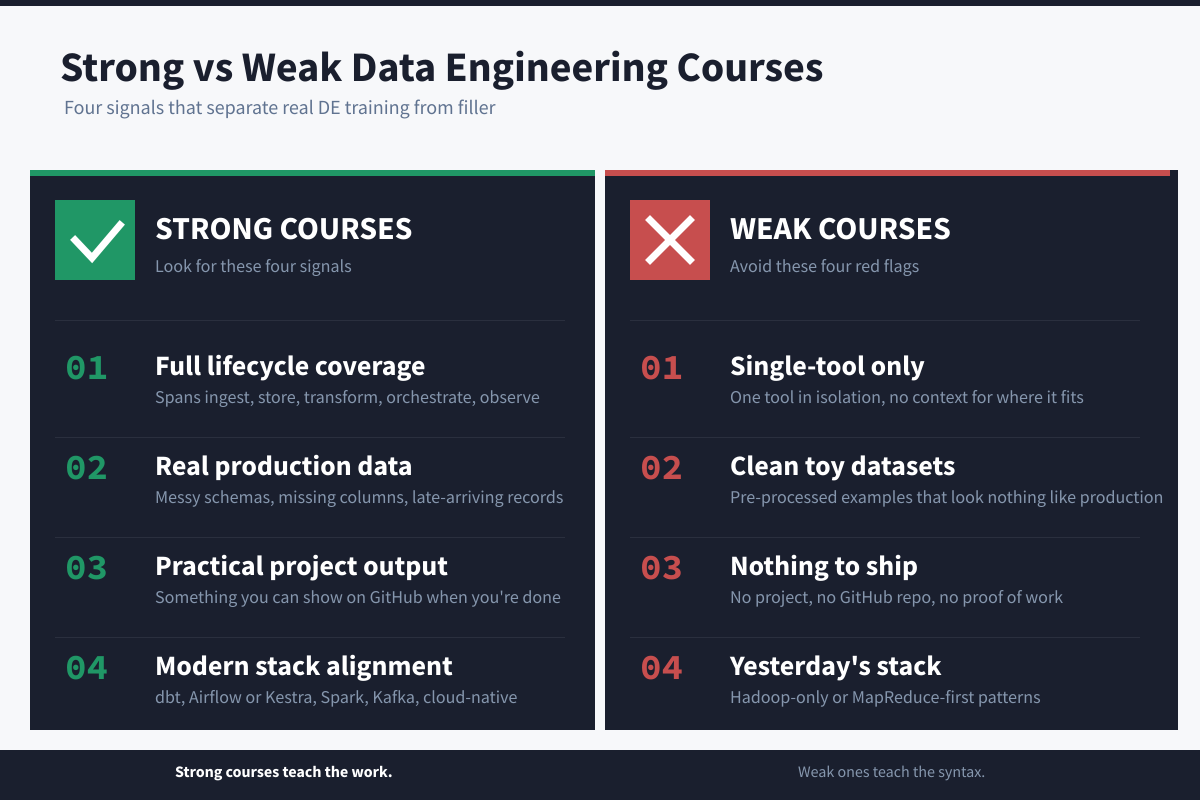
Transform Your Data Skills: Top Engineering Courses for 2026
Ready to elevate your data capabilities? The future of data management demands skilled engineers, and finding the right training is key. We've explored the landscape to identify ten leading data engineering courses for 2026. Discover options tailored to your experience, learning style, and goals—from beginner introductions to advanced cloud platform training. This guide provides a clear comparison, empowering you to transform your skillset and confidently navigate the evolving world of data.
Stop Wrestling Your Daily Trial Balances: Let AI Simplify the Comparison
Power Query can become sluggish when handling multiple daily Trial Balance (TB) files, particularly when files are around 10 MB each. As an intern at a finance organization, you've set up a Power Query to compare numbers side by side, filtering and grouping data for a 15-day range. However, expanding this to a month or quarter increases the burden on performance, especially during edits and refreshes in front of seniors.
Automate your work schedule by syncing cells to the day of the week
Are you looking to streamline your work schedule with automatic shift assignments based on the day of the week? By utilizing simple formulas, you can create a dynamic scheduling system that updates automatically when you change the month. For example, you can set conditions such as "IF Sunday to Tuesday, THEN assign Alpha Shift." This approach not only reduces manual updates but also enhances productivity.
Explore AI-native tools to bridge your spreadsheet workflow on Mac
Are you searching for alternatives to Macabacus for your MacBook Pro? You're not alone! Many users seek effective tools to enhance their spreadsheet experience, especially while transitioning to different operating systems. While you await your new Windows computer, there are several options that can empower your data management. Explore user-friendly solutions like Tiller Money or Spreadsheet.com, which may offer the functionality you need.
When Array Formulas Slow Your Spreadsheet, Explore the Simpler Path
In the pursuit of optimizing Excel workflows, many users, like Nikolaisme, have turned to innovative functions like MAKEARRAY. However, this exploration revealed a significant downside: performance lags that hinder productivity. After attempting to replace traditional methods with dynamic array formulas, it became clear that the spill array feature can inadvertently slow down calculations, even during simple actions like deleting blank cells. This experience highlights that while new tools can enhance capabilities, they may not always improve efficiency.
Automate formulas across hundreds of files without learning macros
If you're looking to automate calculations across multiple Excel files with the same column structure, using macros can be an efficient solution. With 400 files to manage, VBA (Visual Basic for Applications) macros allow you to apply formulas and automate processes seamlessly. You can create a script to add new columns, apply formulas, and fill them down to the last row in each spreadsheet. For a deeper understanding of Excel’s capabilities, consider checking out our article on advanced functions that can enhance your productivity.
Excel's instability is costing you time. Explore a smarter way forward.
If you've found that Excel is increasingly hindering your daily tasks, you're not alone. Many users express frustration with frequent bugs, unresponsive files, and unexpected changes while managing multiple spreadsheets. These issues can disrupt productivity and create a sense of inefficiency. It’s disheartening to see a tool once celebrated for its reliability now causing daily headaches. If you're seeking solutions, consider exploring innovative alternatives that simplify your workflow.

Find the SQL course that actually matches your skill level
In 2026, finding the right SQL course can be a daunting task, especially with so many options available. Most lists either skim the surface or offer a one-size-fits-all approach, ignoring the distinct needs of different users. Whether you're a complete beginner, a working analyst, or an engineer developing production systems, your SQL training should align with your specific goals. In our comprehensive ranking and comparison, we break down the best SQL courses tailored for various skill levels and use cases.

Smarter multi-agent AI with faster inference and 75% fewer tokens
RecursiveMAS represents a significant advancement in multi-agent AI systems, achieving 2.4x faster inference while reducing token usage by 75%. Traditional text-based communication among agents often leads to latency and inflated costs, hindering efficiency. Developed by researchers at the University of Illinois Urbana-Champaign and Stanford University, RecursiveMAS enables agents to share information in embedding space rather than through text, enhancing both speed and performance. This innovative framework not only improves accuracy across complex domains but also offers a cost-effective approach for scalable multi-agent solutions.
Simplify Complex Table References with AI-Powered Conditional Formatting
Conditional formatting can enhance your scheduling tool, but issues arise when using table references in formulas. For instance, while your formula successfully highlights milestones within a traditional range, it falters with table references. The LET() function and XLOOKUP may complicate the process, especially with nested references. To streamline your approach, consider simplifying the use of named references for the G$2 and H$2 cells. For further insights into Excel's powerful capabilities, check out our article on counting with GROUPBY for a deeper understanding of data management.
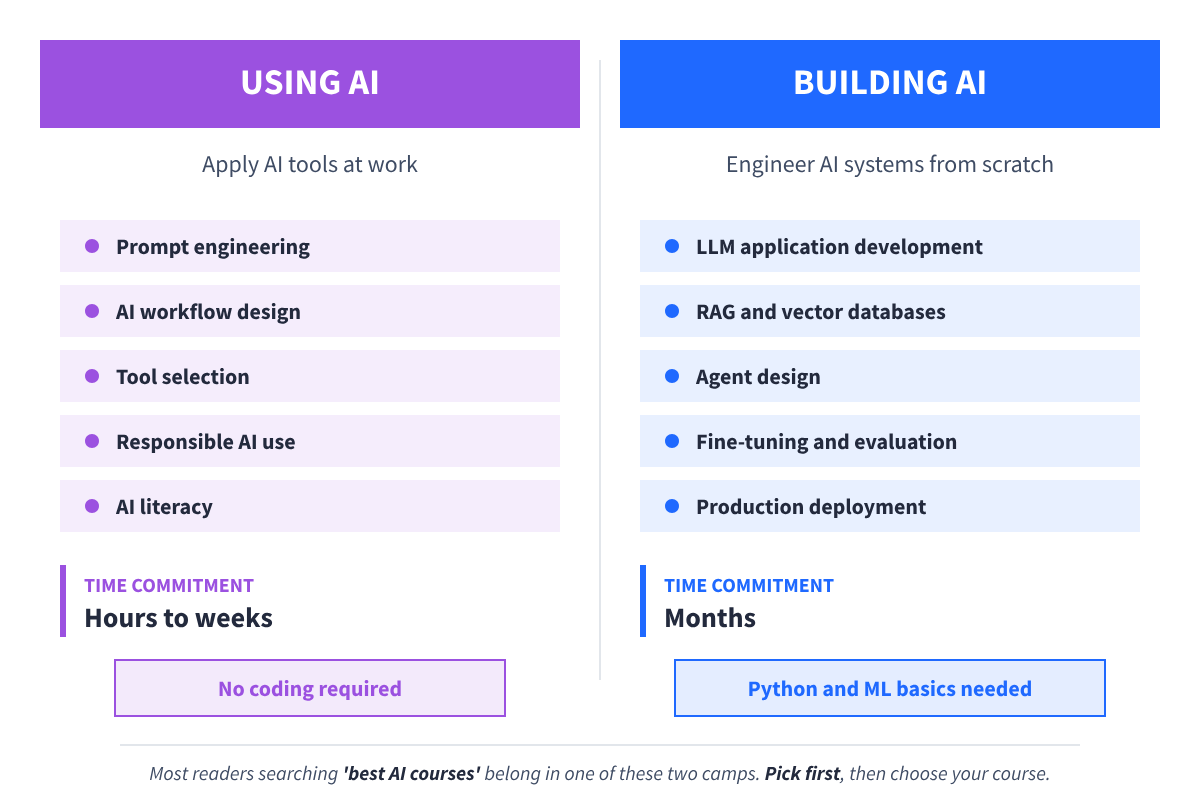
Discover the right AI course path to match your goals and skill level
As the demand for AI expertise continues to grow, choosing the right course can significantly impact your learning journey. In 2026, you’ll encounter two distinct paths: one focused on mastering AI tools and another dedicated to building AI systems from scratch. Selecting the wrong option could lead to months of frustration. This guide compares ten of the best AI courses available, helping you find the perfect fit for your goals.

Measuring AI through a human lens: IQ scores for language models arrive.
Introducing AI IQ, a groundbreaking platform that assigns estimated IQ scores to over 50 leading AI language models, using the familiar yardstick of human intelligence. This innovative approach offers interactive visualizations at aiiq.org, making the complexity of AI advancements more accessible. While praised for its clarity by technologists, it also faces criticism for oversimplifying AI capabilities into a single number. For a deeper dive into the future of AI and its evolving landscape, explore our related article on Anthropic’s vision for proactive AI.
Give each data series its own categories without squishing the chart
Creating a box and whisker plot with multiple series can be challenging, especially when each series has its own unique categories. When plotted together, Excel tends to compress the boxes, making it difficult to visualize the data effectively. To maintain clarity, it's essential to plot each series with its respective categories while avoiding the squished appearance.
Find unique text across thousands of rows and highlight every match instantly
Hi all, It looks like you're navigating a common challenge with Conditional Formatting in spreadsheets. You're aiming to highlight entire rows based on the presence of 15 unique text entries within a specific column. While your initial approach using `=SUM(COUNTIF($AG2, {"Text1", "Text2", "Text3", ...}))>0` is a solid start, it seems you're encountering limitations with reference operators in Conditional Formatting. Consider exploring alternative methods, such as using a helper column for a clearer solution.