generative AI automation
generative AI automation at Beyond Market Intelligence is a file of 286 stories. The newest of them: “From VBA to Dynamic Arrays: Rethinking Your Spreadsheet Automation Toolkit”, “Navigate the AI Tool Landscape with Confidence and Purpose”, and “Cloudflare rethinks AI agent deployment with millisecond-speed sandboxes”. In the evolving landscape of Excel, many users are reconsidering their reliance on VBA for automation. As we embrace the inevitability of AI in our workflows, the pertinent question shifts from “should I use AI?” to “how can I effectively integrate AI into my processes?” With an increasingly crowded market, featuring a… Acme AI is the next-generation, AI-powered spreadsheet platform built to replace Excel and redefine how analysts, data scientists, and enterprise teams work… The list below is every generative AI automation story on Beyond Market Intelligence, newest first.
From VBA to Dynamic Arrays: Rethinking Your Spreadsheet Automation Toolkit
In the evolving landscape of Excel, many users are reconsidering their reliance on VBA for automation. With the rise of Power Query and dynamic arrays, some professionals find these tools meet most of their needs. While VBA remains valuable for specific tasks like automating reports or generating custom emails, the question arises: is it time to shift focus? For those immersed in data-heavy roles, what does your current workflow look like?
Navigate the AI Tool Landscape with Confidence and Purpose
As we embrace the inevitability of AI in our workflows, the pertinent question shifts from “should I use AI?” to “how can I effectively integrate AI into my processes?” With an increasingly crowded market, featuring a vast array of assistants, generators, and automation tools, making informed choices is essential. In this guide, we present the top 46 AI tools for 2026 that you must consider to enhance your productivity and streamline operations.

Cloudflare rethinks AI agent deployment with millisecond-speed sandboxes
Cloudflare is redefining AI agent deployment with the open beta launch of Dynamic Workers, a lightweight, isolate-based sandboxing system that promises to run AI code up to 100 times faster than traditional containers. This innovative approach requires minimal memory and can initiate in milliseconds, transforming how enterprises manage AI tasks. By emphasizing security and efficiency, Cloudflare positions Dynamic Workers as a vital execution layer for scalable AI solutions, enabling developers to embrace rapid, on-demand code execution without compromising safety or performance.

When an AI agent approves a contract at 2 a.m., who's accountable?
In the rapidly evolving landscape of autonomous agents, the stakes have never been higher. After 18 months of building production AI systems, we’ve learned that the challenge isn’t just about creating agents that respond accurately; it’s about ensuring they operate reliably and safely. A misstep—like an agent mistakenly approving a major vendor contract—can have serious consequences. This exploration delves into the complexities of engineering reliable autonomous agents, emphasizing the importance of guardrails, layered reliability, and the balance between innovation and caution in this transformative field.

From Demo to Reality: Navigating the Hard Work of AI Agent Deployments
Deploying AI agents effectively in real-world scenarios presents significant challenges that go beyond successful demonstrations. Issues such as fragmented data, unclear workflows, and high escalation rates hinder enterprises' progress in adopting these technologies. As Sanchit Vir Gogia highlights, the true test lies in navigating the complexities of organizational environments.
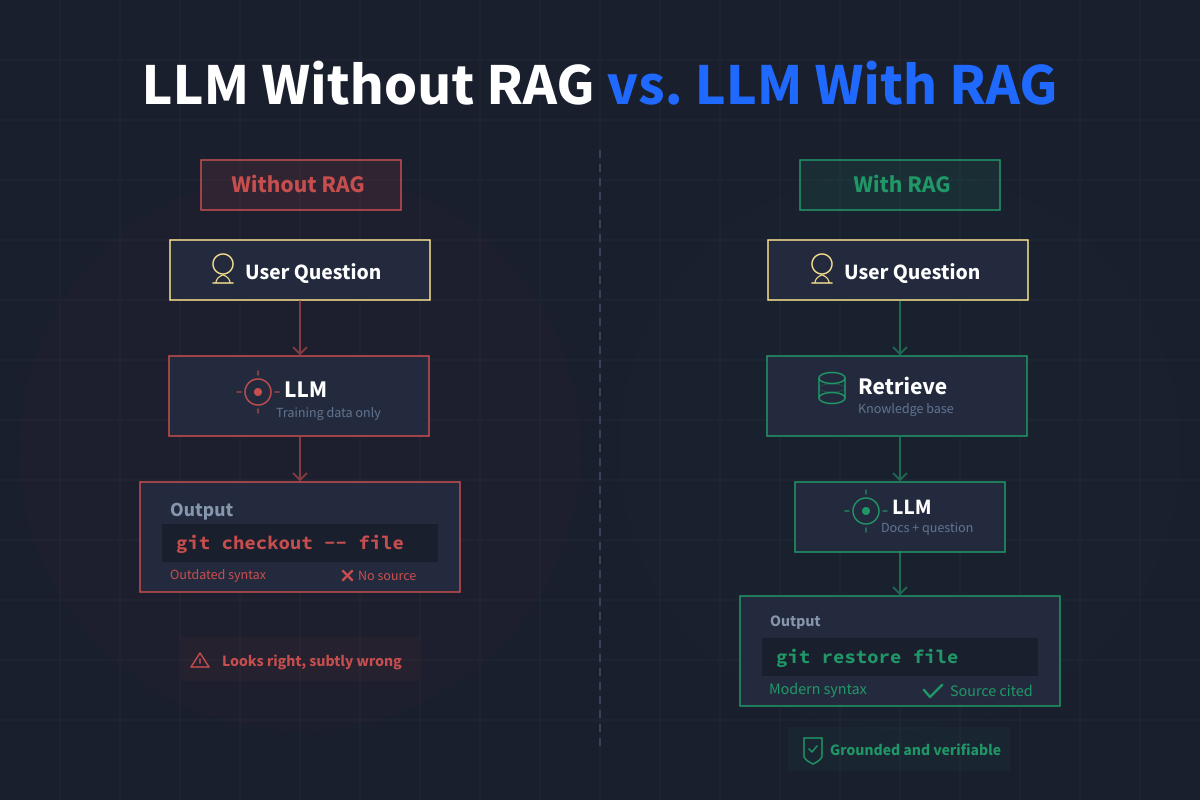
Building a RAG System from Scratch to Understand What Abstraction Hides
In our journey to develop a retrieval-augmented generation (RAG) system from the ground up, we prioritized simplicity and transparency by avoiding existing frameworks such as LangChain or LlamaIndex. Using just Python, a vector database, and a handful of API calls, we created GitQuest—an AI assistant designed to address Git-related inquiries with authoritative answers drawn from official documentation. GitQuest not only cites its sources but also acknowledges when it lacks information, embodying a human-centered approach that prioritizes clarity and user empowerment.
Explore how mastering core ML algorithms transforms your data skills.
Introducing a set of open-source machine learning homework assignments designed to enhance understanding of fundamental algorithms from first principles. Developed for an ML course at Skoltech, these assignments aim to bridge the gap between theory and practice by guiding students through step-by-step problem solving. Each task includes automated testing for immediate feedback, allowing learners to refine their skills while minimizing the grading burden on instructors.

DeerFlow 2.0: A powerful AI agent harness for enterprise exploration
DeerFlow 2.0, launched by ByteDance, is a groundbreaking open-source AI agent orchestrator designed to streamline complex, long-duration tasks in enterprise settings. This powerful framework enables the autonomous orchestration of multiple AI sub-agents, facilitating deep research, report generation, and data analysis—all within a secure, isolated environment. Available under the MIT License, it allows for seamless local deployment, ensuring data sovereignty and compliance. As it gains traction in the AI community, enterprises must weigh its technical demands against the potential for transformative productivity enhancements.

Transform Your Data Portfolio with These 15 Power BI Project Ideas
Building a robust Power BI portfolio is essential for aspiring business or data analysts in 2026. Employers seek candidates who can transform messy data into clean models and create impactful dashboards that drive informed decision-making. 15 compelling Power BI project ideas will not only showcase your technical prowess but also demonstrate your ability to derive actionable insights from data. These projects serve as tangible evidence of your skills, empowering you to stand out in a competitive job market.
From simple time logs to intelligent project insights
Managing time effectively is crucial, especially when juggling multiple projects. For the past four months, I’ve utilized a smart Excel table to track my working hours, capturing essential details like date, time, and project activities. With a pivot table summarizing my hours, I gain valuable insights into daily project time allocation. Now, I aim to streamline my reporting process using Power Automate. I seek guidance on filtering with Office Scripts and exporting my final report as a PDF, enhancing my efficiency without additional manual tasks.
Simplify your meal planning by consolidating ingredients into one smart list
Introducing the Formula Shopping List Generator, a powerful tool designed to streamline your meal planning process. By selecting your meal options for the week, you can automate the generation of a consolidated shopping list. While your formula is functioning well, the challenge lies in aggregating the data into a simple, comprehensive list. Instead of using text-to-columns, which separates the formula from its output, consider exploring array functions or unique value aggregations to create a cohesive list that meets your needs effectively.

30 real data projects to build a portfolio that speaks for itself
Building a strong data science portfolio is essential for showcasing your skills and standing out to potential employers. "30 Data Science Projects for Beginners to Advanced" provides an invaluable resource, offering a curated list of projects that span various skill levels. Each project includes source code, real datasets, and step-by-step instructions to guide you through completion.
From Table to Org Chart: Automate Your Team Structure in Excel
In a quest to streamline the creation of organizational charts, I developed an Excel automation tool that transforms a simple table into a visually coherent org chart. As someone in internal control, I often face the challenge of building these charts manually in PowerPoint or Visio, which can become chaotic when team structures evolve. By inputting employee-manager relationships directly in Excel, the org chart is generated automatically.
Automate data access from unknown CSV filenames with AI
Accessing data from a dynamically named CSV file can streamline your automated data collection process. If each result is stored in a unique folder based on a defined structure—like Region, Person, and Department—you can leverage VBA or Power Query to extract data efficiently. By utilizing cell values to specify the folder path, you can programmatically identify and access the latest CSV file within that directory, ensuring that you seamlessly retrieve the necessary data without needing to know the exact filename.

Build real ML skills with 14 curated projects and ready-to-use datasets
Embarking on a journey into machine learning can be both exciting and overwhelming. 14 carefully curated projects, organized by difficulty, cater to everyone from beginners to advanced practitioners. Each project includes free datasets, starter code, time estimates, and valuable insights on how to enhance your work into a standout portfolio piece. By exploring these projects, you'll not only develop transferable skills but also create tangible results to impress hiring managers, empowering your career in this dynamic field.
Transform Your Audit Data Merge from Hours to Minutes with AI
If you're dealing with massive data entries, like the 500,000 lines from your sales company, finding efficient ways to manage and combine reports is crucial, especially for an IRS audit. Instead of manually compiling and sorting, consider exploring automation tools that can streamline the process. Utilizing Excel's Power Query can help consolidate your data from multiple reports quickly and efficiently. Embracing these innovative solutions not only saves time but also empowers you to focus on analyzing the data rather than just compiling it.
Automate daily report merging to reclaim hours for analysis.
Are you struggling to merge large Excel reports automatically? If you're dealing with financial and operational data generated daily, the task of manually combining multiple reports can be daunting and time-consuming. Even tools like Power Query may fall short when handling thousands of rows across numerous files. Fortunately, there are more efficient approaches to streamline this process. By exploring automation tools designed to effortlessly pull and merge your reports into a structured dataset, you can reclaim valuable time and enhance your data analysis capabilities.
Your Spreadsheet Shouldn't Freeze While You Work
It sounds like you're experiencing significant performance issues with your Excel workbook, especially when handling large datasets across multiple sheets. As a Customer Services Manager, your need for efficient scheduling and error tracking is crucial. Fortunately, there are several strategies you can explore to optimize your workbook and reduce freezing times. These may include simplifying formulas, minimizing the use of volatile functions, or even considering alternative data management solutions that can handle larger datasets more efficiently. Let’s dive into actionable tips to enhance your experience.
Automate your COI tracking by pulling files from your shared network drive.
Automating your COI tracking sheet in Excel can greatly enhance efficiency for project managers monitoring insurance expirations. By pulling data from your shared network drive, you can streamline updates for each subcontractor’s COI files. This approach allows you to maintain an organized, color-coded visual of coverage statuses—green for good, yellow for renewal reminders, and red for expirations.
Automate daily fleet dispatch updates directly to WhatsApp groups.
Automating the process of sending Excel screenshots to WhatsApp groups can significantly streamline your daily workflow. By leveraging innovative tools and techniques, you can eliminate repetitive tasks such as filtering data, capturing images, and typing messages. Imagine effortlessly generating a text list of dispatch codes and exporting filtered tables as images, all while improving efficiency. This transformation not only saves time but also enhances productivity, allowing you to focus on what truly matters in your fleet management tasks.
Simplify Complex Delivery Schedules with AI-Powered Calculations
Managing delivery schedules across multiple vendors can be complex, especially when their final order "drop" days differ. To streamline this process in Excel, you can create a formula that calculates the weekdays between each vendor's delivery days. For instance, if a vendor delivers on Mondays, Wednesdays, and Fridays, but has varying drop dates, you can automate the identification of auto-order days. This method allows you to visualize the days between drops, ensuring you never miss an order while simplifying your workflow.
Automate personalized Excel reports for every manager from a single master file
Power Automate can streamline your task of creating separate Excel files for each manager from your master workbook. By identifying unique manager emails, you can filter the relevant rows and generate individual workbooks that contain only the data for each manager. Automating the emailing process ensures that each manager receives their specific file directly in their inbox.
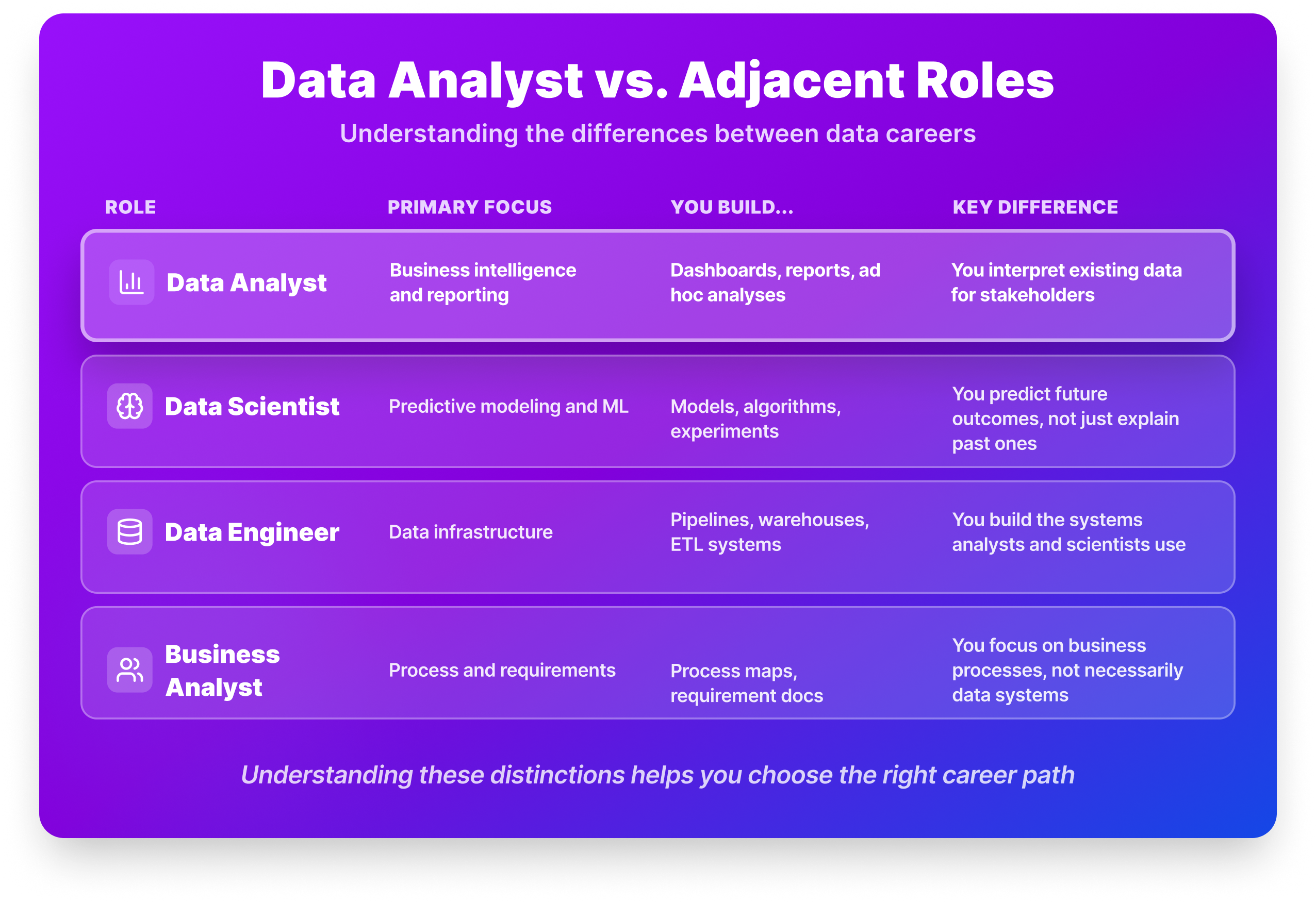
From Raw Numbers to Real Decisions: Your Path to Data Analysis
Navigating the path to becoming a data analyst can feel overwhelming, especially with advice ranging from mastering Excel to pursuing a master’s degree. The reality is more nuanced. Data analysts are crucial in transforming raw data into actionable insights, answering pivotal questions like why sales fluctuate or how customer behavior changes. This step-by-step guide for 2026 will clarify the essential skills, educational requirements, and practical experiences you need to thrive in this dynamic field.
Streamline your academic scheduling with smarter sheet coordination
Are you struggling to keep your auxiliary "Release Tracking" sheet in sync with the primary "Master Schedule" in your online workbook? This common challenge can hinder your ability to manage faculty workload efficiently. By utilizing unique IDs and structured formulas, you can maintain the integrity of your tracking without cluttering the Master Schedule. In this guide, we’ll explore practical strategies to ensure your status selections on Release Tracking remain accurate, even as the Master Schedule evolves.