google sheets
Beyond Market Intelligence keeps google sheets in one place: 137 stories so far. The section currently leads with “Turn scattered recall data into structured insights with AI”, “Automate Your Power Query Updates as New Sheets Arrive”, and “Simplify your data view with one command to collapse all rows”. Counting steps in complex data can be challenging, especially when they're buried within a single cell in Google Sheets or Excel. Are you frustrated with Power Queries that don’t automatically update when you add new tables or sheets? Acme AI is the next-generation, AI-powered spreadsheet platform built to replace Excel and redefine how analysts, data scientists, and enterprise teams work… The list below is every google sheets story on Beyond Market Intelligence, newest first.
Turn scattered recall data into structured insights with AI
Counting steps in complex data can be challenging, especially when they're buried within a single cell in Google Sheets or Excel. To effectively count instances of "1.", "2.", and "3.", you can use a formula that specifically targets these numbered steps, ensuring you extract only the relevant counts. Additionally, if you want to count unique occurrences, consider using conditional logic to filter duplicates, allowing each step to be counted only once.
Automate Your Power Query Updates as New Sheets Arrive
Are you frustrated with Power Queries that don’t automatically update when you add new tables or sheets? You're not alone. Transitioning from legacy processes to Power Query can be transformative, yet many encounter obstacles. To ensure your Power Queries dynamically include new data, start by verifying that all sheets are formatted as tables and share consistent headers. This introduction will guide you through essential steps to troubleshoot and optimize your setup, unlocking the potential of seamless data integration. Ready to elevate your reporting?
Simplify your data view with one command to collapse all rows
Are you overwhelmed by a spreadsheet filled with collapsible data that makes navigation a chore? You’re not alone—many users struggle to manage extensive datasets efficiently. Fortunately, there’s a straightforward solution to collapse all those sub-data sections at once, saving you time and enhancing your productivity. In this guide, we’ll explore effective methods to streamline your workflow, allowing you to focus on what truly matters: deriving insights from your data. Read on to discover the best techniques for managing your spreadsheet with ease.
Transform your darts league tracking with a smarter AI-powered spreadsheet
Are you struggling to get your darts league table in Excel to accurately reflect the highest checkout scores? If your setup involves multiple sheets for data entry, calculations, and final standings, it’s frustrating when values don’t populate as expected. The good news is that with the right formula, you can automate the process of tracking each player’s highest checkout, ensuring your leaderboard is always up to date.
Transform your data workflows with dynamic dropdowns that pull from multiple sheets.
Struggling to create a dynamic display in your spreadsheet? You’re not alone—many users find it challenging to set up dropdown menus that pull data from other sheets. Luckily, this process is simpler than it seems, especially if you’re using tools like Google Sheets. In this guide, we’ll explore how to use dropdowns to change data in a table, providing a clear, step-by-step approach to achieving a clean and organized presentation. Let’s transform your data into an easily navigable format that enhances readability for all users.
One formula, no code: solving 100 math problems entirely in Excel
Are legacy spreadsheets holding you back from tackling complex math challenges? Discover how I solved all 100 Project Euler problems using just Excel and a single formula per solution—no VBA required. This journey transformed my approach to problem-solving, showcasing how Excel's capabilities can rival traditional programming languages for specific tasks. Join me as I share insights, innovative techniques, and the surprising power of functions like REDUCE and SEQUENCE.
Navigate Missing Spreadsheet Labels with a Clear, Practical Fix
Are your row and column titles mysteriously blacked out in Excel, making it difficult to navigate your spreadsheets? You're not alone in facing this frustrating issue, which can disrupt your workflow and productivity. Fortunately, there’s a solution waiting to be discovered. In this post, we'll explore practical steps to restore visibility to your labels, ensuring a seamless experience with your spreadsheets. Keep reading to unlock the insights you need to troubleshoot this pesky problem and regain control over your data.
Simplify Year Filtering Across Tables with Focused DAX Logic
Are you feeling bogged down by the complexities of data modeling in Excel? If you’re looking to filter years effectively or calculate measures across tables, you’re not alone. Many users encounter challenges when trying to harness the full power of DAX in Power Pivot. In this introduction, we’ll explore how to filter your data to focus solely on 2020 and 2021, and we’ll break down the best practices for calculating Total Sales seamlessly across related tables.
Why Google Sheets Adds Curly Braces That Break Your Excel Formulas
Are you frustrated by the way your Google Sheet formulas break when you download them to Excel? You’re not alone. Those pesky curly braces, like {=xlookup(A1,A:A,B:B)}, turn your formulas into a series of errors—#NAME?—making it tedious to fix each one individually. Thankfully, there’s a more efficient way to tackle this issue. In this guide, we’ll explore simple strategies to streamline the process, ensuring your formulas work seamlessly in Excel without the hassle of manual corrections. Let’s dive in!
Master Weekly Totals in Sheets Without the Guesswork
Creating weekly summary totals from your handwritten log can be a frustrating challenge, especially as you transition to using a spreadsheet for your first year as a 1099 employee. You're not alone in facing hurdles when aligning dates with your workweek and extracting totals accurately. Fortunately, with the right approach, you can streamline this process. In this guide, we'll explore effective formulas and techniques to help you automatically calculate weekly totals on your second sheet, ensuring your tax log is both accurate and easy to
Simplify your move with an AI-powered inventory that updates itself
Moving can be a daunting task, especially when it comes to organizing your belongings. Imagine a streamlined system where your inventory automatically updates as you sort items into boxes. With an auto-updating sheet, you can have one master list (Sheet 1) that tracks your items and their designated boxes, while a second sheet (Sheet 2) dynamically displays each box’s contents. As you make changes, the items seamlessly shift between columns, keeping your organization intact. Ready to transform your moving process?
Track Clinical Hours Smarter with AI-Powered Category Tracking
Are you struggling to effectively track your clinical hours in Google Sheets? You’re not alone. Many students face the challenge of categorizing hours as direct or indirect while maintaining accurate totals for each category. The good news is that with a few strategic steps, you can easily enhance your spreadsheet. By adding a dropdown menu for category selection and utilizing formulas to sum hours separately, you’ll gain clear insights into your progress.
Transform Your Mail Merge by Automating Complex Data Formatting
Struggling to do a mail merge in Excel when your data is too large for Word? You’re not alone. Many users face the challenge of pulling and reformatting data efficiently, only to find that dragging rows can lead to misalignment and confusion. The good news is that there’s a smarter way to manage your data. By leveraging AI-native spreadsheet technology, you can streamline this process and ensure your information aligns perfectly.

Transform Excel Into a Smart Data Entry Tool Without Complex Coding
Are you tired of juggling multiple tools just to gather data? While editable PDFs and Google Forms are popular, Microsoft Excel offers a powerful alternative for creating fillable forms that streamline data entry. In this guide, you’ll discover how to leverage Excel’s features to design user-friendly forms that not only enhance data collection but also improve management efficiency. Keep reading to unlock the secrets of transforming your spreadsheets into dynamic, fillable forms that make data entry a breeze.
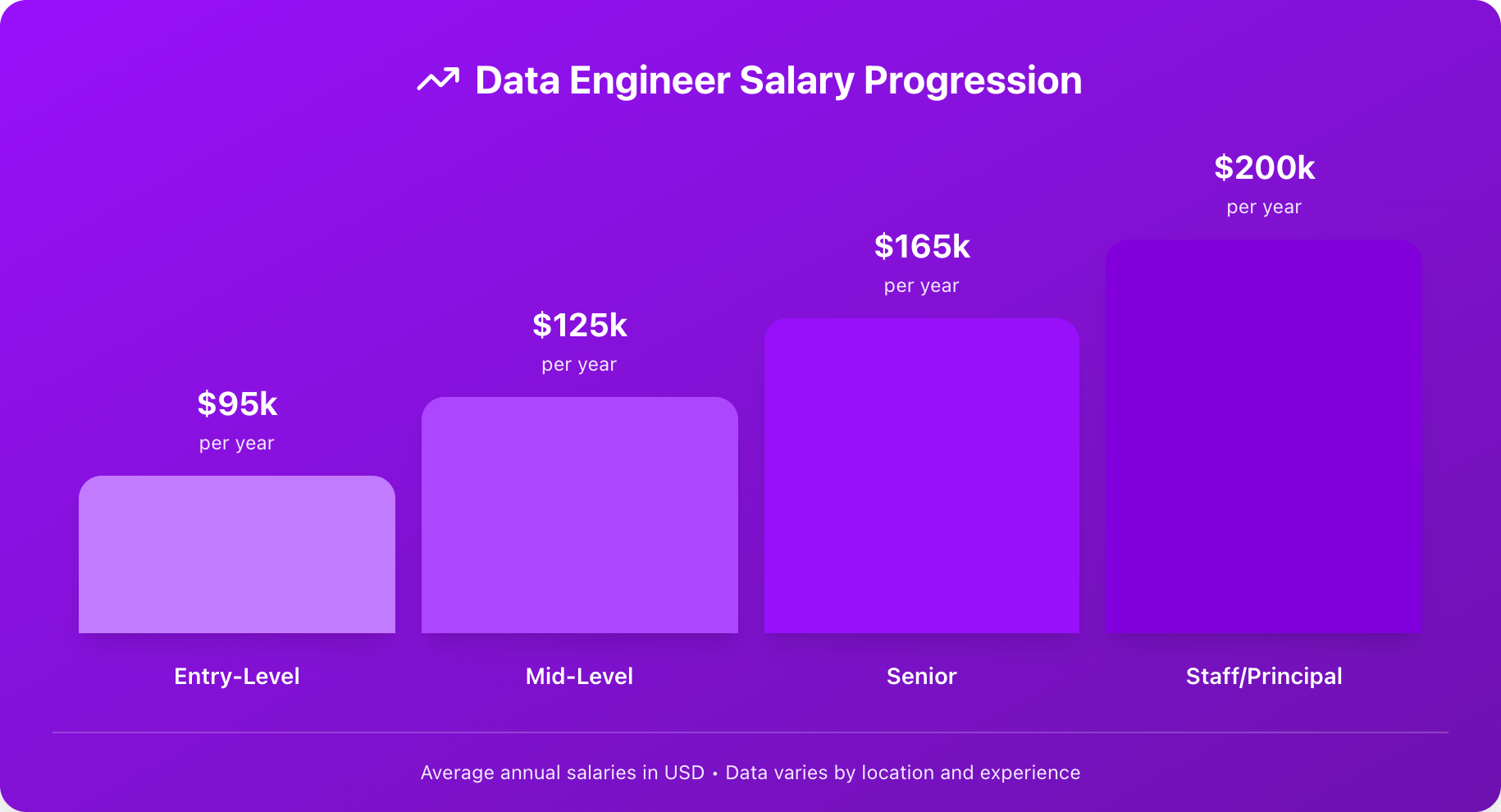
From Spreadsheets to Pipelines: Your Clear Path Into Data Engineering
Are you eager to dive into the world of data engineering but unsure where to start? The Data Engineering Roadmap for Beginners (2026) is designed to guide you through the essential skills you need to master, regardless of your background. Learn what to focus on first, how long each step takes, and why data engineering is crucial for every data-driven company. Discover the path that will empower you to transform raw data into actionable insights, fueling your career in this dynamic field.
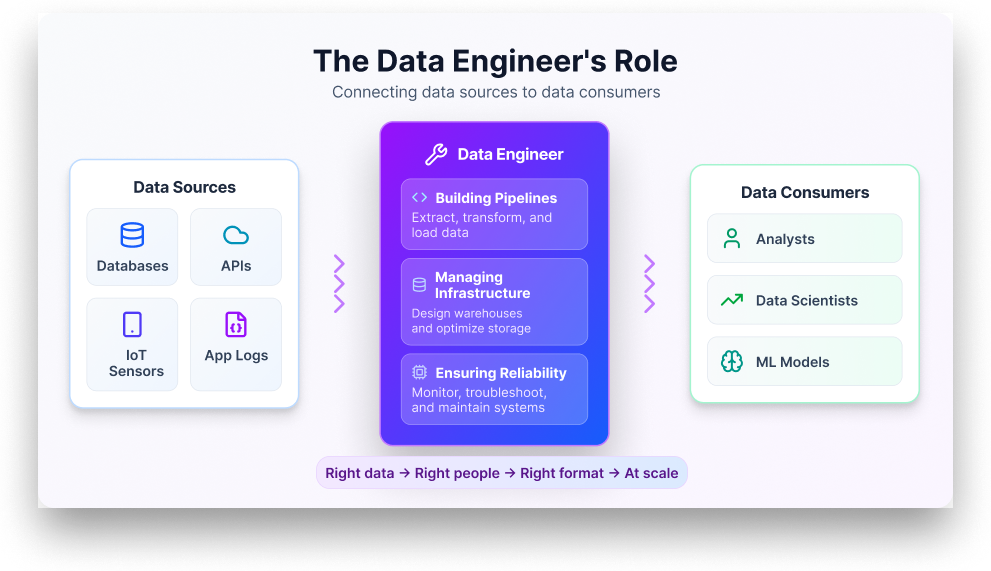
Build the Data Engineering Skills That Will Define 2026
Navigating the evolving landscape of data engineering can be daunting, especially with the endless array of skills like SQL, Python, Spark, and more vying for your attention. As we approach 2026, knowing which of these skills truly matters is essential for staying relevant in this fast-paced field. This guide not only highlights the 15 critical data engineering skills you need to thrive but also offers practical steps to build them.

Unlocking Cleaner Controller Debugging with CSS Layers
Debugging controllers can be frustrating, especially when you're relying on legacy tools that don’t quite fit the bill. Fortunately, the CSS Gamepad API offers a transformative approach to visual debugging. In this guide, we'll explore how CSS layers can streamline your debugging process and help you create a reusable visual debugger for your projects. Get ready to simplify your workflow and enhance your game development experience with practical insights that will empower you to tackle controller issues like a pro.