workflow automation
270 stories filed under workflow automation on Beyond Market Intelligence. The newest of them: “The silent cost of unreported digital friction in your organization”, “xAI ships Grok 4.3 and a voice cloning suite at a competitive price”, and “From Experiment to Expense: The Real Cost of AI at Scale”. Hidden IT problems are silently undermining productivity and creating risks within organizations. xAI has launched Grok 4.3, a new large language model that enhances performance while maintaining an aggressively low pricing structure. Acme AI is the next-generation, AI-powered spreadsheet platform built to replace Excel and redefine how analysts, data scientists, and enterprise teams work… The list below is every workflow automation story on Beyond Market Intelligence, newest first.

The silent cost of unreported digital friction in your organization
Hidden IT problems are silently undermining productivity and creating risks within organizations. Research from TeamViewer reveals that many digital issues, such as slow applications and login failures, remain unreported, leading to significant productivity losses—averaging 1.3 workdays per month per employee. This digital friction not only hampers project timelines but also contributes to employee frustration and turnover. By addressing these underlying issues proactively, organizations can enhance operational efficiency and employee satisfaction, ultimately fostering a more resilient and productive work environment.

xAI ships Grok 4.3 and a voice cloning suite at a competitive price
xAI has launched Grok 4.3, a new large language model that enhances performance while maintaining an aggressively low pricing structure. This release comes amid ongoing legal battles involving founder Elon Musk and OpenAI co-founder Sam Altman. Grok 4.3 introduces advanced reasoning capabilities and a powerful voice cloning suite, designed to optimize user workflows. With significant improvements in specialized tasks, Grok 4.3 positions itself as a strong contender in the AI landscape, offering both affordability and functionality for developers and enterprises alike.

From Experiment to Expense: The Real Cost of AI at Scale
As enterprises transition from AI experimentation to production, the focus shifts from model training to the infrastructure necessary for efficiently managing concurrent inference workloads. This new landscape, driven by agentic AI, demands continuous support for unpredictable requests, highlighting the importance of infrastructure efficiency. Anindo Sengupta from Nutanix underscores that while costs per token have decreased, overall expenses are rising due to increased consumption. To thrive, organizations must adapt their infrastructure strategies, prioritizing metrics like GPU utilization and total cost of ownership for sustainable AI deployment.

AI agents now act on business signals, no prompts required
Writer has launched event-based triggers for its AI agent platform, allowing agents to autonomously detect business signals across popular tools like Gmail, Slack, and Google Calendar, executing multi-step workflows without human prompts. This significant advancement positions Writer at the forefront of the autonomous enterprise AI landscape, competing against giants like Amazon, Microsoft, and Salesforce. The release also introduces a new Adobe Experience Manager connector and enhanced governance controls, reinforcing Writer's commitment to user-friendly, proactive AI solutions that drive business efficiency while prioritizing safety and oversight.

Speak to your database pipeline, and watch it respond with precision.
DBmaestro has unveiled its innovative MCP Server, designed to integrate natural language commands into database DevOps workflows. Announced on April 7, 2026, this powerful tool connects AI agents and enterprise copilots to streamline database management processes. With the MCP Server, database administrators can effortlessly trigger DBmaestro’s robust capabilities, including release automation, source control, CI/CD orchestration, and compliance, all through intuitive language. This advancement empowers teams to enhance productivity and efficiency, making complex database operations more accessible than ever before.

Your Personal Knowledge Graph Now Lives Outside the Control Plane
AWS Quick is redefining the landscape of enterprise orchestration with its newly launched desktop-native agent, which builds a persistent personal knowledge graph. By integrating data from local files, calendars, emails, and SaaS tools, Quick proactively executes actions, enhancing user productivity in ways traditional control planes may overlook. This evolution transforms Quick from a simple AI assistant into a dynamic workflow agent, offering context-driven insights while maintaining essential governance controls.

IBM secures AI coding workflows with multi-model routing and human oversight
IBM has launched Bob, an innovative AI-powered software development platform that integrates multi-model routing and human checkpoints, enhancing security and efficiency in coding workflows. Designed to address the complexities and potential pitfalls of AI in real-time data environments, Bob combines human oversight with AI capabilities, resulting in significant time savings for teams—up to 70% on selected tasks. With a structured approach, Bob empowers developers to seamlessly navigate the software lifecycle, ensuring effective collaboration between AI and human expertise in enterprise settings.
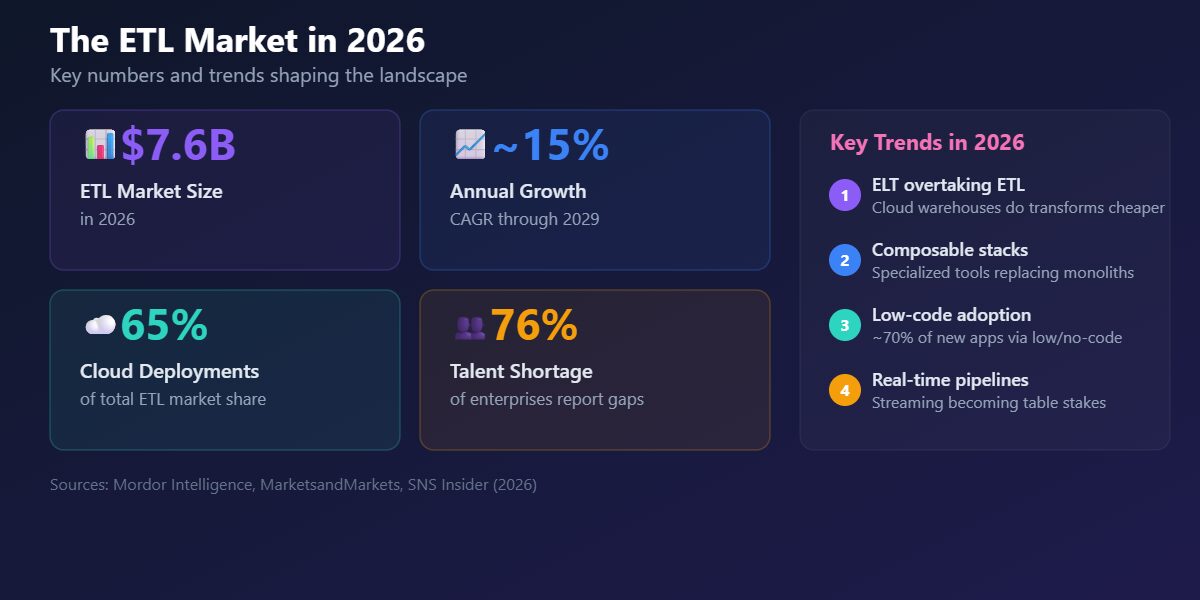
Your Data Pipeline Deserves More Than an Overcrowded Tool List
Choosing the right ETL tools is crucial when building a robust data stack, yet the abundance of overlapping options can be overwhelming. In 2026, the landscape continues to evolve, making it essential to understand which tools align with your specific needs. This practical guide not only highlights the best ETL tools available but also provides clear code examples to facilitate your decision-making process.

Mistral Workflows turns AI experiments into revenue-generating operations.
Mistral AI has unveiled Workflows, a powerful orchestration engine designed to elevate AI systems from mere proofs of concept to integral business processes. Operating within Mistral's Studio platform, Workflows already processes millions of daily executions, addressing critical gaps in operational infrastructure that hinder AI adoption. By separating orchestration from execution, it ensures data privacy and reliability, particularly for regulated industries.

Supply chains reveal where traditional integration falls short
Supply chains are increasingly challenged by the limitations of legacy integration models, which struggle to keep pace with expanding partner networks and rising operational volatility. As traditional middleware falters under complexity and costs, automation-led Integration Platform as a Service (iPaaS) emerges as a vital solution. The evolving landscape of supply chains reveals the inadequacies of legacy systems and how next-gen iPaaS, enhanced by automation, can transform integration practices.

Explore how AI evolves its own training data and model architecture
Introducing ASI-EVOLVE, a groundbreaking framework developed by researchers at SII-GAIR, designed to automate the entire optimization loop for AI training data, model architectures, and algorithms. By employing a continuous "learn-design-experiment-analyze" cycle, ASI-EVOLVE significantly reduces manual engineering efforts while enhancing performance beyond traditional human baselines. This innovative system autonomously discovers novel designs, improves data curation, and refines learning algorithms. With ASI-EVOLVE, enterprises can streamline their AI workflows and unlock new efficiencies, making advanced AI capabilities more accessible and effective than ever before

When AI Runs Silently Wrong, Reliability Demands a New Approach
In the evolving landscape of enterprise AI, a critical issue emerges: silent failures that occur without alerts or visible errors, undermining reliability. These failures often stem from context decay, orchestration drift, and overlooked infrastructure challenges. Traditional monitoring tools focus on uptime and performance metrics, missing behavioral inconsistencies that could lead to costly misinterpretations. To bridge this reliability gap, organizations must adopt a dual-layer observability approach—combining infrastructure and behavioral telemetry—to ensure systems not only function but also behave correctly in real-world conditions.
Taming the unpredictable: A practical guide to testing AI's variability
In the realm of enterprise AI, monitoring large language model (LLM) behavior is critical to ensure reliability and compliance. Unlike traditional software, which operates predictably, generative AI presents unique challenges due to its stochastic nature. This guide introduces the AI Evaluation Stack, a structured framework for assessing model performance through deterministic and model-based assertions. By implementing robust evaluation pipelines, engineers can effectively identify drifts, retries, and refusal patterns, ultimately transforming the development process and enhancing user experiences.
Automated trade commentary: bringing clarity to complex risk data at scale
Building an automated commentary engine for daily trade attribution at scale poses a unique challenge in market risk reporting. With thousands of trades arriving at varying frequencies, the goal is to create a system that precisely analyzes time-series data and generates clear, human-readable insights. The key dilemma lies in balancing deterministic mathematical accuracy with dynamic natural language generation. Consider leveraging advanced workflows, such as Agentic approaches, to allow for flexibility while ensuring the precision of your calculations.

Trust in AI agents lags behind their enterprise adoption
Eighty-five percent of enterprises are piloting AI agents, yet only 5% have transitioned them to production, highlighting a significant trust gap. In an exclusive interview at RSA Conference 2026, Cisco's Jeetu Patel emphasized that this deficit is the key barrier to scaling AI adoption for critical tasks. He likened AI agents to intelligent yet immature teenagers, requiring structured oversight to ensure safe operation. Addressing this trust architecture is essential, as it differentiates thriving enterprises from those at risk of failure.
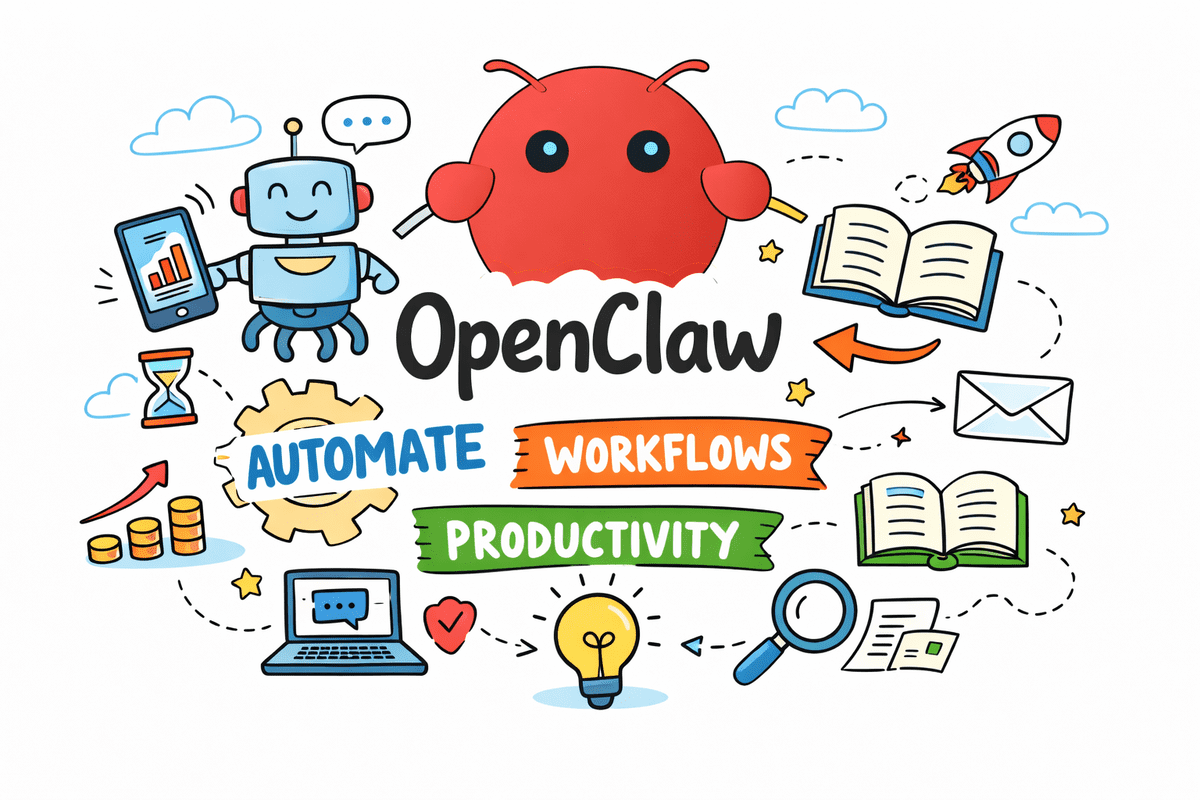
How OpenClaw Turns Workflows Into Smarter Daily Actions
Unlock the potential of OpenClaw with these seven practical use cases that demonstrate its power in transforming workflows. Discover how users are automating routine tasks, building custom agents tailored to their needs, and significantly boosting productivity through innovative AI applications. Each example highlights the versatility of OpenClaw, making complex processes simpler and more intuitive. Whether you’re looking to streamline your operations or enhance your data management, these insights will inspire you to turn AI into meaningful action in your everyday tasks.
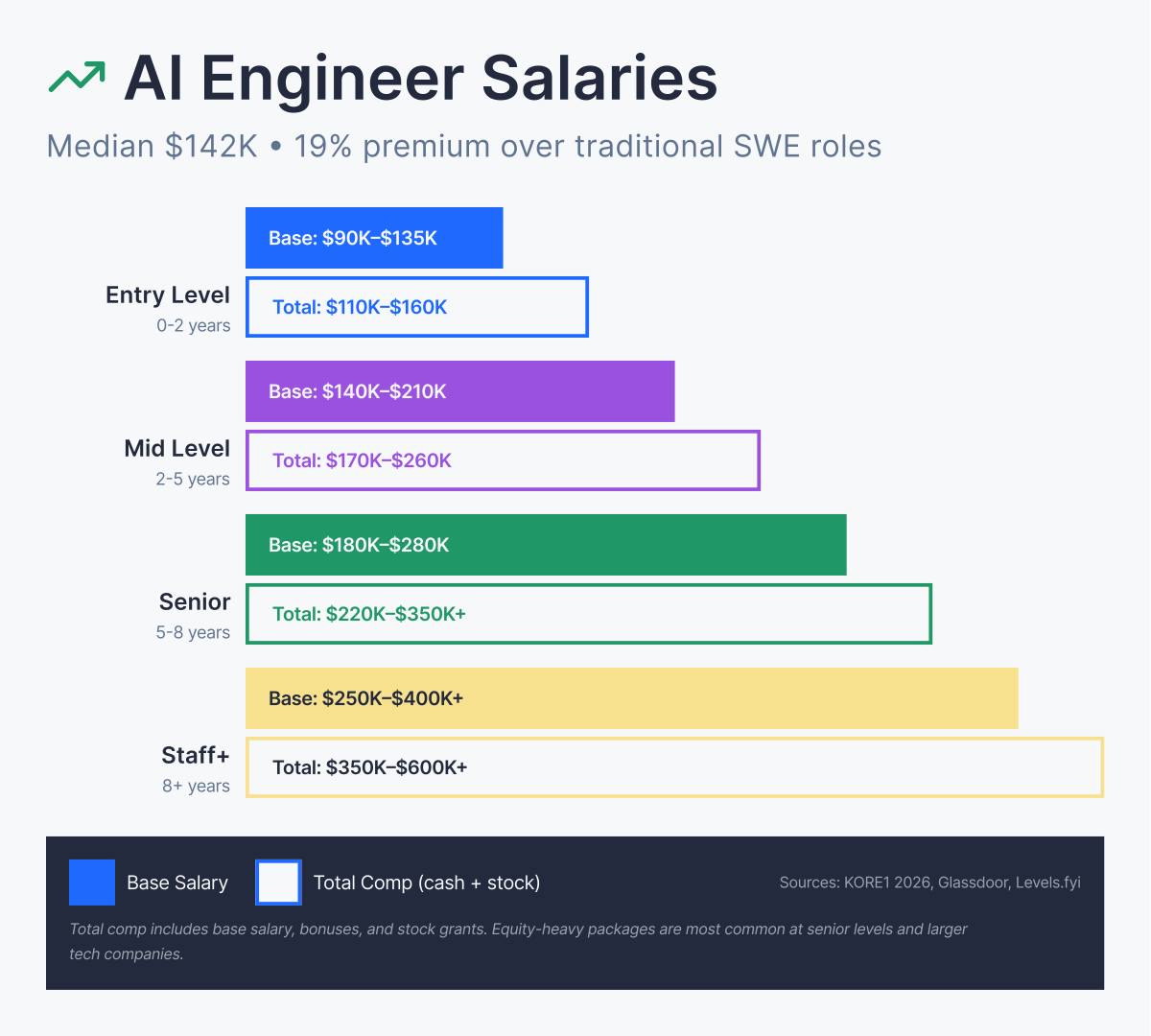
From First Prompt to Production AI in Under a Year
This comprehensive roadmap outlines the essential skills you need to acquire, such as Python, LLM APIs, RAG, and agents, presented in a logical learning sequence. With a realistic timeline of 8 to 12 months to transition from your first LLM prompt to deploying production AI systems, you'll also discover current salary expectations ranging from $130K to $250K+, depending on your experience.

Your agents are working alone. BAND connects them into one workflow.
In a landscape where AI agents proliferate, a new startup called BAND is addressing the challenge of fragmentation in digital communication. With $17 million in Seed funding, BAND introduces a "universal orchestrator" that enables seamless interaction between diverse AI agents, overcoming the limitations of existing systems. Co-founder Arick Goomanovsky emphasizes the need for agents to communicate like humans for effective collaboration. By providing a deterministic communication layer, BAND aims to transform isolated tools into a cohesive workforce, paving the way for a scalable "agentic economy."
Stop Hiding Duplicates in Your Reconciliations With Vertical Netting
If you're frustrated with Excel reconciliations that claim to be "MATCHED" while hiding duplicates and missing entries, it's time to explore a new approach. After a decade of experience in FP&A, I developed **Vertical Netting**, a framework designed to identify discrepancies that standard methods overlook. By reframing reconciliation as a summation problem rather than a simple comparison, this method ensures accuracy and clarity. Join me in discovering how to transform your reconciliation process and achieve true data integrity.

OpenAI Workspace Agents put AI to work inside the tools you already use.
OpenAI has unveiled Workspace Agents, a significant advancement in AI-native tools for enterprises, enabling seamless integration with popular applications like Slack and Salesforce. These agents allow users to design and implement tailored workflows that streamline tasks across various platforms, promoting efficiency and collaboration. By shifting from traditional, session-based interactions to persistent, context-aware agents powered by Codex, OpenAI addresses longstanding challenges in workplace productivity. This innovative approach positions AI as a shared organizational resource, transforming how teams manage data and execute tasks, ultimately enhancing overall performance.

Infosys teams with OpenAI to modernize software and accelerate AI adoption.
OpenAI has partnered with Infosys to enhance business capabilities through advanced AI tools. This collaboration aims to empower clients by modernizing software development, automating workflows, and deploying AI systems. The initial focus will be on software engineering, legacy modernization, and DevOps, providing organizations with transformative solutions that streamline operations and boost productivity. By integrating AI into these critical areas, businesses can explore innovative pathways to optimize their processes and stay competitive in an ever-evolving digital landscape.
Automation speeds your work, but does it quietly dull your judgment?
As automation increasingly integrates into data science workflows, a crucial question arises: does relying on AI tools lead to long-term skill degradation? While automation can enhance efficiency in tasks like data cleaning and dashboarding, it may inadvertently dull our instincts for identifying anomalies and errors. A piece from MIT SMR highlights that augmentation—rather than outright replacement—tends to benefit professionals by keeping them engaged and equipped to intervene when necessary.
Automate Web, Excel, and AI Without Learning to Code
Automating tasks that involve Web, Excel, and AI can streamline your workflow significantly. As a beginner with a commerce background, focus on tools that simplify the automation process. Start by exploring Microsoft Power Automate, which can help you extract PDF data from the web and convert it to Excel easily. Familiarize yourself with no-code platforms like n8n for creating workflows. Additionally, develop basic skills in Excel functions and formulas to enhance your automation capabilities.
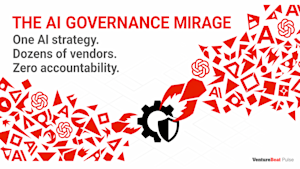
Your AI governance gap is wider than your security team thinks.
In a recent survey by VentureBeat, 72% of enterprises reported using multiple AI platforms as their primary technology layer, highlighting significant gaps in control and security. This sprawl, driven by major software providers rushing to deliver AI solutions, raises critical concerns for enterprise management and security leaders. As organizations hastily adopt AI, they risk creating a landscape of contradictions and vulnerabilities. The emerging "governance mirage" suggests that confidence in AI governance may be misplaced, urging a reevaluation of strategies to safeguard against evolving threats.