generative AI automation
generative AI automation at Beyond Market Intelligence is a file of 286 stories. The newest of them: “Your agents are working alone. BAND connects them into one workflow.”, “Stop Hiding Duplicates in Your Reconciliations With Vertical Netting”, and “OpenAI Workspace Agents put AI to work inside the tools you already use.”. In a landscape where AI agents proliferate, a new startup called BAND is addressing the challenge of fragmentation in digital communication. If you're frustrated with Excel reconciliations that claim to be "MATCHED" while hiding duplicates and missing entries, it's time to explore a new approach. Acme AI is the next-generation, AI-powered spreadsheet platform built to replace Excel and redefine how analysts, data scientists, and enterprise teams work… The list below is every generative AI automation story on Beyond Market Intelligence, newest first.

Your agents are working alone. BAND connects them into one workflow.
In a landscape where AI agents proliferate, a new startup called BAND is addressing the challenge of fragmentation in digital communication. With $17 million in Seed funding, BAND introduces a "universal orchestrator" that enables seamless interaction between diverse AI agents, overcoming the limitations of existing systems. Co-founder Arick Goomanovsky emphasizes the need for agents to communicate like humans for effective collaboration. By providing a deterministic communication layer, BAND aims to transform isolated tools into a cohesive workforce, paving the way for a scalable "agentic economy."
Stop Hiding Duplicates in Your Reconciliations With Vertical Netting
If you're frustrated with Excel reconciliations that claim to be "MATCHED" while hiding duplicates and missing entries, it's time to explore a new approach. After a decade of experience in FP&A, I developed **Vertical Netting**, a framework designed to identify discrepancies that standard methods overlook. By reframing reconciliation as a summation problem rather than a simple comparison, this method ensures accuracy and clarity. Join me in discovering how to transform your reconciliation process and achieve true data integrity.

OpenAI Workspace Agents put AI to work inside the tools you already use.
OpenAI has unveiled Workspace Agents, a significant advancement in AI-native tools for enterprises, enabling seamless integration with popular applications like Slack and Salesforce. These agents allow users to design and implement tailored workflows that streamline tasks across various platforms, promoting efficiency and collaboration. By shifting from traditional, session-based interactions to persistent, context-aware agents powered by Codex, OpenAI addresses longstanding challenges in workplace productivity. This innovative approach positions AI as a shared organizational resource, transforming how teams manage data and execute tasks, ultimately enhancing overall performance.
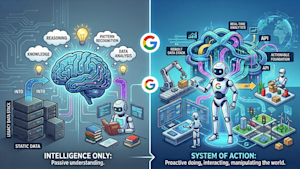
Agents need data built for action, not just answers.
The Agentic Data Cloud, unveiled by Google at Cloud Next, marks a pivotal shift in enterprise data architecture, transitioning from human-driven operations to agent-scale capabilities. This innovative framework, built on three key pillars—Knowledge Catalog, Cross-cloud lakehouse, and Data Agent Kit—aims to empower AI agents to autonomously activate data and drive business actions. By automating metadata curation, enabling seamless cross-cloud access, and simplifying data engineering tasks, Google is positioning itself as a leader in the evolving landscape of data management, prioritizing efficiency and user outcomes.
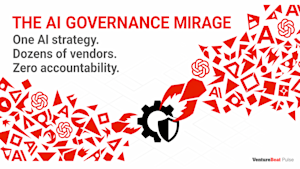
Your AI governance gap is wider than your security team thinks.
In a recent survey by VentureBeat, 72% of enterprises reported using multiple AI platforms as their primary technology layer, highlighting significant gaps in control and security. This sprawl, driven by major software providers rushing to deliver AI solutions, raises critical concerns for enterprise management and security leaders. As organizations hastily adopt AI, they risk creating a landscape of contradictions and vulnerabilities. The emerging "governance mirage" suggests that confidence in AI governance may be misplaced, urging a reevaluation of strategies to safeguard against evolving threats.
Google's new AI agents blend web and private data into one research flow.
On Monday, Google unveiled its most significant upgrade to autonomous research agents with the launch of Deep Research and Deep Research Max. These new agents seamlessly integrate open web data with proprietary enterprise information through a single API call, enabling the generation of native charts and infographics within research reports. Built on the advanced Gemini 3.

Autonomous SOC agents turn AI breaches into direct firewall access.
In 2025, adversaries exploited vulnerabilities in AI security tools across more than 90 organizations, gaining unauthorized access to sensitive data and cryptocurrency. The emergence of autonomous SOC agents, which possess the capability to directly modify firewall rules and IAM policies, introduces a heightened risk of exploitation. As organizations adopt these advanced tools, a critical gap in governance remains, necessitating immediate audits against OWASP's Top 10 risk categories.
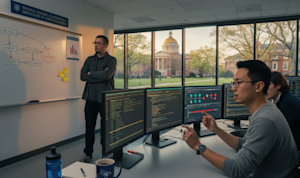
One prompt, three AI agents: secrets spilled from your CI/CD pipeline.
A recent security disclosure reveals a critical vulnerability in three AI coding agents, exposing sensitive secrets via a prompt injection attack. Researcher Aonan Guan, alongside colleagues from Johns Hopkins University, demonstrated how a single malicious instruction infiltrated Anthropic’s Claude Code Security Review, Google’s Gemini CLI Action, and GitHub’s Copilot Agent. This incident highlights systemic risks in AI agent design, particularly around access to secrets and the lack of comprehensive safeguards.

Von's AI picks the right model for every revenue task, automatically.
In the evolving landscape of revenue intelligence, Von emerges as a transformative AI platform designed to unify fragmented sales data and enhance decision-making for Go-To-Market teams. Unlike traditional AI solutions, Von builds a comprehensive context graph that integrates structured and unstructured data, empowering users with actionable insights. By leveraging a mixture of models, Von addresses common challenges in sales operations, automating tasks and providing deep analytical capabilities.
SGOCR: Teaching AI to See Text Where It Lives
Introducing SGOCR: a pioneering open-source dataset pipeline designed for spatially-grounded Optical Character Recognition (OCR) and Visual Question Answering (VQA) tuples. Born from a gap in existing visual datasets, SGOCR empowers vision-language models by grounding text in imagery rather than simply reasoning about it. After two weeks of focused development, I refined the process using a blend of advanced models for text extraction, anchor discovery, and verification. I'm eager to gather feedback and connect with others exploring similar innovative approaches in vision-language modeling.
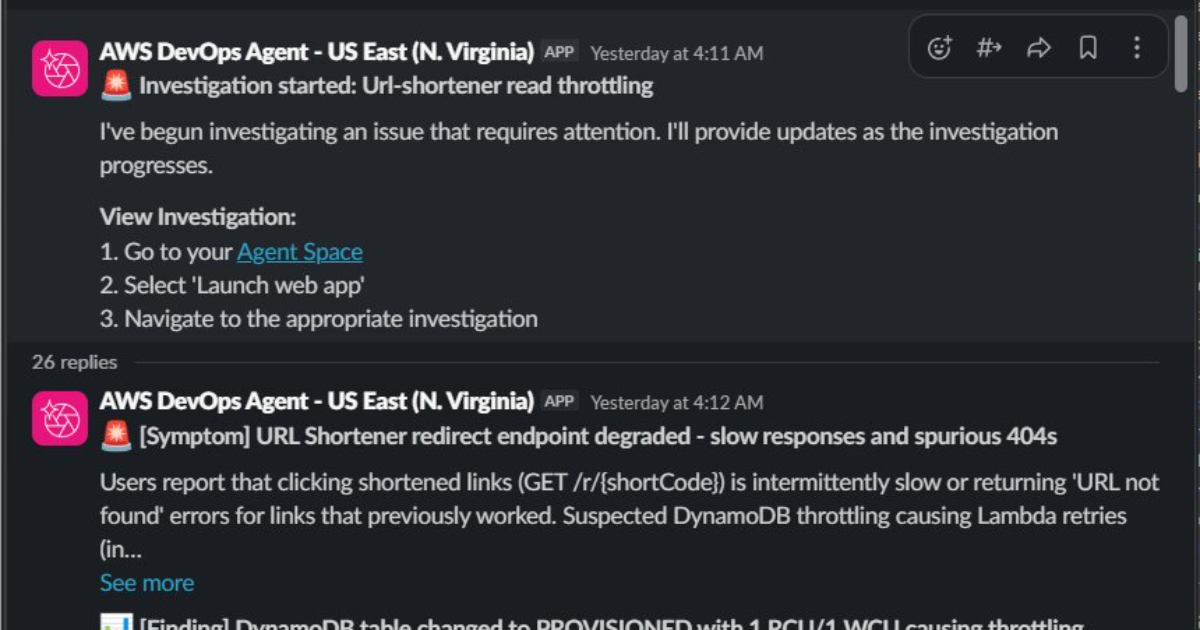
Explore how AWS DevOps Agent simplifies incident response with AI-driven insights.
AWS has just announced the general availability of its DevOps Agent, a generative AI-powered assistant tailored for developers and operators. This innovative tool streamlines the troubleshooting process, enhances deployment analysis, and automates operational tasks across AWS environments. By leveraging advanced AI capabilities, the DevOps Agent empowers teams to efficiently manage incidents and improve productivity, transforming the way organizations approach operational challenges. This launch marks a significant step forward in harnessing AI technology to optimize workflows and elevate the overall development experience.

Master Your Kubernetes Interview with Real-World Cluster Questions
Preparing for Kubernetes interviews involves more than just rote memorization; it requires a deep understanding of cluster operations and the ability to troubleshoot real-world challenges. Interviewers seek candidates who can articulate their knowledge through practical examples. For instance, one platform engineer emphasizes the importance of the foundational concepts by asking, "What's the difference between a Pod, a Service, and a Deployment?" Many candidates struggle to provide clear answers, highlighting the need for a well-rounded preparation.

Codex expands beyond code, turning your desktop into an AI-driven workspace.
OpenAI has announced significant updates to its Codex desktop app, transforming it into a more integrated "Super App" for developers. Now capable of accessing and interacting with all applications on a user's computer, Codex streamlines workflows by gathering relevant information and performing tasks across platforms. With new features such as an integrated web browser, advanced image generation, and background automation, Codex enhances productivity by allowing developers to multitask seamlessly.

Explore how AI can accelerate the journey from lab to life.
OpenAI has introduced GPT-Rosalind, a specialized model tailored for life sciences, designed to streamline the arduous journey from laboratory hypothesis to pharmacy shelf. Named after pioneering chemist Rosalind Franklin, this model transforms how researchers synthesize evidence, generate biological hypotheses, and plan experiments. By integrating with existing tools through a new Codex plugin on GitHub, GPT-Rosalind aims to enhance efficiency in scientific workflows.

Enterprise governance must evolve as AI makes custom software accessible to all.
As AI-driven software development becomes increasingly accessible, the traditional logic of buying over building software is being challenged. Retool's 2026 Build vs. Buy Shift Report reveals that the cost to create custom tools has plummeted, empowering more teams to innovate independently. However, enterprise governance structures have not kept pace, leading to a rise in shadow IT as builders bypass traditional processes for speed.

Claude Opus 4.7 arrives, giving you a smarter, simpler path through complex data.
Anthropic has unveiled Claude Opus 4.7, marking its most powerful large language model to date and retaking the lead in the competitive landscape of AI. This release surpasses OpenAI's GPT-5.4 and Google's Gemini 3.1 Pro in critical benchmarks, particularly in agentic coding and knowledge work. While Opus 4.7 excels in hard sciences and autonomous workflows, it requires careful prompting to maximize its capabilities. With enhanced self-verification and multimodal support, this model positions itself as a specialized powerhouse for enterprises seeking reliable AI solutions.

Explore how hyperagents bring self-improving AI to real-world tasks.
Meta researchers have unveiled a groundbreaking framework called "hyperagents," designed to advance self-improving AI systems for non-coding tasks. Unlike traditional models that depend on fixed improvement mechanisms, hyperagents autonomously rewrite and optimize their problem-solving logic. This innovative approach enables them to excel in dynamic environments, such as robotics and document review, by developing capabilities like persistent memory and automated performance tracking. By integrating self-referential learning, hyperagents promise to enhance adaptability, compounding improvements over time and reducing reliance on manual customization.

Procurement's forgotten workflows finally get an AI upgrade.
Traza, a New York-based startup, has secured $2.1 million in pre-seed funding led by Base10 Partners, aiming to transform procurement workflows through AI. For years, procurement has operated largely on outdated methods like emails and spreadsheets, leading to significant inefficiencies. Traza's innovative solution deploys AI agents that autonomously manage tasks such as vendor outreach and invoice processing, reducing manual effort by up to 70%.

One prompt, endless possibilities: Firefly AI unifies your entire Creative Cloud workflow.
Adobe has unveiled the Firefly AI Assistant, a groundbreaking tool designed to streamline creative workflows across its entire Creative Cloud suite. By allowing users to manage complex tasks in Photoshop, Premiere, Illustrator, and more through a single conversational interface, Firefly represents a significant shift in how creatives interact with technology. This launch also includes new features such as a Color Mode for Premiere Pro and enhanced collaboration tools.

The hidden cost of AI coding: Nearly half of generated code fails in production.
A recent survey from Lightrun reveals a pressing challenge in the software industry: 43% of AI-generated code changes require manual debugging in production, highlighting the struggle to ensure reliability after deployment. Conducted among 200 senior site-reliability and DevOps leaders, the findings indicate that even after passing quality assurance, AI-generated code often leads to increased engineering bottlenecks.

From AI pilots to production: building agentic systems that perform.
In the rapidly evolving landscape of AI-driven enterprises, achieving measurable performance through agentic AI requires more than just innovative ideas. This presentation by Edgeverve delves into the critical transition from pilot programs to impactful, production-grade solutions. By establishing clear goals and data-driven workflows, organizations can harness the potential of semi-autonomous AI agents. This approach emphasizes the importance of integrating autonomy, governance, and observability while maintaining flexibility. Discover how to transform operational grey zones into streamlined processes that drive tangible results and enhance productivity.

Scaling AI agents safely starts with specs, not shortcuts.
In the rapidly evolving landscape of software development, autonomous agents are redefining efficiency by compressing delivery timelines from weeks to days. To harness this potential safely, enterprises must adopt spec-driven development, a method that ensures code quality and trustworthiness. By starting with a structured specification, teams can leverage autonomous agents that continuously verify their outputs against defined standards. This shift not only enhances productivity but also transforms the role of developers, empowering them to focus on innovation while agents manage the complexities of coding.

Is data drift quietly opening the door for security breaches?
Data drift poses a significant threat to machine learning (ML) models used in cybersecurity, undermining their effectiveness and leaving organizations vulnerable to sophisticated attacks. As the statistical properties of input data evolve, models may struggle to accurately detect threats, leading to increased false negatives and positives. Identifying early signs of data drift is essential for maintaining robust security systems. By understanding these indicators, cybersecurity professionals can proactively manage drift, ensuring their ML tools remain reliable and effective against emerging threats in a rapidly changing landscape.
From 900 pages to hours: a compliance workflow built for speed and accuracy.
Intuit's TurboTax team tackled the challenge of the One Big Beautiful Bill, a complex 900-page tax document, by leveraging AI to streamline implementation from months to mere days. By employing large language models for document analysis and developing bespoke tools for coding and testing, they transformed a convoluted process into an efficient workflow adaptable to any regulated industry.